Last Updated: 07 Sep, 2026
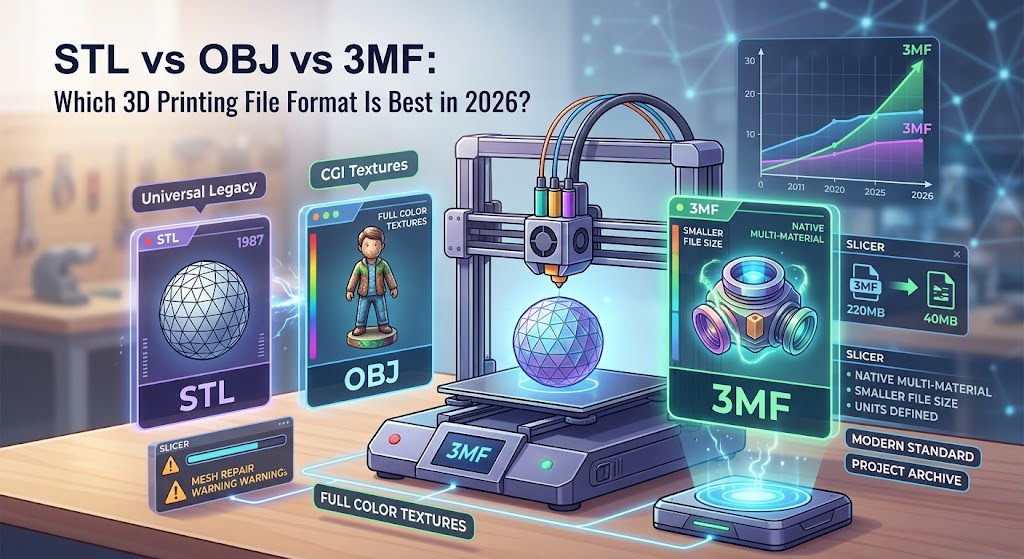
STL vs OBJ vs 3MF: Which 3D Printing File Format Is Best in 2026?
If you have spent any time around 3D printers, you have almost certainly downloaded or exported an STL file. For more than three decades, STL has been the default file extension of additive manufacturing—the MP3 of 3D geometry.
However, desktop and industrial 3D printing have evolved drastically. High-speed CoreXY kinematics, multi-material/multi-color AMS systems, smart slicers, and complex structural composites are now everyday standards. Despite this rapid hardware and software transformation, millions of creators are still saving models in a file format introduced in 1987.
Meanwhile, OBJ brought textured visualization from CGI and game design into additive labs, and 3MF was specifically engineered from the ground up by an industry consortium to address modern manufacturing needs.
So, where do these three formats stand today? Is it finally time to abandon STL for good? Let’s break down the technical differences, practical strengths, and modern workflows of STL, OBJ, and 3MF to help you choose the best file format for your prints in 2026.
Quick Comparison: STL vs. OBJ vs. 3MF at a Glance
| Feature / Metric | STL (.stl) | OBJ (.obj) | 3MF (.3mf) |
|---|---|---|---|
| Year Introduced | 1987 (3D Systems) | 1992 (Wavefront) | 2015 (3MF Consortium) |
| Geometry Representation | Triangular planar mesh | Polygonal mesh, curves, freeform | Triangular mesh (XML-based) |
| Color & Texture Support | None (geometry only) | Yes (via accompanying .mtl / image files) | Native (RGB, multi-material, textures) |
| Internal Structures / Voxel Data | No | Limited | Yes (lattice, interior assemblies) |
| Slicer Settings Storage | No | No | Yes (supports, print profile, orientation) |
| Units of Measurement | Unitless (causes scale mismatches) | Unitless (default depends on app) | Defined explicitly (mm, inches, microns) |
| Mesh Integrity / Repair | Prone to non-manifold errors | Prone to non-manifold & disconnected faces | Self-contained, repair-enforced XML specs |
| File Compression & Size | Uncompressed/Large binary | Large ASCII / multi-file clutter | Compact zip-compressed container |
| Industry Adoption (2026) | Universal legacy standard | Common in modeling & full-color rendering | Dominant modern slicing format |
1. STL (Stereolithography): The Aging Workhorse
Created in the late 1980s by 3D Systems for the earliest stereolithography apparatuses, the STL format represents three-dimensional surfaces using a technique called tessellation. It breaks continuous curves into an interlocking skin of flat triangles.
How STL Works
An STL file stores only two data points per triangle:
- The coordinates (X, Y, Z) of the three vertices.
- The unit normal vector pointing outward to indicate which side of the triangle faces the exterior.
Because it contains nothing else, an STL file does not know whether your model is sized in millimeters, inches, or nautical miles. It simply reads raw coordinates.
Advantages of STL
- Universal Compatibility: Every CAD platform, modeling package, 3D printing slicer, and print farm management tool can parse STL without friction.
- Massive Community Repositories: Decades of legacy models across Printables, MakerWorld, Thingiverse, and Thangs remain cataloged in STL.
- Simplicity: For monochrome mechanical parts with flat planar surfaces (e.g., brackets, jigs, enclosures), STL gets the job done without complex layer parameters.
Disadvantages of STL
- Bloated File Sizes for Curved Geometries: To make a sphere or organic curve look smooth in STL, you must divide the surface into millions of tiny triangles. This causes file sizes to explode into hundreds of megabytes while still retaining slight faceted edges.
- Unit Mismatches: Because STL is unitless, opening an imperial CAD export in a metric slicer frequently results in a model that appears 25.4 times too large or impossibly microscopic.
- No Metadata or Print Configs: An STL cannot save your custom infill modifiers, variable layer heights, tree support placements, or multi-part orientations.
- Zero Color/Material Information: Multi-extrusion, tool-changing, and multi-spool setups cannot deduce color boundaries from a single monolithic STL.
2. OBJ (Wavefront Object): The Full-Color Bridge
Originally developed by Wavefront Technologies for 3D animation and visual graphics, the OBJ format migrated to 3D printing when full-color binder jetting (e.g., HP Multi Jet Fusion, Stratasys PolyJet, and sandstone printers) gained traction.
How OBJ Works
Unlike STL, which uses solely triangular facets, OBJ supports complex polygons, including quadrilaterals and higher-order freeform curves (like NURBS and Bézier surfaces).
Crucially, OBJ handles color and surface texture through companion files:
.obj: Contains the vertices, polygon faces, and UV mapping coordinates..mtl(Material Template Library): Specifies diffuse colors, specular highlights, and opacity.- Texture Maps (
.png/.jpg): Graphic images mapped onto the mesh surface.
Advantages of OBJ
- Photorealistic Textures: Excellent for detailed artistic figurines, game assets, architectural scale mockups, and medical anatomical models with color gradients.
- Broad Support in Creative Suites: Native to Blender, Maya, ZBrush, Cinema 4D, and 3ds Max.
- Flexible Topology: Quads make OBJ much easier to rig, sculpt, and remesh in sculpting applications than tessellated STL files.
Disadvantages of OBJ
- Multi-File Dependency: If you share an
.objfile without its corresponding.mtland linked PNG textures, the recipient receives a plain, untextured grey mesh. - Bloated ASCII Encodings: While binary variants exist, standard human-readable OBJ files are notoriously heavy, slow to parse, and memory-intensive.
- Not Tailored for Additive Manufacturing: OBJ does not include printer parameters, density volumes, lattice generation rules, or multi-nozzle switching logic.
3. 3MF (3D Manufacturing Format): The Modern Standard
In 2015, major manufacturing and technology leaders—including Microsoft, HP, Autodesk, 3D Systems, Ultimaker, Prusa Research, Stratasys, and Materialise—formed the 3MF Consortium. Their mission was direct: build a modern, open-source, production-ready file format designed exclusively for modern additive manufacturing.
How 3MF Works
A .3mf file is an XML-based container packaged inside a standard zip archive (you can rename a .3mf file to .zip and explore its internal directory).
Inside this container, you find:
- Complete geometric mesh data.
- Explicit physical measurement units (millimeters, inches, microns).
- Native full-color palettes, gradients, and multi-material boundaries.
- Thumbnail previews and model metadata (author, license, project notes).
- Slicer build configurations, print orientations, support enforcers, and custom seam positions.
Advantages of 3MF
- Single-File Project Archives: Instead of juggling five separate STL components and writing out recommended print settings in a text file, a single 3MF bundles the full multi-part assembly, paint layers, custom infill rules, and slicer profiles.
- Guaranteed Mesh Integrity: The 3MF specification mathematically prohibits non-manifold edges, inverted normals, and zero-thickness holes. Slicers rarely throw the dreaded “mesh has open vertices” error with native 3MF files.
- Dramatically Smaller File Sizes: Thanks to built-in compression and an efficient XML structure, 3MF files are often 60% to 80% smaller than equivalent binary STLs and OBJs.
- Multi-Color and Multi-Material Precision: 3MF is the backbone of multi-color desktop ecosystems (Bambu Lab AMS, Anycubic ACE, Prusa MMU3, Phrozen Arco) and industrial multi-head extrusion machines.
Disadvantages of 3MF
- Legacy Tool Hesitance: While all modern mainstream slicers support 3MF, some older legacy CNC/CAD converters and discontinued print software struggle with extended 3MF namespaces.
- Slicer Preference Overwriting: Because 3MF files can store slicer profiles, loading a third-party 3MF project into your slicer can inadvertently overwrite your preferred retraction or temperature settings if you don’t select “import geometry only.”
Real-World Workflow Comparison: Why 3MF Wins in 2026
To understand the difference in everyday production, consider a common scenario: printing a dual-color articulated dragon with custom paint layers and organic tree supports.
With STL:
- You must export separate STL bodies for each distinct color.
- You import all files into your slicer simultaneously to prevent parts from losing alignment.
- You manually define support blockers and paint seams from scratch.
- If you send the file to a teammate, you must instruct them on layer height, wall loops, and infill percentages separately.
With 3MF:
- You export a single
.3mfassembly directly from CAD or your painting suite. - The file maintains exact spatial relationships, color designations, tree support enforcers, and plate layouts.
- Opening the file on any machine loads the exact tested configuration with zero guesswork.
Verdict: Which Format Should You Use in 2026?
- Choose STL if: You are submitting models to legacy manufacturing vendors, sharing quick single-color mechanical prototypes with an audience that uses obsolete software, or working with entry-level tools that lack multi-body support.
- Choose OBJ if: You are working in photogrammetry, digital character sculpting, or preparing textured assets for full-color PolyJet/binder jet industrial printing where UV image maps are non-negotiable.
- Choose 3MF if: You are printing on modern FDM/SLA hardware, slicing multi-color or multi-material assemblies, sharing comprehensive project plates, or aiming for lightweight, error-free models. In 2026, 3MF is hands-down the best format for day-to-day 3D printing.
FAQ Section
1. Does switching from STL to 3MF improve surface quality and print accuracy?
Yes, 3MF eliminates unit scale errors, produces cleaner curved meshes without non-manifold artifacts, and lets your slicer calculate precise arc moves (G2/G3) more reliably.
2. Can I convert my existing STL library into 3MF files without losing quality?
Yes, you can easily load any STL into modern slicers like PrusaSlicer, OrcaSlicer, or Bambu Studio and export it as a 3MF, instantly reducing disk footprint and packaging your print settings.
3. Why do some 3D model repositories still default to STL downloads?
Because STL remains a universal legacy format that runs on every discontinued slicer and vintage 3D printer without requiring updated software libraries.
4. How does 3MF preserve multi-color painting across different slicers?
The 3MF standard uses shared XML color and material definitions, allowing slicers that adopt the 3MF Production and Materials extensions to read the exact colored geometry natively.
5. Are 3MF files compatible with resin (SLA/DLP) 3D printers?
Yes, popular resin slicers such as Lychee, Chitubox, and Formlabs PreForm fully support 3MF for lightweight file handling and embedded hollowed geometry structures.
See Also
3D File Formats at FileFormat.com
Open Source APIs for working with 3D file formats
3D Model Formats – Useful for Drafters
File Format Forums – Post your queries in file format forums to get useful information from file format experts and community users
File Format Wiki –Explore file format categories for information about various file formats