Last Updated: 24 August, 2026
Lossless Audio Engineering: WAV vs FLAC Decoding, Parsing, and System Optimization
When building audio pipelines, speech-to-text (STT) ingestion services, game engines, or high-fidelity streaming platforms, choosing the right lossless audio format directly impacts CPU cycles, memory bandwidth, network transfer costs, and storage infrastructure.
While audio enthusiasts often debate WAV vs. FLAC in terms of perceived sound quality (which is identical, as both reproduce uncompressed PCM samples bit-for-bit), software engineers and systems architects must evaluate them through a technical lens: container overhead, byte-level structures, compression-decompression complexity, seeking ergonomics, and decoding latency.
In this deep dive, we explore the internal architectures of WAV and FLAC, benchmark their computational trade-offs, inspect their binary layout, and provide practical guidelines for backend, native, and embedded implementations.
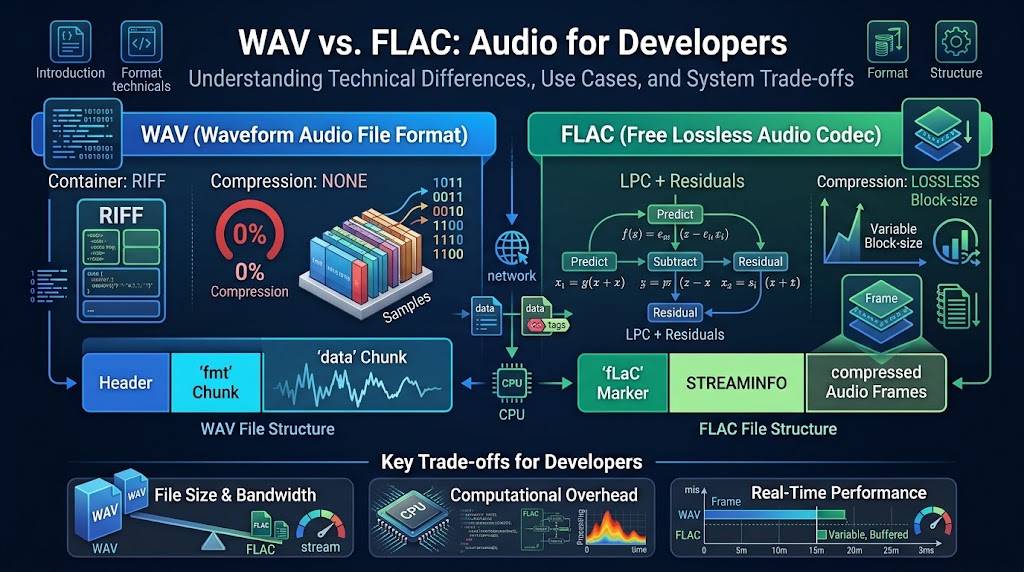
1. Architectural Overview & Binary Internals
To understand why WAV and FLAC behave differently under system load, we must examine how both formats structure PCM (Pulse-Code Modulation) data on disk and in memory.
+-----------------------------------------------------------------------+
|                              WAV (RIFF)                               |
+-----------------------------------------------------------------------+
| [RIFF Header] -> [fmt  chunk (metadata/spec)] -> [data chunk (Raw PCM)]|
+-----------------------------------------------------------------------+

+-----------------------------------------------------------------------+
|                             FLAC Native                               |
+-----------------------------------------------------------------------+
| ["fLaC" Magic] -> [STREAMINFO] -> [Metadata Blocks] -> [Audio Frames] |
|                                   (VORBIS_COMMENT,     (Subframes,    |
|                                    SEEKTABLE, etc.)     Residuals)    |
+-----------------------------------------------------------------------+
WAV: The Canonical Uncompressed RIFF Container
WAV (Waveform Audio File Format) is an application of Microsoft and IBM’s Resource Interchange File Format (RIFF). It is a container that organizes data into tagged byte chunks with 4-byte FourCC identifiers and 32-bit chunk length headers.
In its most standard form, a WAV file contains raw, uncompressed Linear PCM (LPCM) samples:
RIFFChunk Header: Declares the file size and theWAVEformat type.fmtSubchunk: Defines sample rate (e.g., 44100 Hz, 48000 Hz), bit depth (16-bit, 24-bit, 32-bit float), channel count, byte rate, and block alignment.dataSubchunk: Contains raw interleaved sample arrays without compression or framing overhead.
Binary Layout of a Standard LPCM WAV Header
struct WAVHeader {
    // RIFF Chunk Descriptor
    uint8_t  riff_header[4]; // "RIFF"
    uint32_t chunk_size;     // Overall file size - 8 bytes
    uint8_t  wave_header[4]; // "WAVE"

    // fmt Subchunk
    uint8_t  fmt_header[4];  // "fmt "
    uint32_t subchunk1_size; // 16 for PCM
    uint16_t audio_format;   // 1 for PCM, 3 for IEEE Float
    uint16_t num_channels;   // 1 for Mono, 2 for Stereo
    uint32_t sample_rate;    // e.g., 44100, 48000
    uint32_t byte_rate;      // sample_rate * num_channels * (bits_per_sample / 8)
    uint16_t block_align;    // num_channels * (bits_per_sample / 8)
    uint16_t bits_per_sample;// 16, 24, 32

    // data Subchunk
    uint8_t  data_header[4]; // "data"
    uint32_t data_bytes;     // Size of the raw sample array
};
Key Architectural Characteristics of WAV:
- Zero Parse/Decode Overhead: Samples are immediately addressable via standard pointer arithmetic (
void* buffer = mmap(...)). - Direct DMA / Audio Driver Ingestion: Modern ALSA, WASAPI, and CoreAudio sinks can ingest raw PCM buffers without an intermediate codec transform.
- 4 GB Address Limit: Because standard RIFF chunk sizes are unsigned 32-bit integers, WAV files cannot natively exceed 4 GiB without extensions like RF64 (ITU-R BS.2088).
FLAC: Bit-Exact Linear Predictive Audio Codec
FLAC (Free Lossless Audio Codec) is an open, non-proprietary format designed specifically for audio compression. Unlike generic compression algorithms (such as DEFLATE/gzip or Zstandard), FLAC exploits the mathematical correlations present in continuous audio wave patterns.
FLAC files begin with the fLaC 4-byte magic marker, followed by one or more metadata blocks (including mandatory STREAMINFO and optional SEEKTABLE, VORBIS_COMMENT, or CUESHEET), followed by variable or fixed-length audio frames.
How FLAC Achieves 40–60% Compression Without Quality Loss:
- Blocking: The raw PCM stream is partitioned into discrete blocks (typically 1152 to 4096 samples).
- Inter-channel Decorrelation: For stereo audio, samples are converted into Left-Right, Mid-Side, Left-Side, or Right-Side matrix representations to minimize cross-channel redundancy.
- Linear Prediction (LPC): The encoder predicts each sample based on previous samples using either:
- Verbatim Subframes (no prediction, raw copy).
- Constant Subframes (silence or flat signal).
- Fixed Linear Predictors (0th through 4th order polynomial approximations).
- Linear Predictive Coding (LPC): Autocorrelation/Levinson-Durbin algorithm calculates optimal FIR filter coefficients.
- Residual Entropy Coding: The difference between the actual sample and the predicted sample (the “residual” error) is encoded using Rice-Golomb coding (a subset of Huffman coding optimized for geometrically distributed integers).
Because Rice coding requires far fewer bits to store near-zero residual values, dynamic or predictable signals compress significantly while maintaining exact mathematical reversibility.
2. Technical Comparison: WAV vs. FLAC
| Technical Feature | WAV (Linear PCM) | FLAC (Free Lossless Audio Codec) |
|---|---|---|
| Compression Ratio | 1:1 (Uncompressed) | ~1.4:1 to 2.5:1 (Typical reduction of 40–60%) |
| Encoding Cost (CPU) | Negligible (Streaming writes) | Moderate to High (Levinson-Durbin LPC passes) |
| Decoding Cost (CPU) | Zero (Direct buffer read) | Ultra-low (~1–3 integer operations per sample) |
| Seeking Time | Instantaneous (Byte Offset calculation) | Fast (O(1) with SEEKTABLE, binary search without) |
| Streaming Over HTTP | Simple byte-range requests; no state machine | Chunked streamable via frame sync codes (0xFFF8) |
| Max File Size | 4 GiB (Standard RIFF limit; RF64 solves this) | Effectively Unlimited (2^36 samples) |
| Standard Metadata | Poorly standardized (INFO chunk, non-standard ID3) | Robust native support (UTF-8 VORBIS_COMMENT, Cover Art) |
| DSP Pipeline Fit | Ideal for Real-Time DSP, Buffers, Memory Maps | Ideal for Network Ingress/Egress, Storage, and Archival |
3. Computational Trade-offs: Memory, CPU, and Bandwidth
Understanding the trade-off envelope between WAV and FLAC determines which format minimizes infrastructure costs at scale.
       [Raw Audio Data]
              |
     +--------+--------+
     |                 |
 [WAV Path]       [FLAC Path]
     |                 |
     v                 v
 Zero CPU          Moderate CPU
 High Bandwidth    Low Bandwidth
 Large Disk IO     Small Disk IO
     |                 |
     +--------+--------+
              |
       [Audio Engine]
1. I/O vs. CPU Bound Systems
- WAV maximizes I/O and network transfer, but demands zero CPU overhead. If you are handling millions of concurrent short audio assets (e.g., game sound effects or sub-millisecond audio buffers in a digital audio workstation), memory mapping a WAV file avoids decompression thread contention and reduces latency jitter.
- FLAC shifts the workload from disk/network I/O to lightweight CPU integer arithmetic. In cloud architectures (AWS S3 egress, GCP Cloud Storage, cellular API ingestion), reducing payload size by 50% cuts network transmission time and bandwidth expenses in half, while decoding adds less than 1% CPU utilization on modern x86/ARM cores.
2. Seeking Precision & Overhead
- In a 24-bit 48 kHz stereo WAV file:
Offset(seconds) = HeaderOffset + (t * 48000 * 2 * 3)Seeking to an exact sample index is an instantaneous arithmetic pointer jump. - In FLAC, if a
SEEKTABLEmetadata block is present, seeking jumps to the target frame’s byte offset, followed by decoding a small residual block (typically 1024–4096 samples). Without aSEEKTABLE, decoders scan for the 14-bit sync code0xFFF8/0xFFF9, performing a binary search across frame headers.
4. Developer Implementation Examples
Reading a WAV Header in Rust
This lightweight parser extracts sample parameters directly from a WAV byte slice without external dependencies:
use std::convert::TryInto;

#[derive(Debug)]
pub struct WavSpec {
    pub channels: u16,
    pub sample_rate: u32,
    pub bits_per_sample: u16,
    pub data_offset: usize,
    pub data_length: u32,
}

pub fn parse_wav_header(buffer: &[u8]) -> Result<WavSpec, &'static str> {
    if buffer.len() < 44 {
        return Err("Buffer too small for standard WAV header");
    }
    if &buffer[0..4] != b"RIFF" || &buffer[8..12] != b"WAVE" {
        return Err("Invalid RIFF/WAVE signature");
    }

    let channels = u16::from_le_bytes(buffer[22..24].try_into().unwrap());
    let sample_rate = u32::from_le_bytes(buffer[24..28].try_into().unwrap());
    let bits_per_sample = u16::from_le_bytes(buffer[34..36].try_into().unwrap());

    // Iterate through chunks to reliably find the "data" subchunk
    let mut offset = 12;
    while offset + 8 <= buffer.len() {
        let chunk_id = &buffer[offset..offset + 4];
        let chunk_size = u32::from_le_bytes(buffer[offset + 4..offset + 8].try_into().unwrap()) as usize;

        if chunk_id == b"data" {
            return Ok(WavSpec {
                channels,
                sample_rate,
                bits_per_sample,
                data_offset: offset + 8,
                data_length: chunk_size as u32,
            });
        }
        offset += 8 + chunk_size;
    }

    Err("Data chunk not found")
}
Decoding FLAC Streams in Python via libflac / soundfile
For high-throughput backends processing audio data for machine learning or speech pipelines:
import io
import soundfile as sf
import numpy as np

def process_flac_stream(flac_bytes: bytes) -> tuple[np.ndarray, int]:
    # Decodes an in-memory FLAC byte stream to a floating-point NumPy sample matrix.
    with io.BytesIO(flac_bytes) as flac_io:
        audio_data, sample_rate = sf.read(flac_io, dtype='float32')

    return audio_data, sample_rate
5. Decision Matrix: When to Use WAV vs. FLAC
                   [Audio Workflow Scenario]
                               |
        +----------------------+----------------------+
        |                                             |
[Real-Time / Low Latency]                     [Storage / Transport]
  - Game Engine SFX                             - API Ingestion / Egress
  - In-Memory DSP Buffers                       - Archival Storage
  - Embedded MCU Direct DMA                     - Speech-to-Text Pipeline
        |                                             |
        v                                             v
     Use WAV                                       Use FLAC
 (Zero Decode Cost)                           (40-60% Less Bandwidth)
Choose WAV when:
- Low-Latency Game Audio: In-game SFX engines (Unreal Engine, Unity, Wwise) require instant triggering. Decompressing FLAC on the fly consumes worker threads or audio mixing cycles.
- Intermediate DSP Pipelines: If you are chaining filters (equalizers, convolutions, compressors) in a DAW or a real-time voice chat filter, avoid codec encode/decode loops by working directly with uncompressed PCM.
- Embedded Systems / Low-Power Microcontrollers: MCUs without hardware-accelerated integer multipliers or sufficient flash memory for
libFLACbenefit from streaming raw PCM directly to I2S DACs.
Choose FLAC when:
- Cloud Speech Ingestion & Telephony Pipelines: Uploading user voice recordings to an ASR/STT endpoint in FLAC cuts egress latency and network billing by ~50% compared to raw WAV, with negligible client-side encoding cost.
- Long-Term Storage & Database Blobs: Storing petabytes of raw studio masters or audio telemetry in cloud object storage becomes twice as expensive if stored as uncompressed WAV.
- Lossless Distribution & Streaming: FLAC contains native metadata, stream synchronization markers, and embedded seek indices, making it resilient to packet drops and byte stream slicing.
Conclusion
WAV and FLAC are not competitors in audio quality—both deliver mathematically identical PCM streams to the digital-to-analog converter.
Instead, the decision is an engineering trade-off: WAV eliminates computational overhead at the expense of storage footprint and transmission time, while FLAC trades minor CPU cycles to optimize I/O, cache efficiency, and network throughput.
Frequently Asked Questions (FAQ)
1. Does converting a WAV file to FLAC and back to WAV result in sample degradation?
A: No, FLAC is completely lossless, meaning decoding a FLAC file recreates the exact original PCM binary sample stream bit-for-bit.
2. Why do game engines prefer uncompressed WAV over FLAC for sound effects?
A: Game engines prioritize zero-latency playback and instant mixing over storage footprint, avoiding the CPU decompression overhead associated with hundreds of concurrent audio voices.
3. What is the maximum file size limit for standard WAV files, and how does FLAC compare?
A: Standard 32-bit RIFF WAV files are hard-capped at 4 GiB, whereas native FLAC can support streams up to 2^36 samples, easily accommodating terabyte-scale continuous recordings.
4. How does FLAC achieve compression without using perceptual psychoacoustic algorithms like MP3 or AAC?
A: FLAC uses Linear Predictive Coding (LPC) to model signal trends and Rice-Golomb entropy encoding to store mathematical residuals, preserving 100% of the original audio waveform.
5. Can FLAC be streamed over standard network protocols like HTTP or WebSocket without saving to disk?
A: Yes, FLAC uses 14-bit sync codes at the start of every frame and can be decoded sequentially from arbitrary chunked byte streams in memory