Last Updated: 17 July, 2026
OBJ vs FBX vs glTF: Which 3D Model Format Should You Use?
Three-dimensional models are now an essential part of modern CAD, engineering, manufacturing, architecture, product visualization, simulation, digital twins, and web-based applications. As 3D workflows have evolved, several file formats have emerged to store, exchange, render, and distribute 3D models across different software and platforms.
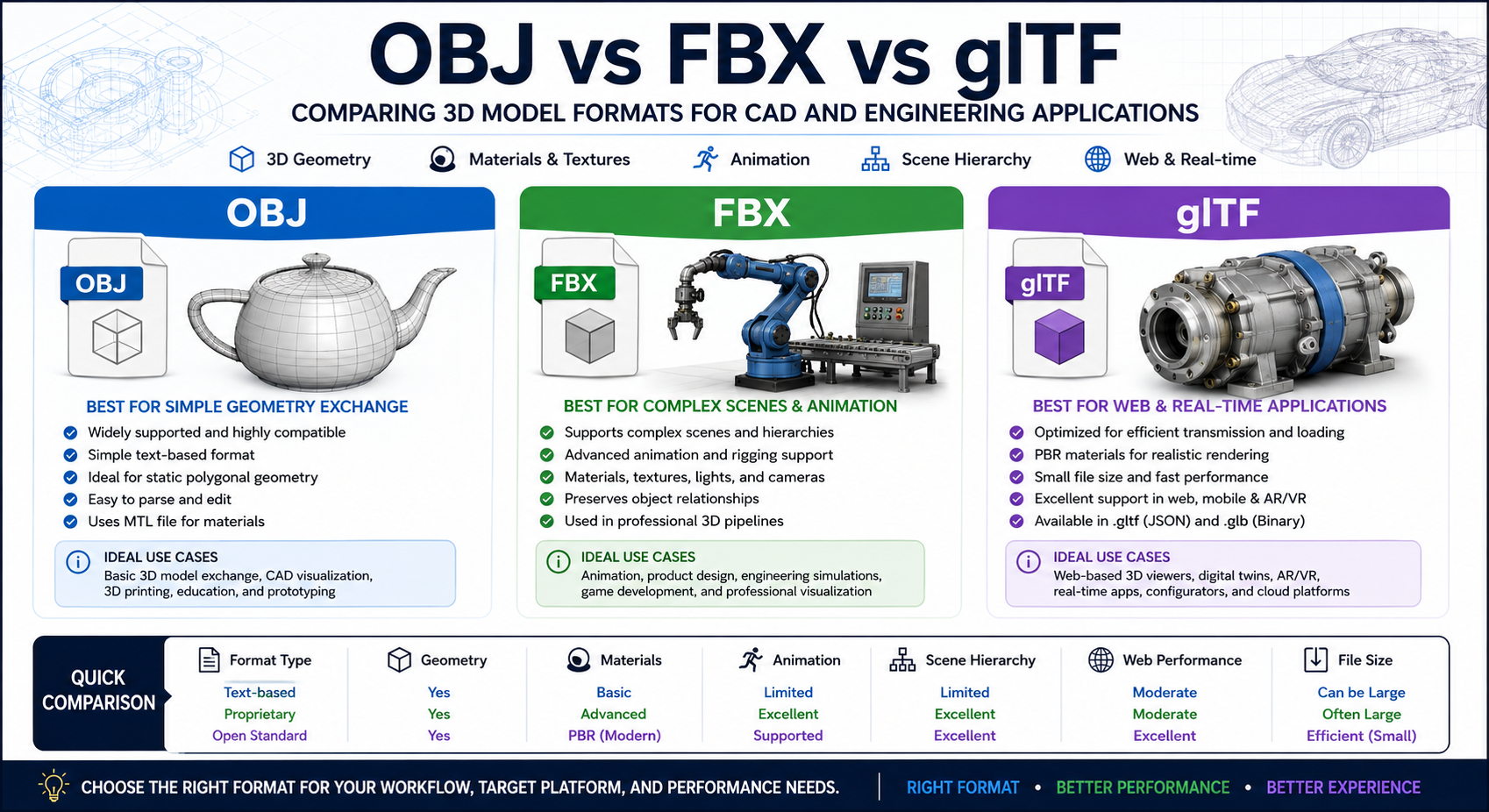
Today, developers, engineers, designers, and technical teams commonly encounter three widely used 3D model formats: OBJ, FBX, and glTF. Although all three can represent 3D models, they were designed with different priorities. OBJ focuses on simple geometry exchange, FBX supports complex scenes and animation, while glTF is optimized for efficient real-time 3D delivery.
Selecting the right format can affect:
- Model compatibility
- File size
- Loading speed
- Rendering performance
- Material and texture support
- Animation capabilities
- Web application performance
- CAD visualization workflows
- Digital twin development
In this guide, we’ll compare OBJ, FBX, and glTF in detail, explain their strengths and limitations, and help you determine which 3D model format best fits your CAD, engineering, visualization, and software development requirements.
Understanding 3D Model Formats
A 3D model file can contain much more than a simple collection of polygons. Depending on the format, a 3D file may store:
- Vertex coordinates
- Polygon faces
- Surface normals
- Texture coordinates
- Materials
- Textures
- Cameras
- Lights
- Scene hierarchies
- Animations
- Skeletons and rigs
- Metadata
- Object transformations
Different formats store these elements in different ways. As a result, the choice of format can significantly affect compatibility, performance, file size, and the ability to exchange data between different applications.
What is OBJ?
The OBJ format is a widely supported 3D geometry format originally designed for storing three-dimensional object data. It is primarily used to represent polygonal geometry, including vertices, texture coordinates, surface normals, and faces.
OBJ files are usually text-based and are often accompanied by an MTL file that defines material properties.
A simple OBJ file may contain geometry similar to the following:
v 0.000000 0.000000 0.000000
v 1.000000 0.000000 0.000000
v 1.000000 1.000000 0.000000

f 1 2 3
Because of its simple structure and extensive software support, OBJ remains one of the most compatible 3D model formats available.
Advantages of OBJ
- Extremely wide software compatibility
- Simple and easy-to-understand structure
- Easy for developers to parse
- Suitable for static polygonal geometry
- Useful for basic 3D model exchange
- Supported by many CAD and 3D applications
Limitations of OBJ
- Does not preserve parametric CAD data
- Limited scene hierarchy support
- No comprehensive native animation system
- Materials are often stored in separate files
- High-resolution models can create large files
- Not optimized for modern real-time rendering
What is FBX?
The FBX format is a proprietary 3D asset exchange format widely used in professional 3D production, animation, game development, visualization, and digital content creation.
Unlike OBJ, FBX can store much more than basic polygonal geometry. A single FBX file may contain:
- 3D meshes
- Materials
- Textures
- Cameras
- Lights
- Animation data
- Skeletons
- Skinning information
- Scene hierarchies
- Transformations
- Morph targets
- Metadata
This makes FBX suitable for complex 3D scenes and professional visualization pipelines.
For example, an engineering visualization project may contain a complete machine assembly with multiple components, materials, cameras, lighting, and animations. FBX can store many of these elements within a single scene-oriented file.
Advantages of FBX
- Supports complex 3D scenes
- Excellent animation support
- Supports skeletons and rigs
- Supports materials and textures
- Preserves scene hierarchies
- Useful for professional 3D production workflows
Limitations of FBX
- Proprietary format
- Different applications may support different versions
- Conversion issues may occur between software packages
- Can be complex to process programmatically
- Not specifically optimized for web delivery
What is glTF?
glTF is an open 3D model transmission format designed for efficient delivery and loading of 3D scenes and models.
Often described as the “JPEG of 3D,” glTF was designed for modern real-time rendering applications. It is especially popular for:
- Web-based 3D applications
- WebGL applications
- Virtual reality
- Augmented reality
- Digital twins
- Interactive product viewers
- Cloud-based visualization
- Mobile applications
- Game engines
glTF supports modern physically based rendering (PBR) materials and is designed to provide 3D content in a format that can be efficiently loaded and rendered by modern graphics systems.
There are two commonly used glTF variants.
.gltf
The .gltf format uses JSON to describe the 3D scene and may reference external files such as:
- Binary geometry buffers
- Texture images
- Material resources
A typical glTF project may contain:
model.gltf
model.bin
basecolor.png
normal.png
metallic-roughness.png
.glb
The .glb format is a binary container that can package the model and associated resources into a single file.
This makes GLB particularly convenient for:
- Web applications
- Cloud storage
- API-based delivery
- Mobile applications
- Digital twin platforms
OBJ vs FBX vs glTF: Feature Comparison
| Feature | OBJ | FBX | glTF |
|---|---|---|---|
| Format Type | Text-based geometry format | Proprietary scene format | Open 3D transmission format |
| Geometry | Yes | Yes | Yes |
| Materials | Basic | Advanced | Modern PBR |
| Textures | Usually external | Supported | Supported |
| Animation | Limited | Excellent | Supported |
| Skeletons | No | Yes | Yes |
| Cameras | No | Yes | Yes |
| Lights | No | Yes | Yes |
| Scene Hierarchy | Limited | Excellent | Excellent |
| File Size | Can be large | Often large | Efficient |
| Web Performance | Moderate | Moderate | Excellent |
| Human Readable | Yes | Usually not | JSON-based .gltf |
| Open Standard | Widely documented | Proprietary | Yes |
| CAD Geometry Exchange | Basic | Moderate | Increasing |
| Real-Time Rendering | Limited | Good | Excellent |
Geometry and CAD Accuracy
For CAD and engineering applications, geometry is one of the most important factors when selecting a 3D model format.
However, it is important to understand that OBJ, FBX, and glTF generally represent polygonal mesh geometry rather than native parametric CAD models.
A typical conversion process may look like this:
Parametric CAD Model
        |
        v
Surface Tessellation
        |
        v
Polygon Mesh
        |
        v
OBJ / FBX / glTF
If a CAD model contains a mathematically defined cylinder, exporting it to one of these formats usually converts the cylinder into a polygonal mesh.
The resulting model may look accurate, but the original CAD feature history and parametric design information are generally not preserved.
OBJ Geometry
OBJ is excellent for exchanging polygonal geometry.
It can store:
- Vertex positions
- Polygon faces
- Surface normals
- Texture coordinates
However, it does not preserve the original parametric design history.
FBX Geometry
FBX can store complex polygonal scenes and object hierarchies.
For example:
Industrial Machine
├── Chassis
├── Motor
├── Gearbox
├── Control Panel
└── Safety Cover
This makes FBX more suitable than basic OBJ when multiple objects and relationships need to be exchanged together.
glTF Geometry
glTF is designed for efficient rendering rather than traditional parametric CAD modeling.
Its geometry representation is optimized for modern graphics hardware, making it particularly suitable for interactive 3D applications and browser-based engineering visualization.
Materials and Textures
Modern 3D visualization often requires more than geometry. Realistic materials and textures are essential for product visualization, engineering demonstrations, digital twins, and interactive applications.
OBJ Materials
OBJ typically uses a separate MTL file to define materials.
A typical OBJ project may contain:
model.obj
model.mtl
diffuse.png
normal.png
This approach is simple but can become difficult to manage when a model contains many external texture files.
FBX Materials
FBX supports advanced material and texture information.
A scene may contain:
- Diffuse maps
- Normal maps
- Specular properties
- Roughness information
- Transparency
- Material assignments
This makes FBX useful for detailed 3D visualization pipelines.
However, material conversion between different applications may produce different results because software packages may interpret material properties differently.
glTF Materials
One of glTF’s major advantages is its support for physically based rendering.
glTF materials can define properties such as:
- Base color
- Metallic value
- Roughness
- Normal maps
- Emissive color
- Ambient occlusion
A simplified material structure may look like this:
{
  "pbrMetallicRoughness": {
    "baseColorFactor": [0.8, 0.8, 0.8, 1.0],
    "metallicFactor": 0.5,
    "roughnessFactor": 0.4
  }
}
This makes glTF particularly suitable for:
- Product visualization
- Digital twins
- Browser-based 3D applications
- Interactive engineering models
- Virtual and augmented reality
File Size Comparison
File size is an important consideration when 3D models are stored in the cloud, transmitted through APIs, or loaded in web browsers.
OBJ
OBJ is a text-based format. Large models can produce very large files because geometry data is represented as text.
For example:
v 1.234567 2.345678 3.456789
Although this structure is human-readable, text-based geometry is generally less storage-efficient than binary data.
FBX
FBX files can also become large when they contain:
- High-resolution meshes
- Complex animations
- Multiple textures
- Large scene hierarchies
The final file size depends on the amount of data included and the specific FBX implementation used.
glTF
glTF is designed for efficient transmission.
The binary GLB format can package model resources into a single container, making it easier to distribute and load.
This is especially useful for:
- Web applications
- Mobile applications
- Cloud platforms
- Remote visualization
- Large engineering assemblies
For a browser-based CAD viewer, a properly optimized GLB file is often more practical than an equivalent OBJ file.
Performance Comparison
Performance becomes increasingly important when working with:
- Large CAD assemblies
- Detailed industrial models
- Digital twins
- Browser-based 3D viewers
- Cloud-based visualization
- Interactive product configurators
OBJ
OBJ is suitable for simple static models, but high-resolution text-based geometry can require additional processing and may consume more storage.
FBX
FBX provides strong performance for complex 3D scenes in professional visualization pipelines. However, performance depends heavily on the application and the amount of scene data included.
glTF
glTF is specifically designed for efficient real-time rendering.
Its structure is optimized for modern graphics pipelines, making it an excellent choice for:
- Web-based 3D viewers
- Mobile applications
- Real-time visualization
- Cloud platforms
- Digital twin systems
Compatibility Comparison
Choosing the right format often depends on the applications and platforms that need to open the model.
OBJ
OBJ has excellent compatibility and is supported by a wide range of:
- CAD applications
- 3D modeling software
- Rendering tools
- Game engines
- Conversion libraries
FBX
FBX is widely supported by professional 3D applications, but compatibility can vary depending on the software version and FBX features used.
glTF
glTF has strong support in modern:
- Web browsers
- WebGL applications
- Game engines
- 3D frameworks
- Mobile applications
- Real-time rendering systems
For modern web applications, glTF generally provides the best combination of compatibility and performance.
Web and Cloud Applications
The growth of web-based 3D applications has made efficient model delivery more important than ever.
A typical cloud-based workflow may look like this:
User Uploads CAD File
        |
        v
Backend Processing API
        |
        v
3D Model Conversion
        |
        v
GLB Optimization
        |
        v
Browser-Based 3D Viewer
OBJ for Web Applications
OBJ can be loaded in web applications, but it may require additional processing and optimization.
FBX for Web Applications
FBX is less convenient for direct web delivery because of its proprietary structure and the need for additional processing in many browser-based workflows.
glTF for Web Applications
glTF was specifically designed for efficient transmission and rendering of 3D assets.
For this reason, it is often the preferred choice for:
- Web-based CAD viewers
- Product configurators
- Digital twin platforms
- Online engineering tools
- Interactive 3D product demonstrations
Animation Support
Animation is another important difference between OBJ, FBX, and glTF.
OBJ
OBJ does not provide a comprehensive native animation system.
Animation generally requires:
- External files
- Application-specific systems
- Separate frame sequences
OBJ is therefore best suited to static geometry.
FBX
FBX provides strong animation support.
It can store:
- Keyframe animation
- Skeletal animation
- Bone hierarchies
- Rigs
- Morph targets
For engineering and manufacturing applications, animation can be used to demonstrate:
- Assembly sequences
- Machine movement
- Product operation
- Exploded views
- Mechanical interactions
glTF
glTF also supports animation and is designed for efficient real-time playback.
It can be used for:
- Transform animation
- Skeletal animation
- Morph target animation
This makes glTF suitable for interactive engineering demonstrations and web-based simulations.
Digital Twin Applications
Digital twins often require more than a static 3D model.
A digital twin may combine:
3D Model
   +
Sensor Data
   +
Metadata
   +
Real-Time Status
   +
Historical Data
The 3D model format is only one part of the overall system.
OBJ in Digital Twins
OBJ can provide a basic visual representation, but additional systems are generally required for:
- Metadata
- Scene relationships
- Real-time interaction
FBX in Digital Twins
FBX can provide rich scene structures and animation capabilities. However, its proprietary nature may make it less suitable for open cloud-based systems.
glTF in Digital Twins
glTF is particularly attractive for digital twin visualization because it provides:
- Efficient 3D rendering
- Modern PBR materials
- Scene hierarchies
- Animation support
- Web compatibility
Application-specific metadata and live sensor data are typically managed separately or through additional systems.
Software Development Considerations
Developers working with 3D formats should consider parsing complexity, library support, conversion requirements, and target platforms.
Processing OBJ
OBJ is relatively straightforward to parse.
A basic parser can identify:
v  → Vertex
vn → Normal
vt → Texture Coordinate
f  → Face
This simplicity makes OBJ useful for:
- Prototyping
- Learning
- Custom geometry processing
- Basic model conversion
Processing FBX
FBX processing can be more complex because the format supports a wide range of scene features.
Developers may need to consider:
- SDK compatibility
- Version compatibility
- Scene conversion
- Material translation
- Animation conversion
Processing glTF
glTF uses a structured architecture based on JSON, binary buffers, and image resources.
A simplified processing workflow may look like this:
Parse JSON
    |
    v
Load Buffers
    |
    v
Load Textures
    |
    v
Build Scene Graph
    |
    v
Render with GPU
This architecture makes glTF attractive for modern software development.
When Should You Use Each Format?
Choose OBJ if:
- You need maximum compatibility.
- You are exchanging basic polygonal geometry.
- The target application supports OBJ.
- You do not require advanced animation.
- You need a simple and easy-to-parse format.
Choose FBX if:
- You need complex 3D scenes.
- Animation is important.
- You need skeletons or rigs.
- You are working with professional 3D production tools.
- You need advanced scene organization.
Choose glTF if:
- You are building a web-based 3D viewer.
- You need fast model loading.
- You need PBR materials.
- You are developing digital twin applications.
- You are building cloud-based visualization tools.
- You need efficient real-time rendering.
Best Practices
To get the best results from 3D model formats:
- Use OBJ when broad compatibility and simple geometry exchange are the main priorities.
- Use FBX when complex scenes, animation, and professional 3D pipelines are required.
- Use glTF or GLB for web-based and real-time 3D applications.
- Optimize polygon counts before deploying models to the web.
- Use appropriate tessellation settings when converting CAD geometry.
- Keep original native CAD files for precise engineering editing.
- Test materials and textures after format conversion.
- Use GLB when a single portable file is preferred.
- Keep application-specific metadata separate when necessary.
- Validate converted models in the target application before deployment.
Converting CAD Models to OBJ, FBX, and glTF
Many CAD workflows convert engineering models into polygonal formats for visualization.
A typical conversion process may look like this:
STEP / IGES / DWG / Native CAD
              |
              v
        CAD Processing
              |
              v
        Mesh Tessellation
              |
              v
     OBJ / FBX / glTF / GLB
The conversion process may involve:
- Reading the original CAD file.
- Extracting geometric entities.
- Tessellating surfaces into polygons.
- Generating normals and texture coordinates.
- Creating materials.
- Building an assembly hierarchy.
- Exporting to the target format.
- Optimizing the resulting model.
The quality of the final result depends heavily on the tessellation settings.
A low tessellation level may produce:
Small File
   +
Poor Visual Accuracy
A high tessellation level may produce:
High Visual Accuracy
   +
Large File Size
Therefore, engineering applications must balance visual quality and performance.
Conclusion
Although OBJ, FBX, and glTF can all represent 3D models, they are designed for different purposes.
OBJ remains an excellent choice for simple polygonal geometry and maximum compatibility. Its straightforward structure makes it easy to parse and widely supported across CAD and 3D software.
FBX is better suited to complex 3D scenes, animation, materials, rigs, and professional visualization pipelines. It is particularly useful when multiple scene components and animations need to be exchanged together.
glTF is optimized for modern real-time 3D applications. Its efficient structure, PBR material support, open standard, and excellent web compatibility make it especially suitable for digital twins, cloud platforms, interactive product viewers, and browser-based CAD visualization.
Choosing the right format depends on your specific requirements. If compatibility and simplicity are the priorities, OBJ is a practical choice. If your workflow requires complex scenes and animation, FBX may be more suitable. For web-based, cloud, mobile, and real-time engineering visualization, glTF or GLB is often the strongest option.
Whether you’re building a CAD viewer, converting engineering models, developing a digital twin, or creating an interactive 3D application, understanding the differences between OBJ, FBX, and glTF can help you select the right format for your workflow.
Frequently Asked Questions (FAQ)
Q1. What is the main difference between OBJ, FBX, and glTF?
A1: OBJ focuses mainly on basic polygonal geometry, FBX supports complex scenes and animation, while glTF is optimized for efficient real-time 3D delivery and web applications.
Q2. Which 3D model format is best for CAD visualization?
A2: The best format depends on the workflow. OBJ is useful for compatibility, FBX is suitable for complex scenes, and glTF is generally best for modern web-based and real-time CAD visualization.
Q3. Is glTF better than FBX for web-based 3D applications?
A3: Yes. glTF is specifically designed for efficient transmission and real-time rendering, making it generally more suitable for browser-based 3D applications than FBX.
Q4. Can CAD models be converted to OBJ, FBX, and glTF formats?
A4: Yes. CAD models can be tessellated and converted into OBJ, FBX, glTF, and GLB formats for visualization and real-time 3D applications.
Q5. Does OBJ, FBX, or glTF preserve the original parametric CAD model?
A5: Generally, no. These formats primarily store polygonal or scene-based 3D data, so the original parametric CAD history and feature tree are usually not preserved.
CAD File Formats at FileFormat.com
Open Source APIs for working with CAD file formats
File Format News – Your one stop for all the news related to file formats from around the world
File Format Forums – Post your queries in file format forums to get useful information from file format experts and community users
File Format Wiki –Explore file format categories for information about various file formats