Last Updated: 02 Oct, 2026
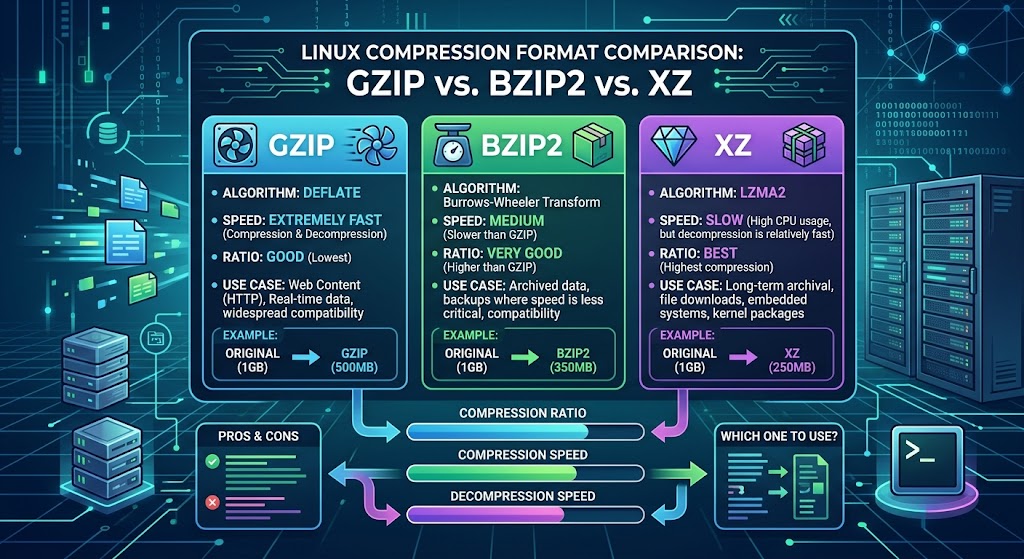
GZIP vs BZIP2 vs XZ: Which Linux Compression Format Is Best?
Whether you are packing daily database dumps, rotating multi-gigabyte web server logs, or distributing compiled binaries to thousands of nodes, compression is an everyday reality in Linux administration.
When invoking tar or processing streaming data through standard input, you typically encounter three standard utilities: GZIP (.gz), BZIP2 (.bz2), and XZ (.xz).
While all three tools aim to squeeze raw bytes into compact archives, they make fundamentally different engineering trade-offs between compression ratio, CPU runtime, and memory overhead. Choosing the wrong format can quietly bottleneck your automated deployments, stall scheduled backup windows, or waste valuable storage over time.
This guide breaks down how each format works under the hood, how they perform across realistic workloads, and how to choose the right one for your infrastructure.
1. Quick Technical Profiles: The Three Contenders
GZIP (GNU Zip)
- Underlying Algorithm: DEFLATE (combination of LZ77 and Huffman coding)
- Default Extension:
.tar.gz,.tgz,.gz - Release Era: 1992 (created by Jean-loup Gailly and Mark Adler as a patent-free alternative to
compress) - Core Advantage: Unbeatable execution speed and near-universal ecosystem support.
- Core Disadvantage: Lower compression ratio compared to modern statistical and dictionary-based encoders.
GZIP has served as the default workhorse of Unix environments for over three decades. Because its DEFLATE algorithm operates with small sliding windows (32 KB), GZIP requires negligible memory overhead during both compression and decompression.
BZIP2
- Underlying Algorithm: Burrows-Wheeler Transform (BWT) combined with Move-to-Front (MTF) transform and Huffman coding
- Default Extension:
.tar.bz2,.tbz2,.bz2 - Release Era: 1996 (created by Julian Seward)
- Core Advantage: Better compression ratios on repetitive ASCII and structured log files than GZIP.
- Core Disadvantage: Slower across the board, notably during decompression, and largely made obsolete by newer algorithms.
BZIP2 processes data in discrete blocks (typically 900 KB) using reversible permutations that group similar characters together before encoding. While it was widely celebrated in the late 1990s and 2000s for beating GZIP’s file sizes, its compute cost is relatively high.
XZ (LZMA2)
- Underlying Algorithm: LZMA2 (Lempel-Ziv-Markov chain Algorithm, improved)
- Default Extension:
.tar.xz,.txz,.xz - Release Era: 2009 (introduced to succeed the older
lzmaformat) - Core Advantage: Exceptionally high compression ratios and rapid, lightweight decompression.
- Core Disadvantage: Heavy RAM usage and prolonged CPU runtime during initial compression.
XZ leverages variable dictionary sizes (often up to 32 MB or 64 MB by default) to find duplicate byte patterns across much wider data windows than GZIP. This makes it devastatingly effective at shrinking large, redundant files like OS installation media, kernel source trees, and firmware images.
2. Performance Comparison Matrix
The table below summarizes the practical performance dynamics of each utility when running default configurations on standard server hardware:
| Metric / Dimension | GZIP (-6) | BZIP2 (-9) | XZ (-6) |
|---|---|---|---|
| Compression Ratio | Moderate (~65-75% reduction) | Good (~75-80% reduction) | Superior (~80-88% reduction) |
| Compression Speed | Very Fast | Slow | Very Slow |
| Decompression Speed | Extremely Fast | Slow to Moderate | Fast |
| Compression RAM Usage | Negligible (~1–2 MB) | Low (~8–10 MB) | High (~100–700 MB+) |
| Decompression RAM Usage | Negligible (< 1 MB) | Low (~4 MB) | Moderate (~10–65 MB) |
| Primary Sweet Spot | Logs, CI/CD pipelines, real-time streams | Legacy archive compatibility | Package repos, OS ISOs, cold storage |
3. Real-World Benchmark Insights
To understand how these tools behave under realistic load, consider a representative 1 GB raw server access log and an uncompressed 500 MB software source code directory.
Scenario A: Compressing Large Log Files (1 GB Text)
- GZIP: Finishes in under 12 seconds, delivering an archive around 180 MB.
- BZIP2: Finishes in roughly 45–50 seconds, reducing the file to around 130 MB.
- XZ: Takes 80–90 seconds at default settings, yielding an archive near 95 MB.
Scenario B: Decompression Workloads
A critical metric often overlooked is asymmetry.
- GZIP decompresses in 2–3 seconds with microscopic memory usage.
- XZ decompresses in 4–6 seconds. While initial compression was slow, extracting
.xzis nearly as fast as extracting.gz. - BZIP2 requires roughly 25–30 seconds just to unpack, because reversing the Burrows-Wheeler Transform is computationally symmetric to encoding it.
4. Why BZIP2 Is Falling Out of Favor
In modern infrastructure, BZIP2 finds itself caught in an awkward middle ground:
- Beaten on speed by GZIP: If processing latency or low CPU usage matters, GZIP is significantly faster.
- Beaten on density by XZ: If bandwidth conservation and storage efficiency matter, XZ generates considerably smaller archives.
- Beaten on decompression speed by both: In software delivery systems, clients pay a measurable CPU penalty when extracting
.tar.bz2files compared to.tar.gzor.tar.xz.
Consequently, major Linux distributions (including Debian, Arch, and Fedora) have shifted their official package distribution and kernel tarballs away from BZIP2 toward XZ (and more recently, Zstandard for runtime operations).
5. Practical Command-Line Usage
Tar Integration (The Most Common Workflow)
Modern implementations of GNU tar automatically recognize the compression format based on the file extension, but using explicit flags is still standard practice:
# GZIP: Fast archive creation
tar -czvf project-backup.tar.gz /var/www/project/

# BZIP2: Legacy high-ratio archive
tar -cjvf project-backup.tar.bz2 /var/www/project/

# XZ: Maximum space savings
tar -cJvf project-backup.tar.xz /var/www/project/

# Generic extraction (tar auto-detects the format)
tar -xvf archive-name.tar.*
Standalone File Compression
To compress individual files without bundling:
# Compress keeping the original file intact (-k)
gzip -k access.log      # Output: access.log.gz
bzip2 -k access.log     # Output: access.log.bz2
xz -k access.log        # Output: access.log.xz

# Decompress individual files
gzip -d access.log.gz
bzip2 -d access.log.bz2
xz -d access.log.xz
Utilizing Multi-Core Systems
By default, single-threaded implementations of these tools use only one CPU core. If you are compressing multi-gigabyte archives on modern multi-core servers, single-threaded processing can take hours.
- XZ Multi-threading: Native support via
-Tor--threads:xz -T0 -k database_dump.sql # Uses all available CPU cores - Parallel GZIP (
pigz): A drop-in replacement that uses all CPU cores for GZIP operations:pigz -k database_dump.sql - Parallel BZIP2 (
pbzip2): Multi-threaded implementation for BZIP2:pbzip2 -k database_dump.sql
6. How to Choose: Practical Decision Framework
Choose your tool based on the primary constraint of your workflow:
Use GZIP if:
- You are setting up real-time stream compression or network transmission where throughput is the limiting factor.
- You are managing automated log rotation (
logrotate) on production servers where CPU resources must be reserved for application workloads. - Maximum portability across legacy embedded systems and standard base images is required.
Use XZ if:
- You are publishing release artifacts, kernel builds, container base images, or static package repositories downloaded frequently by third parties.
- You are preparing long-term cold archives (off-site weekly/monthly backups) where storage costs outweigh the one-time compression time.
- You need small file sizes, but your consumers still demand fast download and quick extraction times.
Keep BZIP2 only if:
- You are maintaining backward compatibility with legacy scripts, existing backup restore routines, or software appliances that do not supply an XZ decompressor.
7. Frequently Asked Questions (FAQ)
Q1. Which format provides the smallest archive size?
XZ consistently produces the smallest archive size among the three due to its larger LZMA2 dictionary windows.
Q2. Is XZ slower than GZIP when decompressing files?
XZ is only slightly slower than GZIP to decompress, but it is substantially faster than BZIP2.
Q3. Can GZIP and XZ take advantage of multiple CPU cores?
XZ supports native multi-threading using the -T0 flag, while GZIP can be parallelized across cores using the pigz drop-in utility.
Q4. Why are Linux distributions dropping BZIP2?
Distributions have largely phased out BZIP2 because XZ compresses smaller and decompresses faster, while GZIP remains faster for quick operations.
Q5. Does a higher compression level like -9 make a noticeable difference?
Setting level -9 yields only a marginal 1% to 3% size reduction on average while dramatically increasing CPU cycle consumption and memory overhead.