Last Updated: 27 Nov, 2026
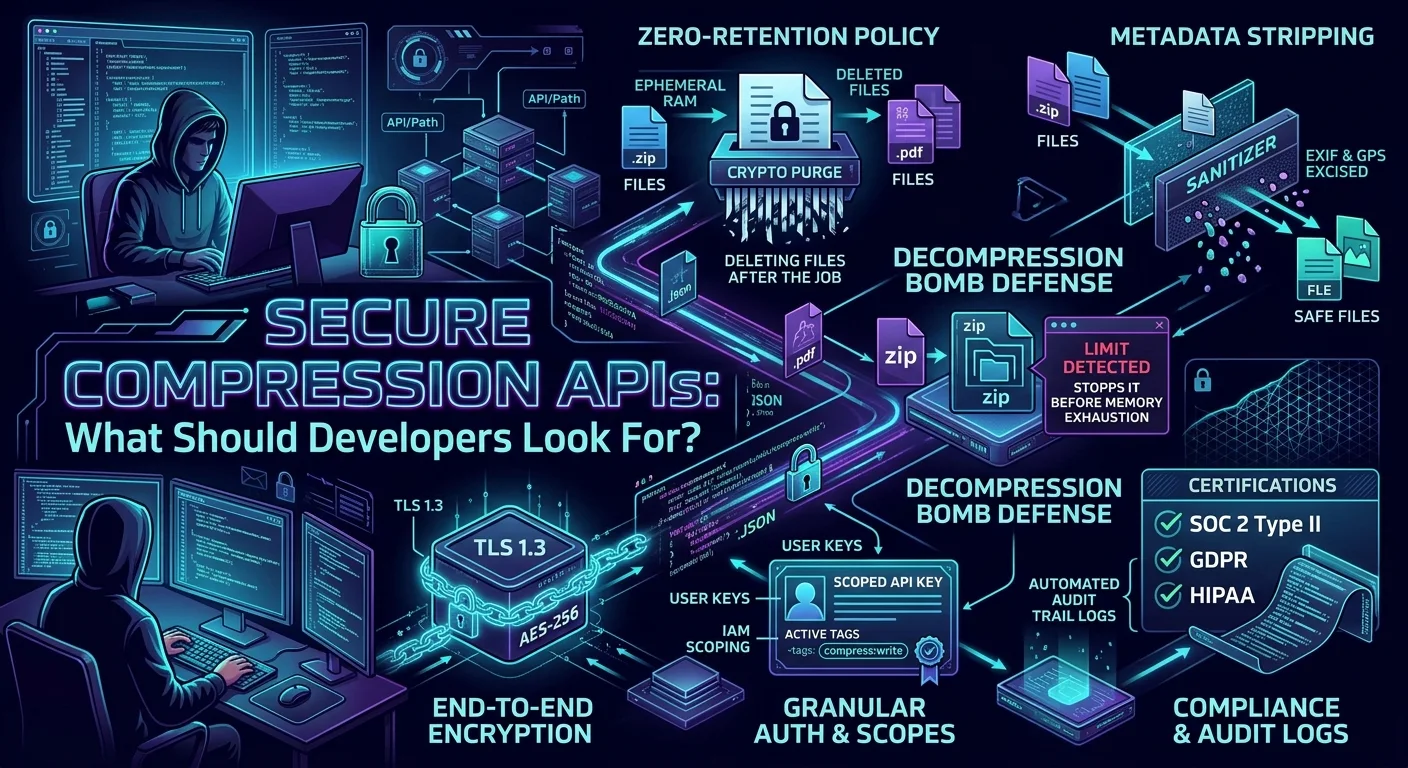
Secure Compression APIs: What Should Developers Look For?
Every developer loves a smaller payload. Whether you are optimizing user-uploaded images for a mobile app, bundling massive log archives, or shrinking PDFs to save on cloud storage costs, offloading file compression to a dedicated API makes total architectural sense. It saves your servers from CPU-intensive crunching and keeps your main application thread fast.
However, handing your users’ files over to an external endpoint introduces an obvious question: What happens to that data once it leaves your server?
When you integrate a compression API, you aren’t just buying faster load times or smaller byte counts; you are extending your application’s trust boundary. If a third-party service mishandles a sensitive PDF or falls victim to a malicious payload, it is your reputation on the line.
Before you hardcode an API key into your production environment, here is what you should look for to ensure your compression pipeline is airtight.
1. End-to-End Encryption (In Transit and at Rest)
This is non-negotiable baseline hygiene, yet it is surprising how often legacy tools cut corners. When files travel from your infrastructure to a compression server, they are prime targets for interception.
- In Transit: Ensure the API strictly enforces TLS 1.2 or TLS 1.3. Any endpoint that still allows unencrypted HTTP fallback is an immediate red flag.
- At Rest: Even if a file only sits on the provider’s disk for three seconds while being processed, it must be encrypted. Look for AES-256 encryption for any temporary storage volumes or caching layers used during the compression lifecycle.
2. Strict Zero-Data Retention Policies
A compression API is a processor, not a storage locker. Once the API shrinks your file and returns the output (or pushes it to your designated webhook/S3 bucket), the provider should have zero reason to keep a copy.
Look closely at the provider’s data lifecycle documentation:
- Ephemeral Processing: Ideally, files are processed entirely in volatile memory (RAM) and never written to a physical disk.
- Automated Purging: If disk space is required for massive files, verify that files are cryptographically wiped immediately after the HTTP response is sent, or within a strictly defined window (e.g., 15 to 60 minutes) for asynchronous jobs.
- No AI Training Clauses: Check the Terms of Service to ensure your users’ documents and images aren’t quietly scraped to train proprietary machine learning models.
3. Built-In Defense Against Decompression Bombs
File compression carries unique, format-specific attack vectors—most notably the decompression bomb (or “zip bomb”). A malicious actor can upload a seemingly harmless 42-kilobyte archive that unpacks into petabytes of data, instantly crashing servers and exhausting memory.
A secure compression API should actively protect both its own infrastructure and your downstream systems by implementing:
- Strict recursion limits on nested archives.
- Maximum uncompressed output thresholds (aborting the job if a file expands beyond a safe ratio).
- Sandboxed worker environments (like isolated containers or microVMs) so one bad file cannot compromise neighboring tenants.
4. Granular Authentication and Scoped Access
If your API provider gives you a single “master key” with full read/write/billing access and no expiration date, keep looking. Modern API security requires granular control.
- Scoped API Keys: You should be able to generate keys restricted strictly to specific actions (e.g.,
compress:writeonly) and specific environments (staging vs. production). - Short-Lived Tokens: Support for OAuth 2.0 or rotating JWTs prevents long-term damage if a token is accidentally leaked in a client-side bundle.
- Direct Cloud Storage Integration: The safest way to move large files is not to route them through the API’s payload at all. Look for APIs that accept pre-signed URLs (like AWS S3 or Google Cloud Storage) so the API fetches, compresses, and drops the file directly into your private bucket without exposing your underlying storage credentials.
5. Metadata Stripping and Sanitization
Files carry a lot of invisible baggage. A standard JPEG from a smartphone contains EXIF data—including GPS coordinates, device serial numbers, and timestamps. PDFs and Office documents often retain author names, revision histories, and hidden comments.
A thoughtful, security-conscious compression API gives developers programmatic control over metadata. Look for simple boolean flags in the API payload (e.g., "strip_metadata": true) that allow you to sanitize files during compression, protecting user privacy by default while keeping color profiles intact when needed.
6. Side-Channel Vulnerability Awareness (BREACH & CRIME)
If you are using an API or middleware layer for real-time HTTP payload compression (like Gzip or Brotli over dynamic JSON responses), security gets a bit nuanced. Historical vulnerabilities like CRIME and BREACH demonstrated that compressing secret data (like session tokens or CSRF tokens) alongside user-controlled input over TLS can allow attackers to guess secrets by observing changes in compressed payload sizes.
Ensure the API architecture keeps sensitive authentication headers and tokens separate from compressed response bodies, or offers context-aware compression rules that automatically bypass compression when sensitive fields are detected.
7. Verifiable Compliance and Audit Logs
If you work in healthcare, finance, or enterprise SaaS, “trust us, we’re secure” won’t pass a vendor security review. You need paperwork to back up the architecture.
- Certifications: Look for active SOC 2 Type II reports, ISO 27001 certification, and GDPR compliance (including a readily available Data Processing Addendum, or DPA). If you handle medical imagery or patient records, HIPAA compliance with a signed Business Associate Agreement (BAA) is mandatory.
- Audit Trails: Your dashboard should provide detailed, exportable logs showing which API key triggered a job, when it occurred, the source IP, and confirmation of file deletion.
8. Predictable Rate Limiting and DDoS Protection
Security isn’t just about confidentiality; it’s also about availability. If a spike in traffic—or a malicious botnet—floods your compression pipeline, how does the API react?
Look for clear, documented rate limits with standard HTTP 429 Too Many Requests headers and Retry-After guidance. Furthermore, check if the provider allows you to set hard spending or volume caps per API key so a runaway loop in your own code doesn’t result in an astronomical cloud bill overnight.
Frequently Asked Questions (FAQ)
Q1. Is it safe to send sensitive PDFs or personal photos to a third-party compression API? Yes, provided the API enforces TLS encryption in transit, encrypts temporary storage at rest, and operates under a strict zero-data retention policy.
** Q2. Should I compress files on my own server or use a dedicated compression API?** Using a dedicated API is usually better for offloading heavy CPU tasks and scaling effortlessly, as long as the provider meets your compliance and security standards.
** Q3. How do pre-signed URLs make file compression APIs more secure?** Pre-signed URLs grant the API temporary, single-file access to your cloud storage bucket without requiring you to share permanent IAM credentials or expose public buckets.
** Q4. What is a decompression bomb, and why does it matter for APIs?** A decompression bomb is a tiny malicious archive designed to expand into massive amounts of data upon extraction, which can crash unguarded servers and cause denial-of-service outages.
** Q5. Does compressing a file strip out sensitive EXIF metadata automatically?** Not always, so developers should explicitly verify whether their chosen API strips EXIF and document metadata by default or requires a specific parameter to sanitize files.
Wrapping Up
Choosing a compression API shouldn’t be a race to the bottom on pricing or a blind test of compression ratios. A tool that shaves an extra 5% off a PNG means very little if it leaves your users’ private data sitting unencrypted on a third-party server. By prioritizing zero-retention architectures, scoped authentication, and active payload sanitization, you can keep your application fast without compromising your security posture.