Poslední aktualizace: 30 června 2026
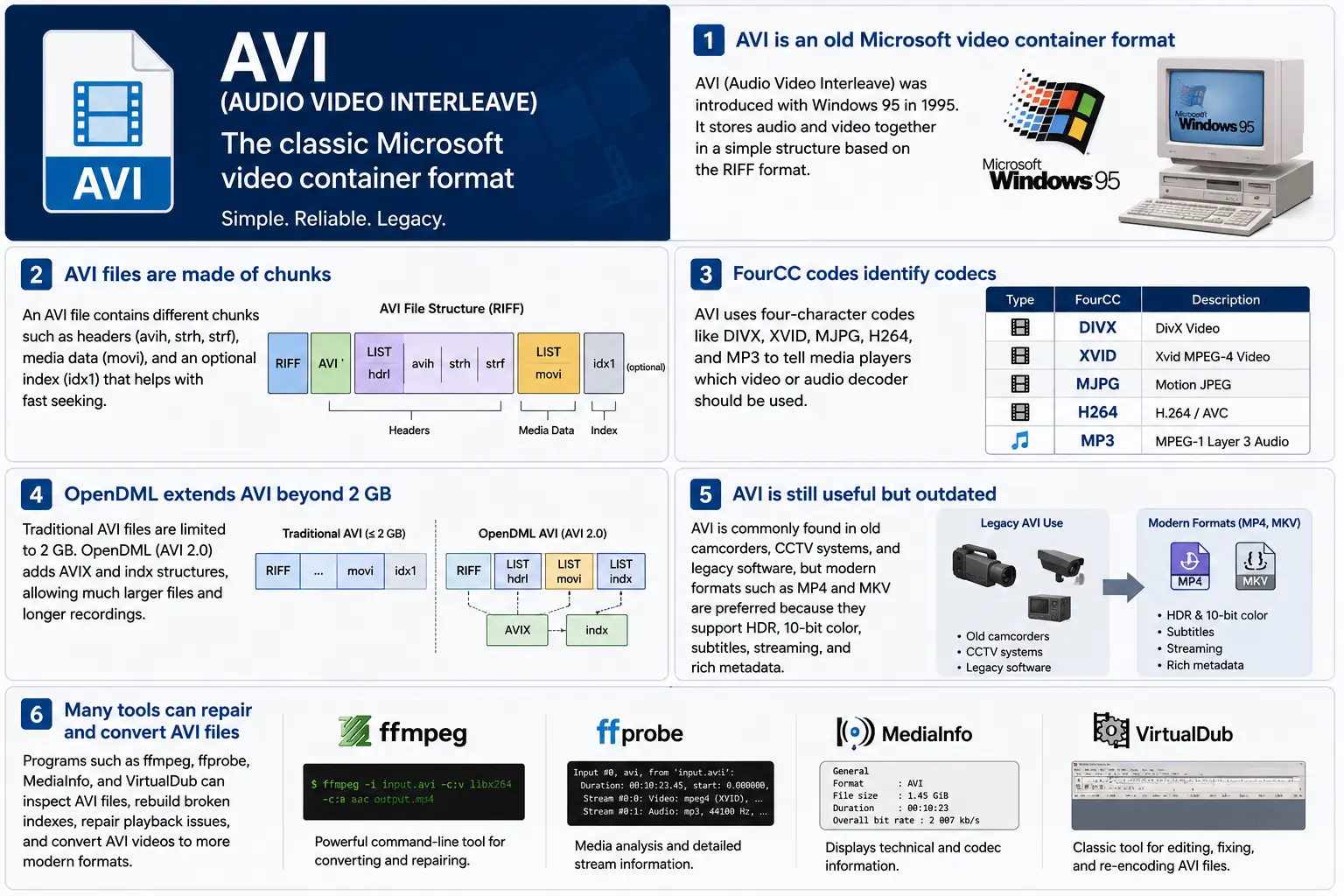
TL;DR – AVI (Audio Video Interleave) je první „digitální video“ kontejner společnosti Microsoft, vzniklý s Windows 95. Jedná se o jednoduchý soubor založený na RIFF, který prokládá komprimované video a audio bloky, aby je přehrávač mohl číst synchronně. Formát je stále podporován Windows Media Playerem a řadou open‑source nástrojů, ale postrádá moderní funkce jako HDR, 10‑bitová barva a robustní metadata pro streamování. Pokud někdy potřebujete proniknout do starších záběrů, pochopit uspořádání bloků, kódy FourCC a rozšíření OpenDML, která zvedají limit 2 GB – to je podstata AVI.
1. Co přesně je soubor AVI?
- Plný název: Audio Video Interleave
- První výskyt: Windows 95 (1995) – odpověď Microsoftu na „digitální video“ na spotřebitelském PC.
- Specifikace: Postavena na specifikaci RIFF (Resource Interchange File Format) z roku 1991. RIFF je obecný „chunk‑based“ kontejner; AVI jednoduše definuje sadu chunků, které obsahují audio, video a indexová data.
- Přípona souboru / MIME:
.avi–video/x-msvideo. - Hlavní cíl: Udržet audio a video proudy těsně propletené na disku, aby naivní smyčka přehrávání mohla načíst video snímek, pak odpovídající audio vzorek, bez nákladných přesunů.
- Stav dědictví: Stále přehratelné ve Windows Media Player, DirectShow, VLC a nesčetných dalších přehrávačích, ale není to “moderní” kontejner. Žádná nativní podpora HDR, 10‑bit, proměnlivého bitrate ani bohatých metadat.
2. Uvnitř krabice – jak AVI funguje
Kostra RIFF chunku
Soubor AVI je jen řadou chunků:
RIFF <size> "AVI "          ; file header
  LIST "hdrl"               ; header list
    avih ...                ; main AVI header (global info)
    LIST "strl"             ; stream list (one per stream)
      strh ...              ; stream header (type, codec, timing)
      strf ...              ; stream format (codec‑specific data)
  LIST "movi"               ; interleaved media data
    00dc <size> <video frame>
    01wb <size> <audio block>
    …
  idx1 ...                  ; optional index for fast seeking
- ID chunku (4 bajty) – např.
avih,strh,movi. - Velikost chunku (4 bajty) – délka následujících dat (bez polí ID a velikosti).
- Data – skutečný obsah (hlavičky, surové snímky atd.).
Protože je RIFF rozšiřitelný, můžete přidávat nové typy chunků, aniž byste rozbili starší parsery – design, který udržel AVI naživu po desetiletí.
FourCC – Šeptající kodek
Čtyřznakové kódy (FourCC) jsou lepidlem, které říká přehrávači, který dekodér načíst. Některé běžné, které uvidíte v souborech AVI:
| FourCC | Kodek (ffmpeg) | Typické použití |
|---|---|---|
DIVX | mpeg4 (DivX) | Počáteční MPEG‑4 část 2 |
XVID | mpeg4 (Xvid) | Open‑source MPEG‑4 |
MJPG | mjpeg | Motion‑JPEG (digitální kamery) |
H264 | h264 | H.264/AVC (vzácné, ale možné) |
MP3 | mp3 | MP3 audio stream |
PCM | pcm_s16le | Nekomprimovaný PCM audio |
FourCC se nachází v strh chunku (identifikátor kodeku) a někdy v strf bloku (formát pixelů, formát audio vzorku).
Časování a synchronizace
AVI používá jednoduchý time‑base systém:
- Globální hlavička (
avih):dwRate/dwScale→ snímky za sekundu. - Hlavička pro každý proud (
strh): vlastnídwRate/dwScalepro audio nebo sekundární video proudy.
Přehrávač násobí číslo snímku poměrem scale/rate, aby vypočítal časové razítko prezentace (PTS). Pokud se měřítka neshodují, uvidíte klasickou chybu „audio se rozchází“, která pronásleduje starší nástroje.
Chunk movi – Kde se nachází média
Všechny komprimované snímky jsou uloženy v LISTu movi. Každý snímek je předcházen ID chunku, které říká, zda jde o video (00dc) nebo audio (01wb). ID také kóduje číslo proudu, takže soubor se dvěma audio stopami bude mít 01wb a 02wb.
Protože jsou data již prokládána, přehrávač může načíst video snímek, pak následující audio blok a předložit je společně bez nutnosti dalekého skákání. Tento deterministický zápisový vzor učinil AVI populárním pro raná zachytávací zařízení, která potřebovala nízkou latenci zápisu na disk.
Indexování (idx1) – Rychlé přetáčení vpřed, rychlé přetáčení zpět
Volitelný chunk idx1 je tabulka offsetů a velikostí pro každý snímek v movi. Když je přítomen, přetáčení je jednoduché vyhledání v tabulce. Pokud chybí, přehrávače musí soubor procházet za běhu – což může způsobit znatelnou „bufferovací“ pauzu u velkých souborů.
OpenDML (AVI 2.0) – Překonání 2 GB bariéry
Původní specifikace RIFF omezuje pole velikosti chunku na 32‑bitové nezáporné celé číslo → 2 GB maximální velikost souboru. OpenDML (někdy nazývaný AVI 2.0) zavedl:
AVIXLISTy – další „rozšířené“ RIFF sekce, které mohou následovat po prvních 2 GB.indxchunk – 64‑bitový index.- Další pole hlavičky pro delší trvání.
Většina moderních nástrojů (ffmpeg, VLC) automaticky přepne na OpenDML, když výstup překročí 2 GB, ale mnoho starších přehrávačů stále selhává na AVIX chunky, takže občas narazíte na kompatibilní hacky, které rozdělí dlouhý záznam do několika 2 GB AVI souborů.
3. Kde AVI žije v roce 2024?
| Trend | Co to znamená pro AVI |
|---|---|
| Přechod na MP4/MKV/ProRes | Nové produkce upřednostňují kontejnery, které nativně podporují HDR, 10‑bit, VBR a bohatá metadata. AVI se pro čerstvý obsah zřídka volí. |
| Zastaralý hardware | Staré CCTV kamery, kamery z počátku 2000‑let a některé herní enginy stále vytvářejí AVI. Budete i nadále potřebovat tyto soubory zpracovat v moderním workflow. |
| Podpora open‑source | ffmpeg, libav, VLC, HandBrake a GStreamer udržují parsery AVI naživu, ale často překódují do MP4/MKV pro distribuci. |
| Obnovení OpenDML | 4K záznamy z dohledu, které běží dny, rychle překročí 2 GB. OpenDML (AVIX) je stále preferovaným řešením, i když s ním mnoho nástrojů zachází nesprávně. |
| Zpevnění zabezpečení | Historické AVI parsery akceptovaly poškozené velikosti chunků, což vedlo k CVE (např. CVE‑2020‑13144). Windows nyní upřednostňuje Media Foundation, který odmítá mnoho starých zvláštností, čímž nasměruje vývojáře k bezpečnějším pipelineům. |
| Kontejnerově-agnostické pipeline | Moderní mediální frameworky považují AVI za další zdrojový prvek. Jakmile jsou data demultiplexována do surových bufferů, kontejner se pro následné zpracování stává irelevantním. |
Stručně řečeno, AVI je živé, ale stárnoucí – přežívá tam, kde je vyžadován starý hardware nebo jednoduché prokládané úložiště, ale není první volbou pro nové projekty.
4. Praktické: Práce s AVI dnes
A. Nahlédnutí do minimální hlavičky (hex)
52 49 46 46  00 00 00 00  41 56 49 20   ; "RIFF" + size + "AVI "
4C 49 53 54  20 00 00 00  68 64 72 6C   ; LIST "hdrl"
...
Magie RIFF (52 49 46 46) říká každému parseru „toto je soubor RIFF“. Další čtyři bajty představují celkovou velikost souboru (minus 8). Identifikátor \"AVI \" zařazuje soubor do rodiny AVI.
B. Převod moderního MP4 → starší AVI
ffmpeg -i input.mp4 \
       -c:v mpeg4 -q

```bash
ffmpeg -i input.mp4 \\ -c:v mpeg4 -qscale:v 5 \\   # MPEG‑4 Part 2 (kompatibilní s DivX/Xvid) -c:a mp3 -b:a 192k \\      # MP3 audio (většina AVI přehrávačů to rozumí) -f avi output.avi
The command above forces MPEG‑4 Part 2 video (the codec most legacy AVI players recognize) and MP3 audio, then writes an AVI container. If you need OpenDML support for files larger than 2 GB, add the -movflags +faststart‑style flag that tells FFmpeg to use the extended AVIX chunks:
ffmpeg -i input.mp4 \\ -c:v mpeg4 -qscale:v 5 \\ -c:a mp3 -b:a 192k \\ -f avi -flags +global_header -movflags +faststart output.avi
Tip: Some older Windows Media Player versions still choke on the
AVIXextension. If you must stay under 2 GB, split the source into multiple AVIs using the-segment_timeand-f segmentmuxer.
5. Common Pitfalls & How to Fix Them
| Symptom | Likely Cause | Fix |
|---|---|---|
| Audio drifts out of sync after a few minutes | Mismatched dwRate/dwScale between avih and strh (or a VBR audio stream) | Re‑encode audio to a constant‑bitrate format (e.g., MP3 128 kbps) or use -vsync 2 in FFmpeg to force frame‑accurate timestamps. |
| “Cannot play this video” on Windows Media Player | Missing or corrupt idx1 index, or OpenDML (AVIX) chunks not recognized | Run ffmpeg -i broken.avi -c copy -map 0 -f avi repaired.avi to rebuild the index; or use aviindex (part of mplayer) to generate a fresh idx1. |
| File size capped at 2 GB despite long footage | Encoder used classic AVI (no OpenDML) | Add -use\_open\_dml 1 (FFmpeg) or -format avi2 (VirtualDub) to enable OpenDML extensions. |
| Green or corrupted frames | Incompatible FourCC (e.g., H.264 in an AVI without proper headers) | Stick to codecs known to work in AVI (mpeg4, msmpeg4v2, MJPG, XVID). If you must store H.264, use the h264 FourCC and ensure the strf chunk contains the SPS/PPS extradata. |
| Playback stalls on network streams | AVI’s lack of robust streaming metadata (no moov atom) | Wrap the AVI in a streaming protocol (e.g., RTSP) that handles byte‑range requests, or convert to MP4/MKV for smoother streaming. |
6. Debugging Tools You Should Keep Handy
| Tool | Platform | What It Does |
|---|---|---|
| ffprobe / ffmpeg | Cross‑platform | Dumps every chunk, FourCC, timestamps, and can rebuild indexes (-c copy). |
| MediaInfo | Windows/macOS/Linux | Human‑readable summary of streams, codecs, and container flags. |
| VirtualDub | Windows | Classic AVI editor; can rebuild headers, add OpenDML, and preview frame‑by‑frame. |
| GSpot (legacy) | Windows | Identifies obscure FourCCs and suggests appropriate codecs. |
| aviindex (part of MPlayer) | Linux/macOS | Generates a fresh idx1 chunk for broken files. |
| Hex editors (HxD, Bless) | Any | Directly inspect RIFF headers when you suspect malformed chunk sizes. |
A typical workflow when an AVI refuses to play:
- Inspect with
ffprobe -show_format -show_streams file.avi. - Check the index:
ffmpeg -i file.avi -c copy -f avi -y temp.avi(FFmpeg will rebuild it automatically). - Validate FourCCs:
mediainfo file.avi. If you see an unknown codec, consider re‑encoding that stream. - Repair with VirtualDub → “File → Re‑open as AVI (OpenDML)”. Save a fresh copy.
7. When (and When Not) to Use AVI
Good Use‑Cases
| Scenario | Why AVI Works |
|---|---|
| Legacy camcorder ingest | The device outputs native AVI; transcoding adds unnecessary quality loss. |
| Simple interleaved capture | Low‑latency write to disk without needing complex container features. |
| Compatibility with old Windows‑only software | Some industrial automation tools only understand AVI. |
| Archiving raw, uncompressed video | AVI can hold PCM audio and uncompressed RGB24 video without extra overhead. |
Bad Use‑Cases
| Scenario | Why AVI Fails |
|---|---|
| HDR or 10‑bit color | No standard way to store those pixel formats; you’d need a custom FourCC that most players ignore. |
| Variable‑bit‑rate streaming | Lack of a proper moov‑like atom makes adaptive bitrate impossible. |
| Rich metadata (chapters, subtitles, tags) | AVI’s chunk model doesn’t define standard containers for subtitles or extensive tags. |
| Cross‑platform mobile distribution | Modern mobile players expect MP4/MKV; AVI may not be hardware‑accelerated. |
If you’re starting a new project, treat AVI as a fallback for legacy pipelines, not a primary delivery format.
8. Future Outlook – Will AVI Ever Make a Comeback?
The short answer: unlikely. The industry has coalesced around ISO‑BMFF‑based containers (MP4, MOV, HEVC‑MP4, etc.) because they support:
- Extensible metadata (ISO‑UserData, UUID boxes).
- Fragmented streaming (moof/mdat) for adaptive bitrate.
- Native HDR/10‑bit/12‑bit video definitions.
AVI’s design, while elegant for its time, is fundamentally limited by its 32‑bit size fields and its reliance on external FourCC‑driven codecs. Even though OpenDML extended the size limit, it never gained widespread adoption beyond niche surveillance and archival tools.
That said, software preservation will keep AVI parsers alive for decades. Projects like FFmpeg, GStreamer, and VLC will continue to support the format, ensuring that the massive archive of 1990s‑2000s footage remains accessible. In a world where “digital archaeology” is becoming a real discipline, knowing how to read and repair AVI files is still a valuable skill.
9. Quick Reference Cheat‑Sheet
| Item | Command / Setting | Explanation |
|---|---|---|
| Create classic AVI | ffmpeg -i src -c:v mpeg4 -qscale:v 5 -c:a mp3 -b:a 192k -f avi out.avi | Simple, widely compatible. |
| Enable OpenDML | ffmpeg -i src -c:v mpeg4 -qscale:v 5 -c:a mp3 -b:a 192k -f avi -use_open_dml 1 out.avi | Allows >2 GB files. |
| Re‑index broken AVI | ffmpeg -i broken.avi -c copy -f avi repaired.avi | Rewrites idx1. |
| Split >2 GB into chunks | ffmpeg -i long.avi -c copy -map 0 -segment_time 1800 -f segment part_%03d.avi | 30‑minute segments stay under the limit. |
| Inspect header | ffprobe -show_format -show_streams file.avi | Dumps all RIFF chunks and stream info. |
| Add a subtitle track (non‑standard) | ffmpeg -i video.avi -i subs.srt -c copy -metadata:s:s:0 language=eng out.avi | Works only with players that read the txt stream; not universally supported. |
Keep this table bookmarked; it covers 80 % of everyday AVI tasks.
10. Best Practices for Archiving AVI Files
Even though AVI is a legacy container, many institutions still have petabytes of it sitting on tape or in cold‑storage. Treating those assets with a disciplined workflow will save you headaches down the line.
| Practice | Why It Matters | How to Implement |
|---|---|---|
| Validate on ingest | Corrupt headers or missing indexes can go unnoticed until playback. | Run ffprobe -v error -show_format -show_streams file.avi immediately after copying. Log any non‑zero exit codes. |
| Generate a checksum | Guarantees bit‑exact preservation across media migrations. | Use SHA‑256 (sha256sum file.avi > file.avi.sha256). Store the checksum alongside the file in your catalog. |
| Create a modern proxy | Most downstream workflows (editing, streaming) expect MP4/MKV. | Encode a low‑bitrate MP4 proxy (ffmpeg -i file.avi -c:v libx264 -crf 23 -c:a aac -b:a 128k proxy.mp4). Keep the proxy in the same directory with a clear naming convention (*_proxy.mp4). |
| Document FourCCs and codec versions | Some FourCCs map to multiple codec implementations (e.g., DIVX could be DivX 5, 6, or 7). | Extract the codec private data (ffprobe -show_private_data) and store it in a side‑car JSON file (file.avi.codec.json). |
| Migrate to OpenDML for large files | Files >2 GB will become unreadable on older players. | When transcoding, always pass -use_open_dml 1. If you’re only copying, use aviindex to rebuild an OpenDML‑compatible index. |
| Store metadata in a side‑car | AVI has no standard for extensive tags (e.g., creator, location). | Use XMP side‑car files (file.avi.xmp) or embed a small INFO LIST chunk manually if you need minimal in‑container metadata. |
| Regularly test playback | Bit‑rot can affect codecs as well as containers. | Schedule a quarterly job that runs a headless player (e.g., ffplay -autoexit -frames 10 file.avi) and reports any failures. |
By applying these steps at the moment of acquisition, you avoid costly “repair‑the‑archive” projects later.
11. Frequently Asked Questions (FAQ)
Q1: Can I store H.265/HEVC video inside an AVI file?
Short answer: Technically yes, if you supply the correct FourCC (HEVC or HVC1) and include the SPS/PPS NAL units in the strf chunk. In practice, very few players support it, and many will treat the stream as unknown. For reliable playback, stick to MPEG‑4 Part 2 or Motion‑JPEG.
Q2: Why does Windows Media Player sometimes show a black screen but still plays audio?
Explanation: The player has successfully opened the audio stream but failed to locate a usable video decoder for the FourCC. This can happen when the FourCC is custom or when the required codec isn’t installed. Installing a codec pack (e.g., K-Lite) or re‑encoding the video to a known FourCC resolves the issue.
Q3: Is there any way to embed subtitles directly into an AVI file?
Answer: AVI does not define a standard subtitle stream. Some tools cheat by adding a “txt” stream (FourCC txt ) that contains plain‑text subtitles, but only a handful of players (e.g., VirtualDub with a plugin) will render them. The recommended approach is to keep subtitles in a separate .srt or .ass file, or to re‑mux into a container that officially supports subtitles (MP4, MKV).
Q4: My video shows a “frame rate mismatch” warning in MediaInfo. What should I do?
Solution: Verify that the dwRate/dwScale values in both the global avih and per‑stream strh headers are consistent. If they differ, re‑mux with FFmpeg using -video_track_timescale to force a uniform time base:
ffmpeg -i broken.avi -c copy -video_track_timescale 1000 fixed.avi
Q5: Does AVI support multiple audio languages?
Yes, but with caveats. You can add several audio streams, each with its own strh/strf pair and a distinct stream number (01wb, 02wb, …). However, there is no standardized way to label the language; you must rely on external metadata (e.g., an accompanying .xml file) or embed a custom INFO chunk.
Q6: How can I extract raw frames from an AVI without re‑encoding?
Command:
ffmpeg -i source.avi -c:v copy -f image2 frame_%05d.bmp
Replace bmp with png or tiff if you prefer lossless image formats. The -c:v copy flag tells FFmpeg to dump the compressed frames as‑is; if the codec is MJPEG, the output will already be JPEG images.
Q7: Are there any security concerns when opening AVI files from untrusted sources?
Yes. Malformed chunk sizes can trigger buffer overflows in legacy parsers (e.g., older DirectShow filters). Always open unknown AVIs in a sandboxed environment or use a modern library like FFmpeg that performs strict bounds checking. Updating Windows Media Foundation and disabling legacy DirectShow filters further mitigates risk.
12. TL;DR Shrnutí (pro netrpělivé)
- AVI = RIFF‑based, interleaved container introduced with Windows 95.
- FourCC tells the player which codec to use; common ones are
DIVX,XVID,MJPG,H264,MP3. - Timing is driven by
dwRate/dwScalein the global and stream headers. moviholds the actual media;idx1(optional) speeds up seeking.- OpenDML (
AVIX) lifts the 2 GB limit but isn’t universally supported. - Use cases today: legacy camcorder ingest, simple interleaved capture, archival of raw PCM video.
- Avoid for new projects: no HDR, 10‑bit, VBR, subtitles, or rich metadata.
- Toolbox:
ffprobe,ffmpeg, MediaInfo, VirtualDub, aviindex, hex editors. - Best practice: validate, checksum, generate modern proxies, and migrate large files to OpenDML.
13. Závěrečné úvahy
AVI’s simplicity is both its strength and its Achilles’ heel. It gave early PC users a straightforward way to store synchronized audio‑video pairs, and that design philosophy—interleaved chunks, a clear header layout, and extensible FourCC identifiers—still influences modern containers. While the industry has moved on to more feature‑rich formats, the sheer volume of legacy footage means AVI will remain a “must‑know” for anyone working in video preservation, forensic analysis, or any field that must bridge the past with today’s workflows.
If you ever find yourself staring at a dusty .avi on a hard drive from the late‑90s, you now have the conceptual map, the command‑line recipes, and the troubleshooting checklist to bring that footage back to life—whether you choose to keep it in its original container or transcode it into a modern, HDR‑ready format.
Happy demuxing!