Last Updated: 27 August, 2026
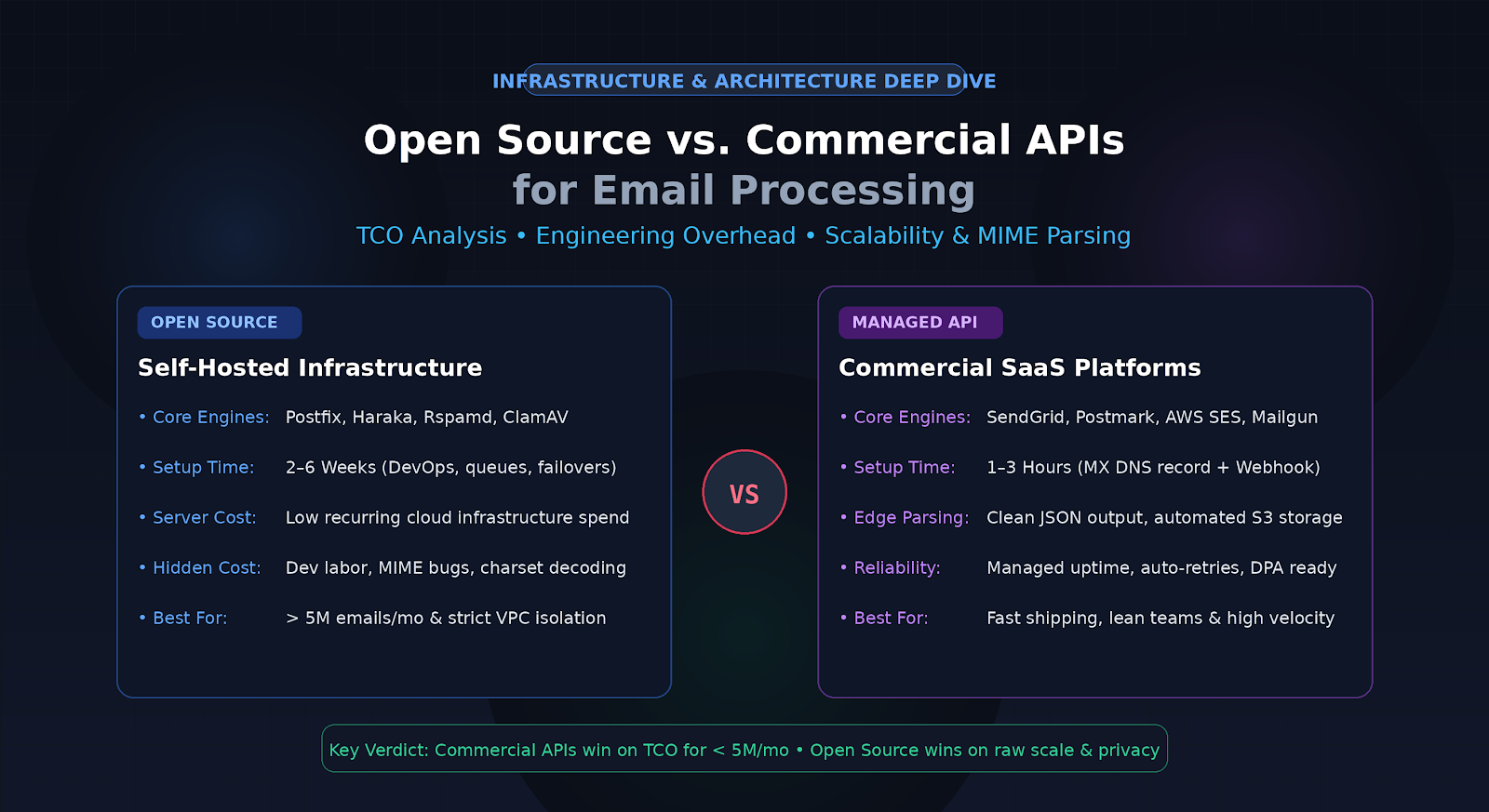
Open Source vs. Commercial APIs for Email Processing: A Cost-Benefit Analysis
Processing inbound email at scale sounds deceptively simple on paper. An email arrives over SMTP, your backend reads the headers and body, extracts attachments, parses JSON payloads or form data, and routes the content into your application database.
However, any engineering team that has maintained self-hosted inbound mail infrastructure knows the reality: Email is one of the messiest, most fragmented, and edge-case-heavy protocols on the modern internet.
From non-standard MIME encodings and multipart boundary errors to spam mitigation, TLS handshakes, charset detection, attachment sanitization, and IP reputation management, inbound mail processing can quickly consume hundreds of engineering hours. When architecting an email ingestion pipeline, software engineering leads face a classic dilemma: Should you build and maintain a custom pipeline using open-source tools (like Postfix, Haraka, or Mailparser libraries), or outsource the parsing to commercial APIs (such as SendGrid Inbound Parse, Postmark, Mailgun, or AWS SES)?
In this guide, we break down both approaches across architecture, infrastructure overhead, hidden engineering costs, security compliance, and long-term Total Cost of Ownership (TCO).
1. Architectural Overview: How Both Paradigms Work
Understanding the trade-offs starts with understanding the architecture required by both paradigms.
+-------------------------------------------------------------------------------+
|                             INBOUND EMAIL FLOW                                |
+-------------------------------------------------------------------------------+

[Sender] ---> (SMTP Port 25) ---> [MX Record / Ingestion Gateway]
                                              |
     +----------------------------------------+------------------------------------+
     |                                                                             |
     v                                                                             v
[ Open Source Pipeline ]                                              [ Commercial Email API ]
  - Self-hosted MTA (Postfix / Haraka)                                  - Globally Distributed MX Edge
  - SpamAssassin / Rspamd (Spam Scoring)                                - Automatic MIME & Charset Normalization
  - ClamAV (Antivirus Extraction)                                       - Attachment Sandboxing & S3 Offload
  - Custom MIME Parser (libmime, mailparser)                            - Webhook Dispatch with Retries & Signatures
  - Custom Webhook Worker & Retry Queue                                 - Security Audits & Compliance Built-in
     |                                                                             |
     v                                                                             v
[ Your Core Application API ] <----------------------------------------------------+
The Open Source Pipeline
A self-hosted open-source pipeline typically involves chaining several battle-tested standalone tools:
- Mail Transfer Agent (MTA): Postfix, Exim, Haraka, or Stalwart to handle the raw inbound SMTP connection on port 25.
- Security & Filtering Daemon: Rspamd or SpamAssassin for heuristic spam filtering, SPF/DKIM/DMARC authentication verification, and ClamAV for attachment scanning.
- Parsing Library: Node.js
mailparser, Pythonmail-parser/flanker, or Goenmimeto decode multipart MIME trees, strip nested boundaries, and handle character sets (e.g., Windows-1252, ISO-8859-1, UTF-8). - Delivery Service: A custom worker daemon that converts parsed payloads into JSON and delivers them to your internal webhooks with local queuing (e.g., Redis + BullMQ or RabbitMQ).
The Commercial API Pipeline
A managed commercial API abstracts the entire SMTP lifecycle into an HTTP-first interface:
- You point your DNS
MXrecords to the provider’s managed cluster (e.g.,inbound.yourdomain.com). - The provider receives raw RFC 5322 payloads, terminates TLS, authenticates headers, scrubs viruses, strips multi-part attachments into hosted object storage (S3/GCS), and normalizes the payload into clean JSON.
- The provider sends an HTTP
POSTwebhook to your designated API endpoint, handling retries with exponential backoff if your server is temporarily degraded.
2. Head-to-Head Comparison: Open Source Email APIs vs. Commercial APIs
| Evaluation Dimension | Open Source Stack (Self-Hosted) | Commercial API (Managed SaaS) |
|---|---|---|
| Initial Setup Time | 2–6 weeks of DevOps & backend design | 1–3 hours (DNS record + Webhook endpoint) |
| Direct Cash Cost | Low (Basic compute, block storage, and bandwidth) | Tiered pricing based on inbound message volume |
| MIME Edge Case Handling | High maintenance; requires ongoing rule tuning | Handled by provider (millions of daily samples) |
| Spam / Antivirus Defense | Manual setup (Rspamd, ClamAV, Surbl lists) | Automated & continuously updated threat feeds |
| High Availability & Scale | Requires multi-region load balancers & queue failovers | Built-in redundancy, high-burst concurrency |
| Data Privacy / Governance | Full control; raw data never leaves your VPC | Vendor-dependent; requires DPA, BAA, or SOC2 review |
| Ongoing Maintenance | Patching Linux OS, updating MTAs, monitoring queues | Zero infrastructure maintenance overhead |
3. The Hidden Costs of Open Source Email Ingestion
While open-source software eliminates recurring software subscription bills, it shifts the financial burden entirely onto engineering hours and operational toil.
A. The “MIME Nightmare” & Charset Normalization
Emails in the wild rarely conform perfectly to RFC specifications. Outlook, Apple Mail, Android email clients, and legacy marketing automation tools all encode headers, inline images, and nested message replies differently.
- Charset encoding failures: You will encounter emails encoded in non-standard charsets or mixed charsets across different parts of the same multipart email.
- Malformed attachments: Base64 decoders frequently fail when clients insert rogue whitespaces or omit padding characters.
- Nested forwards: Parsing an email that was forwarded three times across three different email clients requires recursive multipart extraction.
Resolving these parsing bugs requires recurring developer intervention every month.
B. High Availability & SMTP Burst Spikes
Email traffic is bursty. If an enterprise customer sends a bulk notification or an incoming newsletter blast hits your server, your MTA can be hit with thousands of simultaneous SMTP connections.
- To prevent dropped connections, you must provision high-concurrency connection pools, tune Linux kernel socket limits (
somaxconn,epoll), and maintain auto-scaling worker groups. - A single dropped connection during an SMTP transaction results in hard delivery bounces for senders, directly harming client trust.
C. Spam, Malware, and Inbound DDoS
Exposing Port 25 directly to the open internet turns your IP into a magnet for dictionary attacks, spam relays, and malware campaigns.
- Running ClamAV and Rspamd consumes significant RAM and CPU.
- If your filter is misconfigured, your inbound queues will choke on spam floods, introducing processing latency for legitimate customers.
4. The Real Total Cost of Ownership (TCO) Breakdown
To understand which approach makes financial sense, let’s analyze the 3-year Total Cost of Ownership across three typical monthly email volume tiers: 50,000, 500,000, and 5,000,000 emails/month.
Scenario A: Low Volume (50,000 emails / month)
- Open Source:
- Cloud Server (2x small VPS for HA): ~$40/month
- DevOps Setup: 40 hours initial ($4,000)
- Ongoing Maintenance: 3 hours/month (~$300/month)
- Year 1 Cost: ~$8,080 | Year 2 & 3 Cost: ~$4,080/yr
- Commercial API:
- SaaS Cost: ~$35 – $50/month
- Setup: 4 hours ($400)
- Ongoing Maintenance: 0.5 hours/month ($50/month)
- Year 1 Cost: ~$1,600 | Year 2 & 3 Cost: ~$1,200/yr
- Verdict: Commercial API wins decisively. Building custom infrastructure for low volumes wastes engineering bandwidth.
Scenario B: Medium Volume (500,000 emails / month)
- Open Source:
- Cloud Server (HA Cluster, Redis, S3 storage): ~$150/month
- Setup: 60 hours ($6,000)
- Maintenance: 6 hours/month ($600/month)
- Year 1 Cost: ~$15,000 | Year 2 & 3 Cost: ~$9,000/yr
- Commercial API:
- SaaS Cost: ~$350 – $500/month
- Setup: 6 hours ($600)
- Maintenance: 1 hour/month ($100/month)
- Year 1 Cost: ~$7,200 | Year 2 & 3 Cost: ~$6,000/yr
- Verdict: Commercial API remains more cost-effective when factoring in the opportunity cost of developer salary.
Scenario C: High Volume (5,000,000+ emails / month)
- Open Source:
- Cloud Infrastructure (Dedicated multi-node cluster, Redis, NVMe, S3): ~$800/month
- Setup: 120 hours initial build ($12,000)
- Maintenance: 12 hours/month ($1,200/month)
- Year 1 Cost: ~$36,000 | Year 2 & 3 Cost: ~$24,000/yr
- Commercial API:
- SaaS Cost: ~$2,500 – $4,000/month ($30,000 – $48,000/yr)
- Setup: 10 hours ($1,000)
- Maintenance: 2 hours/month ($200/month)
- Year 1 Cost: ~$33,400 – $51,400 | Year 2 & 3 Cost: ~$32,400 – $50,400/yr
- Verdict: Open Source becomes financially viable, provided you have in-house systems/DevOps engineers with mail protocol expertise.
5. Security, Privacy, and Regulatory Compliance
Financial costs aside, regulatory constraints often dictate the technical roadmap:
- HIPAA & Sensitive Health Data:
- Sending PHI (Protected Health Information) through third-party email APIs requires executing a Business Associate Agreement (BAA). Not all commercial tiers offer BAAs without five-figure enterprise contracts.
- Open source keeps data entirely within your private VPC, simplifying strict HIPAA auditing.
- GDPR & Regional Data Residency:
- If incoming emails contain EU citizen data, commercial APIs must guarantee data processing within the EU/EEA. Open source gives you full sovereignty over server locations and data retention policies.
- Data Isolation:
- For banking, fintech, or government clients, zero-trust policies may strictly ban routing customer communication through multi-tenant external SaaS vendors.
6. Strategic Decision Matrix: Which Should You Choose?
Choose an Open Source Stack If:
- You process over 5,000,000 emails per month, where SaaS per-message pricing significantly outpaces the cost of dedicated server infrastructure.
- Strict compliance mandates (e.g., air-gapped environments, on-premise defense contracts, specialized banking compliance) prohibit third-party data transit.
- You need deep protocol-level customization (e.g., custom SMTP extensions, raw milter modifications, bespoke header routing).
- Your engineering team already has dedicated SREs and email infrastructure specialists.
Choose a Commercial API If:
- You are a startup, scale-up, or lean product team that needs to ship email-driven features (helpdesks, CRM ingestion, parsing invoice attachments) quickly.
- You want guaranteed SLA uptime, automated webhook retries, and high-concurrency handling without on-call DevOps alerts.
- You do not want your developers debugging legacy MIME character encoding quirks and non-standard multipart attachments.
- Your monthly volume is under 3–5 million emails, where engineering time saved heavily outweighs SaaS subscription costs.
Summary Conclusion
Building vs. buying an email processing engine is not merely a question of monthly subscription fees vs. cloud server costs. It is an investment decision between predictable SaaS operational expenses and ongoing internal developer labor.
For 85% of businesses, starting with a managed commercial email API provides the best return on investment by accelerating time-to-market and freeing engineering talent to focus on core product differentiators. Only when message volume scales into multi-million tiers—or when strict data sovereignty mandates dictate private storage—does transitioning to an in-house open-source architecture deliver a justifiable return on investment.
Frequently Asked Questions (FAQ)
1. What is inbound email parsing in modern application development?
A: Inbound email parsing is the automated process of converting raw SMTP emails, headers, and attachments into clean, structured JSON payloads that webhooks can deliver directly to backend applications.
2. Can open-source mail parsers reliably extract all email attachments?
A: Open-source libraries handle standard formats well, but they frequently require manual bug fixes when handling corrupted encodings, non-standard multipart boundaries, or winmail.dat files.
3. How do commercial email APIs protect backend applications from spam bursts?
A: Commercial APIs run enterprise-grade reputation filtering and rate-limiting at their edge before triggering webhooks, preventing malicious spam floods from overwhelming your backend servers.
4. Is self-hosting an email processor cheaper than using an API at high volume?
A: Yes, once email volumes exceed several million messages per month, self-hosted open-source infrastructure generally yields lower server costs than per-email SaaS billing, provided developer maintenance overhead is managed.
5. Does using a commercial email parsing API introduce data compliance risks?
A: Using a commercial API requires ensuring the vendor complies with regulations like GDPR or HIPAA through Data Processing Agreements (DPAs) and appropriate data retention policies.