Last Updated: 16 Nov, 2026
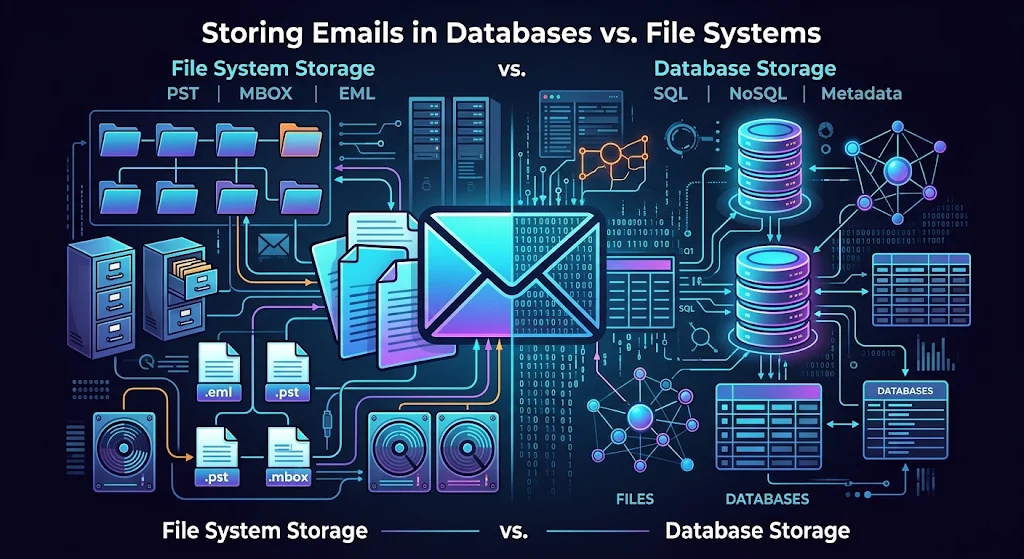
Storing Emails in Databases vs. File Systems: PST, MBOX, and Beyond
Every software system that ingests, archives, or serves email eventually hits the same architectural fork in the road: should messages live inside a structured database or directly on a file system?
On the surface, an email looks deceptively simple—a block of headers, a plain-text or HTML body, and perhaps a few MIME-encoded attachments. Yet when you scale from a single user’s desktop inbox to millions of enterprise messages, compliance archives, or multi-tenant SaaS pipelines, the underlying storage engine dictates everything from query latency to disaster recovery.
Let’s break down how classic file-based containers like PST and MBOX stack up against modern relational and NoSQL databases, where individual message formats like EML and Maildir fit in, and why most production systems end up using a hybrid approach.
1. File System Storage: Classic Mailbox Containers
Storing emails on a file system is as old as SMTP itself. Rather than spinning up a database daemon, mail servers and desktop clients historically wrote messages straight to disk using either single-file containers or one-file-per-message directories.
MBOX: The Concatenated Plain-Text Workhorse
Originating in early Unix mail systems, MBOX stores an entire folder of emails inside a single, sequential plain-text file. Each message begins with a special From delimiter line, followed by standard RFC 5322 headers, the message body, and Base64-encoded attachments.
- Strengths: Because MBOX is an open, human-readable text format, it is universally supported across Thunderbird, Apple Mail, Google Takeout exports, and Unix command-line utilities (
grep,awk,sed). Appending a newly arrived email to the end of the file is an $O(1)$ sequential write. - Weaknesses: Updating flags (like marking an email as “read”) or deleting a message in the middle of a 10 GB MBOX file forces the client to rewrite huge chunks of the file. Worse, a single disk sector corruption or concurrent write lock failure can corrupt the delimiter boundaries and scramble the entire mailbox.
PST: Microsoft’s Proprietary B-Tree Container
Microsoft’s Personal Storage Table (PST) takes a very different approach. Rather than flat text, a PST file is essentially a self-contained, binary database file structured around B-trees and allocation tables.
- Strengths: A single
.pstfile encapsulates emails, folder hierarchies, calendar events, contacts, tasks, and Outlook-specific metadata. It supports built-in compression, encryption, and structured indexing without needing an external database server. - Weaknesses: PST is a closed, proprietary format tightly coupled to Windows and Microsoft Outlook. File sizes historically top out around 50 GB by default in modern Outlook configurations, and storing PST files over network shares is notorious for causing index corruption.
Maildir and EML: One File Per Message
To eliminate the locking and corruption nightmares of monolithic MBOX and PST files, architectures like Maildir (popularized by Qmail and Dovecot) store every individual email as a separate file—often structured as standard .eml (RFC 5322) files—organized across tmp/, new/, and cur/ directories.
- Strengths: Atomic file moves eliminate lock contention. If a disk sector goes bad, you lose one email instead of ten years of correspondence. Standard OS backups,
rsync, and incremental snapshots become effortless. - Weaknesses: Storing millions of tiny files exhausts file system inodes and degrades directory listing performance unless you shard directories by date or hash (e.g.,
/2026/11/14/a3/msg-id.eml). Full-text search across raw.emlfiles is painfully slow without a separate index file.
2. Database Storage: Relational and NoSQL Engines
When applications need instant search, multi-user concurrency, role-based access control, or complex analytics (such as CRM platforms, helpdesks, and eDiscovery tools), engineers often turn to databases like PostgreSQL, MySQL, Elasticsearch, or MongoDB.
How Databases Model Email
In a relational database, an email isn’t stored as an opaque blob—it is normalized into queryable entities:
CREATE TABLE emails (
    id UUID PRIMARY KEY,
    thread_id UUID NOT NULL,
    message_id VARCHAR(255) UNIQUE NOT NULL,
    sender VARCHAR(320) NOT NULL,
    subject TEXT,
    received_at TIMESTAMPTZ NOT NULL,
    is_read BOOLEAN DEFAULT FALSE,
    headers JSONB,
    body_text TEXT,
    body_html TEXT
);

CREATE INDEX idx_emails_thread_received ON emails (thread_id, received_at DESC);
CREATE INDEX idx_emails_fts ON emails USING GIN (to_tsvector('english', coalesce(subject, '') || ' ' || coalesce(body_text, '')));
Strengths of Database Storage
- Sub-Millisecond Filtering and Threading: Fetching “all unread emails from a specific domain in the last 30 days” uses B-tree and GIN indexes rather than scanning gigabytes of disk text.
- ACID Transactions and Concurrency: Multiple background workers, IMAP sync processes, and web clients can safely update read states, labels, and folder assignments simultaneously without file-lock collisions.
- Structured Metadata & Deduplication: Storing SHA-256 hashes of attachments allows you to deduplicate identical PDFs sent across 500 internal recipients—something monolithic PST or MBOX files duplicate 500 times.
Weaknesses of Database Storage
- Storage Bloat & Cost: Storing multi-megabyte Base64 attachments and raw HTML bodies inside primary database tables inflates database size, slows down replication, bloats write-ahead logs (WAL), and drives up SSD/cloud IOPS costs.
- Backup & Restore Bottlenecks: Restoring a 2 TB relational database from a snapshot takes dramatically longer than restoring individual files from object storage.
- Loss of Raw Wire Fidelity: If you parse an incoming email into database columns and discard the original MIME stream, you can break DKIM cryptographic signatures or lose obscure custom headers needed for forensic auditing.
3. Side-by-Side Comparison: File Systems vs. Databases
| Architectural Factor | MBOX (Flat File) | PST (Binary Container) | Maildir / EML (Per-File) | SQL / NoSQL Database |
|---|---|---|---|---|
| Storage Structure | Single concatenated text file | Proprietary binary B-tree file | One RFC 5322 file per email | Normalized tables / JSON documents |
| Query & Search Speed | Slow (requires linear scan or external index) | Fast inside Outlook; slow externally | Slow without sidecar index | Extremely fast (B-tree, GIN, full-text) |
| Concurrency | Poor (requires file-level locking) | Single-user desktop lock only | High (atomic file operations) | High (row-level ACID locking) |
| Corruption Blast Radius | High (entire folder/mailbox at risk) | High (single file holds entire mailbox) | Low (isolated to a single message) | Medium (mitigated by WAL & replicas) |
| Portability | High (open standard across Unix/Mac/Linux) | Low (locked to Microsoft ecosystem) | Highest (universal .eml standard) | Low (coupled to application schema) |
| Attachment Deduplication | None | Limited internal compression | None (unless hard-linked) | Native via content-addressable hashing |
4. Beyond the Binary Choice: The Modern Hybrid Architecture
In modern cloud engineering, choosing strictly between a database or a file system is a false dichotomy. High-scale email platforms, compliance archives, and SaaS tools almost universally adopt a Hybrid Object-Metadata Architecture:
- Raw Message & Attachments in Object Storage (S3 / GCS / MinIO): When an email arrives, the exact, unmodified
.emlMIME payload—and any extracted binary attachments—is written immutably to object storage using a content-addressed or date-partitioned key (e.g.,s3://mail-archive/2026/11/14/<sha256>.eml). This preserves original DKIM signatures, keeps storage pennies per gigabyte, and isolates binary bulk from transactional databases. - Headers, State & Relationships in a Relational Database: PostgreSQL or MySQL stores lightweight metadata: sender, recipients, subject, timestamps, thread IDs, folder pointers, read/unread flags, and the S3 object key.
- Full-Text Search in a Dedicated Search Engine: For instant keyword search across billions of messages, extracted plain text is streamed asynchronously into Elasticsearch, OpenSearch, or Typesense.
- Export Pipelines for PST and MBOX: Rather than using PST or MBOX as live production storage, modern systems generate
.pst,.mbox, or.ziparchives of.emlfiles on demand when users request a Google Takeout-style export or legal eDiscovery bundle.
Which Approach Should You Choose?
- Use MBOX or EML on a file system when building local desktop clients, lightweight CLI tools, portable backups, or forensic data-transfer pipelines where zero-dependency portability matters most.
- Use PST only when interoperability with Microsoft Outlook desktop environments or legacy Exchange exports is a hard requirement.
- Use a Database + Object Storage hybrid for any multi-user web application, customer support platform, or enterprise archive requiring fast search, concurrent access, and horizontal scalability.
Frequently Asked Questions (FAQs)
1. Is it better to store emails in a database or as files on disk?
For high-concurrency applications needing fast search and filtering, a hybrid approach—storing searchable metadata in a database and raw .eml files or attachments in object storage—performs best.
2. What is the main difference between PST and MBOX file formats? PST is Microsoft Outlook’s proprietary binary container that stores emails, calendars, and contacts together, whereas MBOX is an open plain-text format that concatenates email messages into a single file.
3. Why do large MBOX and PST files become prone to corruption? Because both formats pack thousands of messages into one monolithic file, an interrupted write, disk sector error, or network share glitch can break internal pointers or message delimiters across the entire archive.
4. Why is storing email attachments directly inside SQL databases discouraged? Large binary or Base64 attachments bloat database tables, slow down backups and replication, and dramatically increase high-speed storage costs compared to object storage or file systems.
5. When should developers use EML or Maildir instead of MBOX? Developers should choose EML or Maildir when they need atomic file operations, safe concurrent access, and isolated message recovery without locking or rewriting an entire mailbox file.