آخرین بهروزرسانی: 30 Jun, 2026
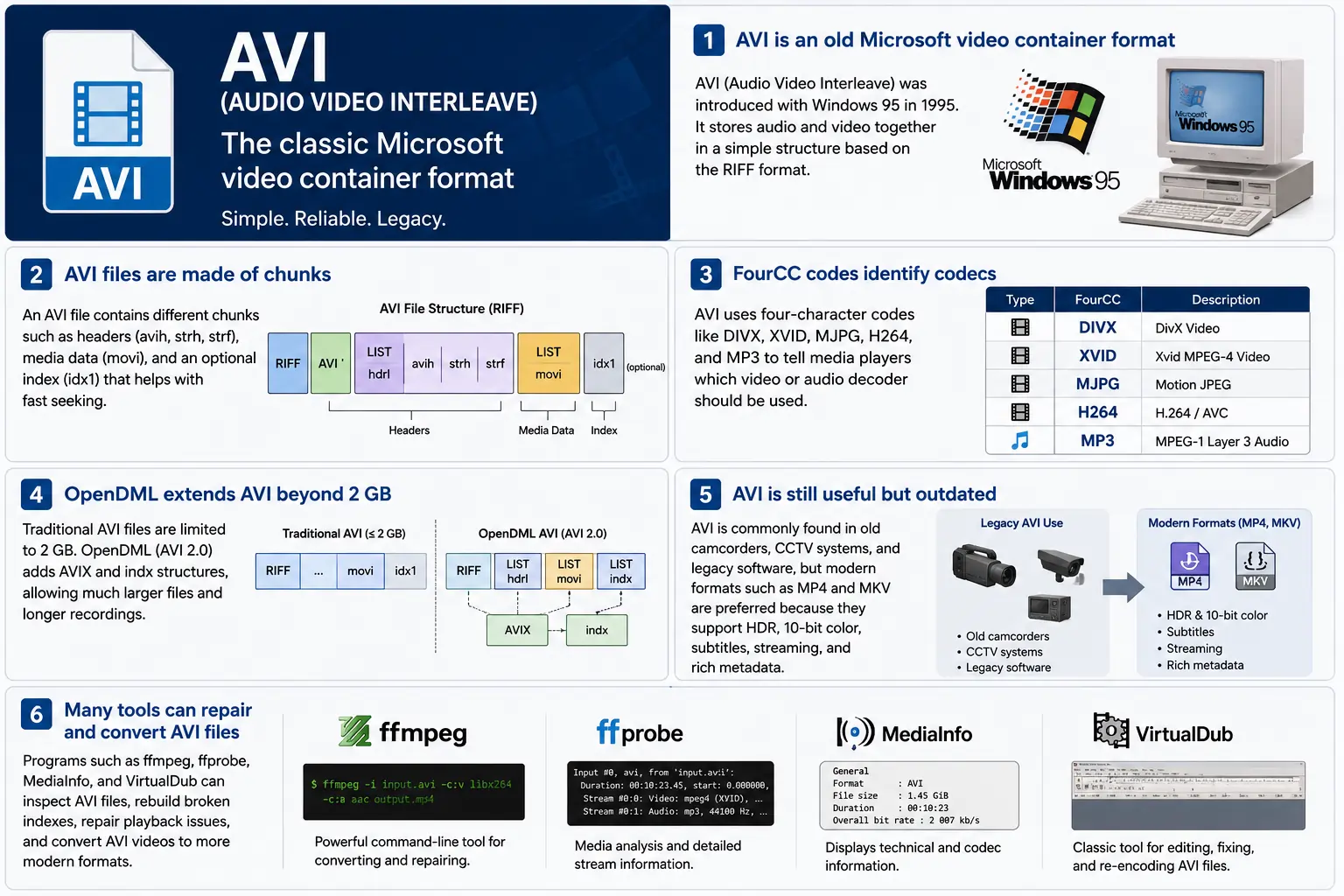
TL;DR – AVI (Audio Video Interleave) اولین کانتینر “digital video” مایکروسافت است که با Windows 95 به وجود آمد. این یک فایل ساده مبتنی بر RIFF‑based است که بخشهای فشرده ویدئو و صدا را بهصورت متناوب قرار میدهد تا پخشکننده بتواند آنها را همزمان بخواند. این فرمت هنوز توسط Windows Media Player و مجموعهای از ابزارهای منبع باز شناخته میشود، اما فاقد ویژگیهای مدرن مانند HDR، رنگ 10‑بیتی و متادیتای استریمینگ قوی است. اگر روزی نیاز به بررسی فیلمهای قدیمی داشتید، باید ساختار بخشها، کدهای FourCC و افزونههای OpenDML که سقف 2 GB را برمیدارند را درک کنید – اینجا نکات اصلی AVI است.
۱. فایل AVI دقیقاً چیست؟
- نام کامل: Audio Video Interleave
- اولین ظهور: Windows 95 (1995) – پاسخ مایکروسافت به “digital video” در رایانههای مصرفی.
- مشخصات: ساخته شده بر پایهٔ RIFF (Resource Interchange File Format) از سال 1991. RIFF یک کانتینر عمومی «مبتنی بر تکهها» است؛ AVI به سادگی مجموعهای از تکهها را تعریف میکند که صدا، ویدئو و دادههای ایندکس را در خود نگه میدارند.
- پسوند فایل / MIME:
.avi–video/x-msvideo. - هدف اصلی: صدا و ویدیو را بهصورت بههمپیوسته بر روی دیسک نگه دارید تا یک حلقه پخش ساده بتواند یک فریم ویدیو را خوانده، سپس نمونه صوتی متناظر را بدون جستجوهای پرهزینه بخواند.
- وضعیت قدیمی: هنوز در Windows Media Player، DirectShow، VLC و شمار زیادی از پخشکنندههای دیگر قابل پخش است، اما یک کانتینر «مدرن» نیست. پشتیبانی بومی از HDR، 10‑بیتی، نرخ بیت متغیر یا متادیتای غنی وجود ندارد.
۲. داخل جعبه – نحوه کار AVI
اسکلت چانک RIFF
یک فایل AVI فقط مجموعهای از بخشها است:
RIFF <size> "AVI "          ; file header
  LIST "hdrl"               ; header list
    avih ...                ; main AVI header (global info)
    LIST "strl"             ; stream list (one per stream)
      strh ...              ; stream header (type, codec, timing)
      strf ...              ; stream format (codec‑specific data)
  LIST "movi"               ; interleaved media data
    00dc <size> <video frame>
    01wb <size> <audio block>
    …
  idx1 ...                  ; optional index for fast seeking
- شناسه بخش (4 bytes) – به عنوان مثال،
avih،strh،movi. - اندازه بخش (4 bytes) – طول دادهای که پس از آن میآید (بهجز فیلدهای شناسه و اندازه).
- داده – بار واقعی (سرصفحهها، فریمهای خام، و غیره).
از آنجا که RIFF قابل گسترش است، میتوانید انواع جدیدی از بخشها را اضافه کنید بدون اینکه تجزیهکنندههای قدیمی خراب شوند – طراحیای که AVI را برای دههها زنده نگه داشته است.
FourCC – نجواگر کدک
کدهای چهار حرفی (FourCC) چسبی هستند که به پخشکننده میگوید کدام رمزگشای را بارگذاری کند. برخی از رایجترینها که در فایلهای AVI میبینید:
| FourCC | کدک (ffmpeg) | کاربرد معمول |
|---|---|---|
DIVX | mpeg4 (DivX) | MPEG‑4 Part 2 اولیه |
XVID | mpeg4 (Xvid) | منبع باز MPEG‑4 |
MJPG | mjpeg | Motion‑JPEG (دوربینهای دیجیتال) |
H264 | h264 | H.264/AVC (نادر اما ممکن) |
MP3 | mp3 | جریان صوتی MP3 |
PCM | pcm_s16le | صوت PCM بدون فشردهسازی |
FourCC در بخش strh (شناسه کدک) قرار دارد و گاهی در بلوک strf (قالب پیکسل، قالب نمونه صوتی) نیز یافت میشود.
زمانبندی و همگامسازی
AVI از یک سیستم پایه‑زمانی ساده استفاده میکند:
- سرصفحهٔ سراسری (
avih):dwRate/dwScale→ فریم بر ثانیه. - سرصفحهٔ هر جریان (
strh):dwRate/dwScaleمخصوص برای صدا یا جریانهای ویدئویی ثانویه.
پخشکننده شماره فریم را در scale/rate ضرب میکند تا زمان ارائه (PTS) را محاسبه کند. اگر مقیاسها همراستا نباشند، با باگ کلاسیک «صدا از هم میلغزد» که ابزارهای قدیمی را آزار میدهد، مواجه میشوید.
بخش movi – جایی که رسانه قرار دارد
تمام فریمهای فشرده در لیست movi قرار دارند. هر فریم پیش از خود یک شناسهٔ تکه دارد که مشخص میکند آیا ویدئو (00dc) است یا صدا (01wb). این شناسه همچنین شمارهٔ جریان را رمزگذاری میکند، بنابراین فایلی با دو مسیر صوتی دارای 01wb و 02wb خواهد بود.
از آنجا که دادهها از پیش بههمریختهاند، پخشکننده میتواند یک فریم ویدئویی را بخواند، سپس بلوک صوتی بعدی را، و آنها را بهصورت همزمان بدون جستجوی پیشرفته ارائه دهد. این الگوی نوشتاری تعیینپذیر باعث شد AVI برای دستگاههای ضبط اولیه که به نوشتن دیسک با تأخیر کم نیاز داشتند، محبوب شود.
نمایهسازی (idx1) – جلو رفتن سریع، عقب رفتن سریع
تکهٔ اختیاری idx1 جدولی از آفستها و اندازهها برای هر فریم در movi است. وقتی موجود باشد، جستجو تنها یک نگاه ساده به جدول است. اگر موجود نباشد، پخشکنندهها باید فایل را بهصورت زنده اسکن کنند – که میتواند توقف «بافرینگ» قابلتوجهی در فایلهای بزرگ ایجاد کند.
OpenDML (AVI 2.0) – شکستن مانع ۲ گیگابایتی
مشخصات اصلی RIFF اندازه فیلد اندازه یک تکه را به یک عدد صحیح بدون علامت ۳۲‑بیتی محدود میکند → ۲ GB حداکثر حجم فایل. OpenDML (گاهی به عنوان AVI 2.0 شناخته میشود) معرفی کرد:
AVIXLISTها – بخشهای «گسترش یافته» RIFF که میتوانند پس از اولین ۲ GB دنبال شوند.indxتکه – یک فهرست ۶۴‑بیتی.- فیلدهای سرصفحهٔ اضافی برای مدت زمانهای طولانیتر.
اکثر ابزارهای مدرن (ffmpeg، VLC) بهصورت خودکار به OpenDML سوئیچ میکنند وقتی خروجی بیش از ۲ GB باشد، اما بسیاری از پخشکنندههای قدیمی هنوز در مواجهه با تکههای AVIX دچار مشکل میشوند، بنابراین گاهی اوقات ترفندهای سازگاری را میبینید که یک ضبط طولانی را به چند فایل AVI با حجم ۲ GB تقسیم میکنند.
۳. AVI در سال ۲۰۲۴ کجا زندگی میکند؟
| روند | چه معنایی برای AVI دارد |
|---|---|
| تغییر به MP4/MKV/ProRes | تولیدات جدید ترجیح میدهند از کانتینرهایی استفاده کنند که بهصورت بومی از HDR، ۱۰‑بیتی، VBR و متادیتای غنی پشتیبانی میکنند. AVI بهندرت برای محتوای تازه انتخاب میشود. |
| سختافزارهای قدیمی | دوربینهای CCTV قدیمی، دوربینهای ویدئویی اوایل دهه ۲۰۰۰ و برخی موتورهای بازی هنوز خروجی AVI میدهند. شما همچنان نیاز دارید این فایلها را در یک جریان کاری مدرن وارد کنید. |
| پشتیبانی منبع باز | ffmpeg، libav، VLC، HandBrake و GStreamer پارسرهای AVI را زنده نگه میدارند، اما اغلب دوبارهکدگذاری به MP4/MKV برای توزیع انجام میدهند. |
| احیای OpenDML | ضبطهای نظارتی 4K که بهمدت روزها ادامه مییابند، بهسرعت از ۲ GB عبور میکنند. OpenDML (AVIX) همچنان راهحل اصلی است، اگرچه بسیاری از ابزارها آن را بهدرستی مدیریت نمیکنند. |
| سختسازی امنیتی | پارسرهای تاریخی AVI اندازههای خراب تکهها را میپذیرفتند که منجر به CVEها (مثلاً CVE‑2020‑13144) میشد. ویندوز اکنون Media Foundation را ترجیح میدهد که بسیاری از ناهنجاریهای قدیمی را رد میکند و توسعهدهندگان را به سمت خطوط لوله ایمنتر هدایت میکند. |
| خطوط لوله مستقل از کانتینر | چارچوبهای مدرن رسانهای AVI را بهعنوان یک عنصر منبع دیگر در نظر میگیرند. پس از آنکه دادهها به بافرهای خام تفکیک شدند، کانتینر برای پردازشهای بعدی بیاهمیت میشود. |
بهطور خلاصه، AVI زنده اما پیر شده است – در جایی که سختافزار قدیمی یا ذخیرهسازی سادهٔ درهمتنیده لازم است، بقا مییابد، اما برای پروژههای جدید گزینهٔ اول نیست.
۴. عملی: کار با AVI امروز
A. نگاهی به یک هدر حداقل (hex)
52 49 46 46  00 00 00 00  41 56 49 20   ; "RIFF" + size + "AVI "
4C 49 53 54  20 00 00 00  68 64 72 6C   ; LIST "hdrl"
...
جادوی RIFF (52 49 46 46) به هر پارسری میگوید «این یک فایل RIFF است». چهار بایت بعدی اندازهٔ کل فایل (منهای ۸) را نشان میدهد. شناسهٔ "AVI " فایل را به خانوادهٔ AVI قفل میکند.
B. تبدیل MP4 مدرن → AVI قدیمی
ffmpeg -i input.mp4 \
-c:v mpeg4 -q
```bash
ffmpeg -i input.mp4 \\ -c:v mpeg4 -qscale:v 5 \\ # MPEG‑4 بخش ۲ (سازگار با DivX/Xvid) -c:a mp3 -b:a 192k \\ # صدای MP3 (اکثر پخشکنندههای AVI این را میفهمند) -f avi output.avi
The command above forces MPEG‑4 Part 2 video (the codec most legacy AVI players recognize) and MP3 audio, then writes an AVI container. If you need OpenDML support for files larger than 2 GB, add the -movflags +faststart‑style flag that tells FFmpeg to use the extended AVIX chunks:
ffmpeg -i input.mp4 \\ -c:v mpeg4 -qscale:v 5 \\ -c:a mp3 -b:a 192k \\ -f avi -flags +global_header -movflags +faststart output.avi
Tip: Some older Windows Media Player versions still choke on the
AVIXextension. If you must stay under 2 GB, split the source into multiple AVIs using the-segment_timeand-f segmentmuxer.
5. Common Pitfalls & How to Fix Them
| Symptom | Likely Cause | Fix |
|---|---|---|
| Audio drifts out of sync after a few minutes | Mismatched dwRate/dwScale between avih and strh (or a VBR audio stream) | Re‑encode audio to a constant‑bitrate format (e.g., MP3 128 kbps) or use -vsync 2 in FFmpeg to force frame‑accurate timestamps. |
| “Cannot play this video” on Windows Media Player | Missing or corrupt idx1 index, or OpenDML (AVIX) chunks not recognized | Run ffmpeg -i broken.avi -c copy -map 0 -f avi repaired.avi to rebuild the index; or use aviindex (part of mplayer) to generate a fresh idx1. |
| File size capped at 2 GB despite long footage | Encoder used classic AVI (no OpenDML) | Add -use\_open\_dml 1 (FFmpeg) or -format avi2 (VirtualDub) to enable OpenDML extensions. |
| Green or corrupted frames | Incompatible FourCC (e.g., H.264 in an AVI without proper headers) | Stick to codecs known to work in AVI (mpeg4, msmpeg4v2, MJPG, XVID). If you must store H.264, use the h264 FourCC and ensure the strf chunk contains the SPS/PPS extradata. |
| Playback stalls on network streams | AVI’s lack of robust streaming metadata (no moov atom) | Wrap the AVI in a streaming protocol (e.g., RTSP) that handles byte‑range requests, or convert to MP4/MKV for smoother streaming. |
6. Debugging Tools You Should Keep Handy
| Tool | Platform | What It Does |
|---|---|---|
| ffprobe / ffmpeg | Cross‑platform | Dumps every chunk, FourCC, timestamps, and can rebuild indexes (-c copy). |
| MediaInfo | Windows/macOS/Linux | Human‑readable summary of streams, codecs, and container flags. |
| VirtualDub | Windows | Classic AVI editor; can rebuild headers, add OpenDML, and preview frame‑by‑frame. |
| GSpot (legacy) | Windows | Identifies obscure FourCCs and suggests appropriate codecs. |
| aviindex (part of MPlayer) | Linux/macOS | Generates a fresh idx1 chunk for broken files. |
| Hex editors (HxD, Bless) | Any | Directly inspect RIFF headers when you suspect malformed chunk sizes. |
A typical workflow when an AVI refuses to play:
- Inspect with
ffprobe -show_format -show_streams file.avi. - Check the index:
ffmpeg -i file.avi -c copy -f avi -y temp.avi(FFmpeg will rebuild it automatically). - Validate FourCCs:
mediainfo file.avi. If you see an unknown codec, consider re‑encoding that stream. - Repair with VirtualDub → “File → Re‑open as AVI (OpenDML)”. Save a fresh copy.
7. When (and When Not) to Use AVI
Good Use‑Cases
| Scenario | Why AVI Works |
|---|---|
| Legacy camcorder ingest | The device outputs native AVI; transcoding adds unnecessary quality loss. |
| Simple interleaved capture | Low‑latency write to disk without needing complex container features. |
| Compatibility with old Windows‑only software | Some industrial automation tools only understand AVI. |
| Archiving raw, uncompressed video | AVI can hold PCM audio and uncompressed RGB24 video without extra overhead. |
Bad Use‑Cases
| Scenario | Why AVI Fails |
|---|---|
| HDR or 10‑bit color | No standard way to store those pixel formats; you’d need a custom FourCC that most players ignore. |
| Variable‑bit‑rate streaming | Lack of a proper moov‑like atom makes adaptive bitrate impossible. |
| Rich metadata (chapters, subtitles, tags) | AVI’s chunk model doesn’t define standard containers for subtitles or extensive tags. |
| Cross‑platform mobile distribution | Modern mobile players expect MP4/MKV; AVI may not be hardware‑accelerated. |
If you’re starting a new project, treat AVI as a fallback for legacy pipelines, not a primary delivery format.
8. Future Outlook – Will AVI Ever Make a Comeback?
The short answer: unlikely. The industry has coalesced around ISO‑BMFF‑based containers (MP4, MOV, HEVC‑MP4, etc.) because they support:
- Extensible metadata (ISO‑UserData, UUID boxes).
- Fragmented streaming (moof/mdat) for adaptive bitrate.
- Native HDR/10‑bit/12‑bit video definitions.
AVI’s design, while elegant for its time, is fundamentally limited by its 32‑bit size fields and its reliance on external FourCC‑driven codecs. Even though OpenDML extended the size limit, it never gained widespread adoption beyond niche surveillance and archival tools.
That said, software preservation will keep AVI parsers alive for decades. Projects like FFmpeg, GStreamer, and VLC will continue to support the format, ensuring that the massive archive of 1990s‑2000s footage remains accessible. In a world where “digital archaeology” is becoming a real discipline, knowing how to read and repair AVI files is still a valuable skill.
9. Quick Reference Cheat‑Sheet
| Item | Command / Setting | Explanation |
|---|---|---|
| Create classic AVI | ffmpeg -i src -c:v mpeg4 -qscale:v 5 -c:a mp3 -b:a 192k -f avi out.avi | Simple, widely compatible. |
| Enable OpenDML | ffmpeg -i src -c:v mpeg4 -qscale:v 5 -c:a mp3 -b:a 192k -f avi -use_open_dml 1 out.avi | Allows >2 GB files. |
| Re‑index broken AVI | ffmpeg -i broken.avi -c copy -f avi repaired.avi | Rewrites idx1. |
| Split >2 GB into chunks | ffmpeg -i long.avi -c copy -map 0 -segment_time 1800 -f segment part_%03d.avi | 30‑minute segments stay under the limit. |
| Inspect header | ffprobe -show_format -show_streams file.avi | Dumps all RIFF chunks and stream info. |
| Add a subtitle track (non‑standard) | ffmpeg -i video.avi -i subs.srt -c copy -metadata:s:s:0 language=eng out.avi | Works only with players that read the txt stream; not universally supported. |
Keep this table bookmarked; it covers 80 % of everyday AVI tasks.
10. Best Practices for Archiving AVI Files
Even though AVI is a legacy container, many institutions still have petabytes of it sitting on tape or in cold‑storage. Treating those assets with a disciplined workflow will save you headaches down the line.
| Practice | Why It Matters | How to Implement |
|---|---|---|
| Validate on ingest | Corrupt headers or missing indexes can go unnoticed until playback. | Run ffprobe -v error -show_format -show_streams file.avi immediately after copying. Log any non‑zero exit codes. |
| Generate a checksum | Guarantees bit‑exact preservation across media migrations. | Use SHA‑256 (sha256sum file.avi > file.avi.sha256). Store the checksum alongside the file in your catalog. |
| Create a modern proxy | Most downstream workflows (editing, streaming) expect MP4/MKV. | Encode a low‑bitrate MP4 proxy (ffmpeg -i file.avi -c:v libx264 -crf 23 -c:a aac -b:a 128k proxy.mp4). Keep the proxy in the same directory with a clear naming convention (*_proxy.mp4). |
| Document FourCCs and codec versions | Some FourCCs map to multiple codec implementations (e.g., DIVX could be DivX 5, 6, or 7). | Extract the codec private data (ffprobe -show_private_data) and store it in a side‑car JSON file (file.avi.codec.json). |
| Migrate to OpenDML for large files | Files >2 GB will become unreadable on older players. | When transcoding, always pass -use_open_dml 1. If you’re only copying, use aviindex to rebuild an OpenDML‑compatible index. |
| Store metadata in a side‑car | AVI has no standard for extensive tags (e.g., creator, location). | Use XMP side‑car files (file.avi.xmp) or embed a small INFO LIST chunk manually if you need minimal in‑container metadata. |
| Regularly test playback | Bit‑rot can affect codecs as well as containers. | Schedule a quarterly job that runs a headless player (e.g., ffplay -autoexit -frames 10 file.avi) and reports any failures. |
By applying these steps at the moment of acquisition, you avoid costly “repair‑the‑archive” projects later.
11. Frequently Asked Questions (FAQ)
Q1: Can I store H.265/HEVC video inside an AVI file?
Short answer: Technically yes, if you supply the correct FourCC (HEVC or HVC1) and include the SPS/PPS NAL units in the strf chunk. In practice, very few players support it, and many will treat the stream as unknown. For reliable playback, stick to MPEG‑4 Part 2 or Motion‑JPEG.
Q2: Why does Windows Media Player sometimes show a black screen but still plays audio?
Explanation: The player has successfully opened the audio stream but failed to locate a usable video decoder for the FourCC. This can happen when the FourCC is custom or when the required codec isn’t installed. Installing a codec pack (e.g., K-Lite) or re‑encoding the video to a known FourCC resolves the issue.
Q3: Is there any way to embed subtitles directly into an AVI file?
Answer: AVI does not define a standard subtitle stream. Some tools cheat by adding a “txt” stream (FourCC txt ) that contains plain‑text subtitles, but only a handful of players (e.g., VirtualDub with a plugin) will render them. The recommended approach is to keep subtitles in a separate .srt or .ass file, or to re‑mux into a container that officially supports subtitles (MP4, MKV).
Q4: My video shows a “frame rate mismatch” warning in MediaInfo. What should I do?
Solution: Verify that the dwRate/dwScale values in both the global avih and per‑stream strh headers are consistent. If they differ, re‑mux with FFmpeg using -video_track_timescale to force a uniform time base:
ffmpeg -i broken.avi -c copy -video_track_timescale 1000 fixed.avi
Q5: Does AVI support multiple audio languages?
Yes, but with caveats. You can add several audio streams, each with its own strh/strf pair and a distinct stream number (01wb, 02wb, …). However, there is no standardized way to label the language; you must rely on external metadata (e.g., an accompanying .xml file) or embed a custom INFO chunk.
Q6: How can I extract raw frames from an AVI without re‑encoding?
Command:
ffmpeg -i source.avi -c:v copy -f image2 frame_%05d.bmp
Replace bmp with png or tiff if you prefer lossless image formats. The -c:v copy flag tells FFmpeg to dump the compressed frames as‑is; if the codec is MJPEG, the output will already be JPEG images.
Q7: Are there any security concerns when opening AVI files from untrusted sources?
Yes. Malformed chunk sizes can trigger buffer overflows in legacy parsers (e.g., older DirectShow filters). Always open unknown AVIs in a sandboxed environment or use a modern library like FFmpeg that performs strict bounds checking. Updating Windows Media Foundation and disabling legacy DirectShow filters further mitigates risk.
12. TL;DR خلاصه (برای بیصبران)
- AVI = RIFF‑based, interleaved container introduced with Windows 95.
- FourCC tells the player which codec to use; common ones are
DIVX,XVID,MJPG,H264,MP3. - Timing is driven by
dwRate/dwScalein the global and stream headers. moviholds the actual media;idx1(optional) speeds up seeking.- OpenDML (
AVIX) lifts the 2 GB limit but isn’t universally supported. - Use cases today: legacy camcorder ingest, simple interleaved capture, archival of raw PCM video.
- Avoid for new projects: no HDR, 10‑bit, VBR, subtitles, or rich metadata.
- Toolbox:
ffprobe,ffmpeg, MediaInfo, VirtualDub, aviindex, hex editors. - Best practice: validate, checksum, generate modern proxies, and migrate large files to OpenDML.
13. افکار پایانی
AVI’s simplicity is both its strength and its Achilles’ heel. It gave early PC users a straightforward way to store synchronized audio‑video pairs, and that design philosophy—interleaved chunks, a clear header layout, and extensible FourCC identifiers—still influences modern containers. While the industry has moved on to more feature‑rich formats, the sheer volume of legacy footage means AVI will remain a “must‑know” for anyone working in video preservation, forensic analysis, or any field that must bridge the past with today’s workflows.
If you ever find yourself staring at a dusty .avi on a hard drive from the late‑90s, you now have the conceptual map, the command‑line recipes, and the troubleshooting checklist to bring that footage back to life—whether you choose to keep it in its original container or transcode it into a modern, HDR‑ready format.
Happy demuxing!