Last Updated: 08 May, 2025
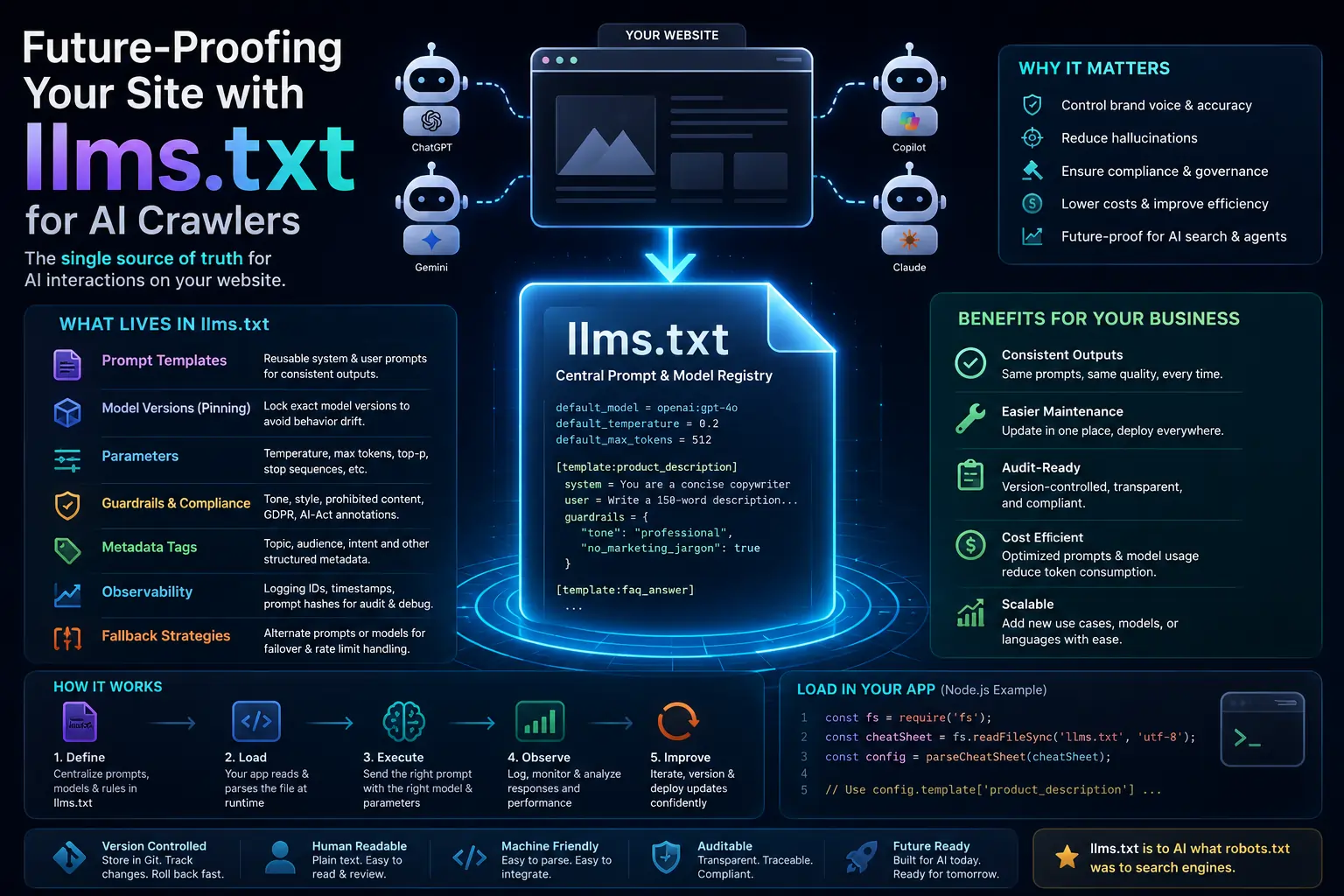
TL;DR – A single, version‑controlled llms.txt file turns a chaotic mess of hard‑coded prompts, hidden model versions, and ad‑hoc guardrails into a transparent, auditable, and cost‑effective “cheat sheet” that every modern website should ship with.
Why a Cheat Sheet Is No Longer Optional
The LLM landscape exploded in 2024: more than 1,200 publicly available models now range from 7 B‑parameter open‑source gems to 175 B‑parameter commercial APIs. That variety is a blessing and a curse. Prompt‑engineering success can swing 10‑30 % between models for the same task, and an un‑optimised prompt can inflate API usage by 15‑40 % per request—meaning bigger cloud bills for the same traffic.
At the same time, Google’s Search Generative Experience and Microsoft’s Copilot are surfacing LLM‑generated answers on billions of pages. If you can’t dictate how those answers are built, you lose control of brand voice, factuality, and compliance. In fact, 78 % of Fortune 500 firms now demand a documented model‑usage policy for any web service that calls an LLM (GDPR, CCPA, AI‑Act drafts). A plain‑text llms.txt file gives you a human‑readable contract with the model itself, satisfying auditors, product managers, and developers alike.
Core Concepts That Live Inside llms.txt
| Concept | What It Means | Why It Belongs in the File |
|---|---|---|
| Prompt Engineering | Exact wording, format, and context sent to the LLM. | Centralises the “gold‑standard” template so every request uses the same baseline. |
| Model‑Specific Parameters | Temperature, top‑p, max‑tokens, system messages, stop sequences, etc. | Prevents accidental “creative” outputs that break UI/UX. |
| Prompt Guardrails | Instructions that constrain tone, style, factuality, or prohibited content. | Acts like a terms‑of‑service for the model itself. |
| Version Pinning | Explicit model version (e.g., gpt‑4o‑2024‑05‑13). | Stops silent drift when providers roll out updates that could change behaviour. |
| Metadata Tags | Structured tags like #topic:product-description or #audience:tech-savvy. | Enables dynamic prompt selection without hard‑coding logic. |
| Observability Hooks | Logging IDs, timestamps, prompt hashes. | Makes auditing, debugging, and iteration trivial. |
| Fallback Strategies | Alternate prompts or models if the primary LLM fails or hits rate limits. | Guarantees graceful degradation; the cheat sheet can list a hierarchy of fallbacks. |
| Compliance Annotations | Flags for GDPR‑relevant data handling, copyright, AI‑Act risk levels. | Provides a quick reference for legal and security teams. |
These concepts are deliberately lightweight: a simple INI/TOML‑style file is enough for humans to read, and a few lines of code can parse it into a runtime object.
Real‑World Examples & Ready‑to‑Copy Code
Minimal llms.txt Skeleton
# llms.txt – Central Prompt & Model Registry
# -------------------------------------------------
# Format: <key> = <value>
# Comments start with #
# -------------------------------------------------

# ==== Global Settings ====
default_model = openai:gpt-4o
default_temperature = 0.2
default_max_tokens = 512

# ==== Prompt Templates ====
# Key: <template_name>
# Values: JSON with system, user, and optional guardrails

[template:product_description]
system = You are a concise copywriter for tech products.
user = Write a 150‑word description for the following product: {{product_name}}.
guardrails = {
  "tone": "professional",
  "no_marketing_jargon": true,
  "max_sentences": 5
}

[template:faq_answer]
system = You are an expert support agent. Answer only with factual information.
user = Question: {{question}}
guardrails = {"max_tokens": 200, "temperature": 0.0}
Why it works:
- Human‑readable – anyone can open the file and see exactly what the model will receive.
- Version‑controlled – store it in Git, tag releases, roll back a bad prompt in seconds.
- Parseable – a few regexes or a tiny INI parser turn it into a JavaScript/Python object.
Loading the Cheat Sheet in a Node/Express App
// utils/llmsLoader.js
import fs from 'fs';
import path from 'path';
import { OpenAI } from 'openai';

const cheatPath = path.resolve(process.cwd(), 'llms.txt');
const raw = fs.readFileSync(cheatPath, 'utf-8');

function parseCheatSheet(txt) {
  const sections = {};
  let current = null;
  txt.split('\n').forEach(line => {
    line = line.trim();
    if (!line || line.startsWith('#')) return;
    if (line.startsWith('[') && line.endsWith(']')) {
      current = line.slice(1, -1);
      sections[current] = {};
    } else if (current) {
      const [k, ...v] = line.split('=');
      sections[current][k.trim()] = v.join('=').trim();
    }
  });
  return sections;
}

export const cheatSheet = parseCheatSheet(raw);

export async function generateProductDesc(product) {
  const tmpl = cheatSheet['template:product_description'];
  const client = new OpenAI({ apiKey: process.env.OPENAI_API_KEY });
  const response = await client.chat.completions.create({
    model: cheatSheet.default_model,
    temperature: parseFloat(tmpl.temperature || cheatSheet.default_temperature),
    max_tokens: parseInt(tmpl.max_tokens || cheatSheet.default_max_tokens),
    messages: [
      { role: 'system', content: tmpl.system },
      { role: 'user',   content: tmpl.user.replace('{{product_name}}', product) }
    ]
  });
  return response.choices[0].message.content.trim();
}
Takeaway: Change a line in llms.txt and every endpoint that uses generateProductDesc instantly picks up the new prompt, temperature, or fallback model—no redeploy needed.
Real‑World Use Cases (Numbers That Matter)
| Site / Industry | Prompt Goal | Savings / Gains |
|---|---|---|
| Shopify plugin | Auto‑generate product titles & SEO meta‑descriptions | API calls ↓ 22 %, copy‑editing hours ↓ 8 h/week |
| Legal SaaS | Summarise contracts in plain English | Guardrails eliminated hallucinations, audit passed in 2 days vs. 3 weeks |
| Online Education | Create quiz questions from lecture transcripts | Version‑pinned model kept difficulty consistent across semesters |
| News aggregator | Generate headline blurbs for AI‑curated articles | Fallback chain kept 99.8 % uptime during OpenAI rate‑limit spikes |
| Healthcare portal | Draft patient‑friendly medication instructions | Metadata tags (#audience:patient) let a single UI component pick the right tone automatically |
These examples show that a well‑maintained llms.txt isn’t a “nice‑to‑have”—it’s a bottom‑line driver.
Implementing & Best‑Practice Checklist
- Store in Git (or a version‑controlled CMS). Tag releases (
v1.2‑faq‑prompt) so you can roll back instantly. - Pick a simple format – INI, TOML, or even plain‑text with sections. Keep it human‑editable.
- Separate globals from template overrides. Guarantees a sane fallback when a template omits a parameter.
- Add a
#last_updatedcomment with timestamp & author. Auditors love a clear change trail. - Automate validation in CI. Lint for missing keys, run a smoke test against the model, and fail the build if the response is an error.
- Expose a read‑only endpoint (
GET /.well-known/llms.txt). Mirrors the.well-knownpattern used forrobots.txtandsecurity.txt, making the cheat sheet discoverable for partners and auditors. - Link to observability dashboards (PromptLayer, Langfuse) via a comment:
# promptlayer_id = pl_5f3a2b…. This turns a static file into a living version‑control artifact.
Performance tip: Load the file once at startup and cache the parsed object in memory. In serverless environments, bundle the file with the deployment artifact so there’s zero runtime I/O.
Future‑Proofing & Regulatory Alignment
- Model‑as‑a‑Service consolidation means you’ll be swapping providers on the fly for cost or latency. With explicit version pinning in
llms.txt, the switch is intentional, not accidental. - AI‑First front‑ends (chat‑first search bars, conversational forms) push prompt logic into the UI layer. Decoupling that logic into a cheat sheet lets designers iterate without touching the backend.
- Regulatory momentum (EU AI Act, US AI Transparency Act) is pushing for model‑level documentation. A human‑readable
llms.txtcan serve as the compliance artifact auditors request. - Prompt‑sharing communities (PromptBase, PromptHub) are normalising reusable prompt libraries. By adopting a site‑wide file, you make internal sharing as easy as pulling a single file from a repo.
- Edge‑LLM deployments (Apple CoreML, NVIDIA Jetson) have tighter token limits. A cheat sheet can automatically switch to a “lightweight” prompt for those environments, keeping latency low without code branching.
In short, the llms.txt cheat sheet is the single source of truth that bridges product, engineering, legal, and finance. It makes LLM integration predictable, auditable, and cheap—exactly what every modern site needs.
Tags: #AI #LLM #WebDev
Slug: the-ai-cheat-sheet-llms-txt