Dernière mise à jour : 30 juin 2026
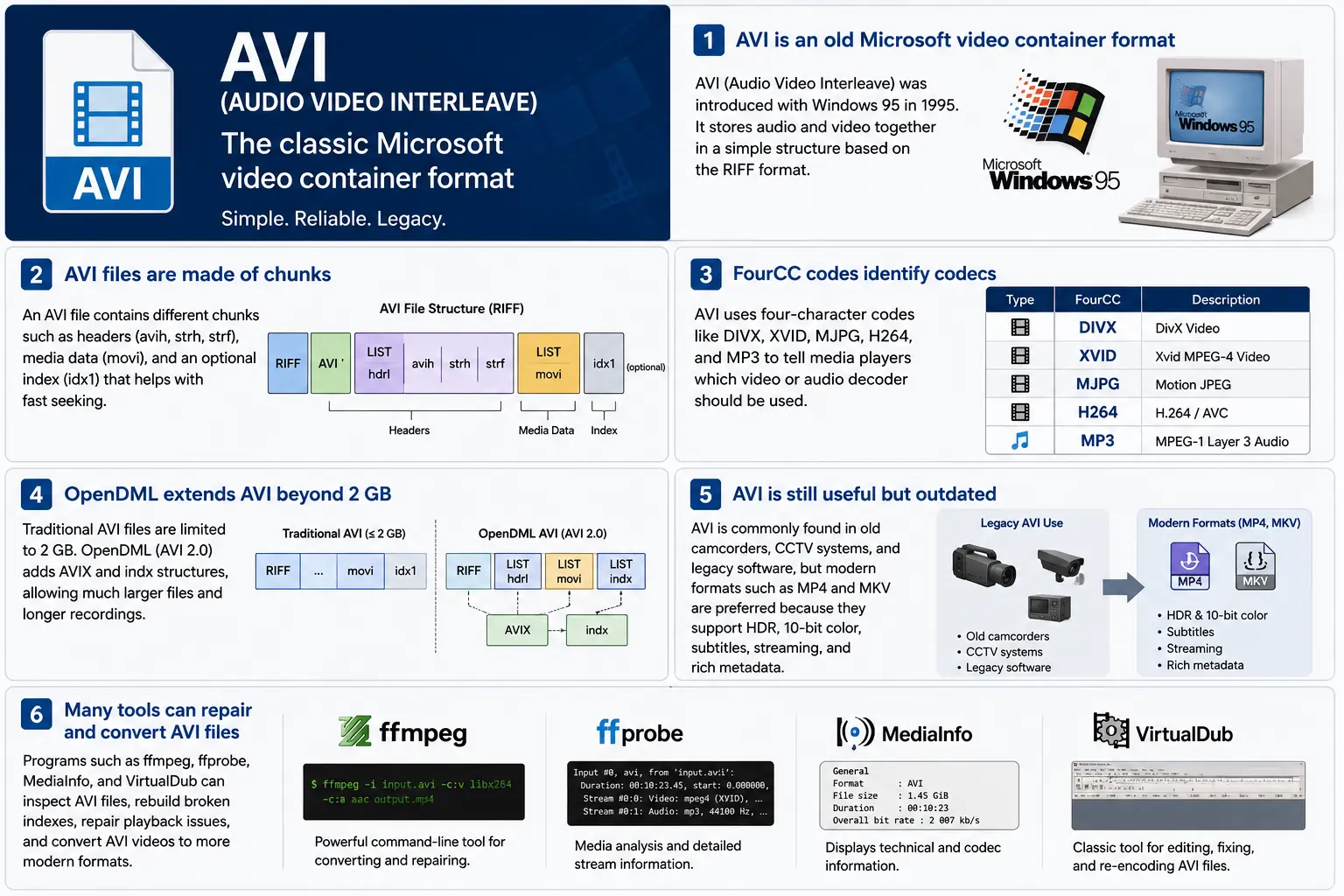
TL;DR – AVI (Audio Video Interleave) est le premier conteneur « vidéo numérique » de Microsoft, né avec Windows 95. C’est un fichier simple basé sur RIFF‑based qui entrelace des blocs vidéo et audio compressés afin qu’un lecteur puisse les lire en synchronisation. Le format est encore reconnu par Windows Media Player et de nombreux outils open‑source, mais il manque de fonctionnalités modernes comme le HDR, la couleur 10 bits et des métadonnées de streaming robustes. Si vous devez un jour explorer des séquences héritées, comprendre la disposition des blocs, les codes FourCC et les extensions OpenDML qui dépassent la limite de 2 GB – c’est l’essentiel d’AVI.
1. Qu’est-ce exactement qu’un fichier AVI ?
- Nom complet : Audio Video Interleave
- Première apparition : Windows 95 (1995) – la réponse de Microsoft à la « vidéo numérique » sur le PC grand public.
- Spécification : Basé sur la spécification RIFF (Resource Interchange File Format) de 1991. RIFF est un conteneur générique « basé sur des blocs » ; AVI définit simplement un ensemble de blocs contenant l’audio, la vidéo et les données d’indexation.
- Extension de fichier / MIME :
.avi–video/x-msvideo. - Objectif principal : Conserver les flux audio et vidéo étroitement entrelacés sur le disque afin qu’une boucle de lecture naïve puisse lire une image vidéo, puis l’échantillon audio correspondant, sans recherches coûteuses.
- Statut hérité : Toujours lisible dans Windows Media Player, DirectShow, VLC et d’innombrables autres lecteurs, mais ce n’est pas un conteneur « moderne ». Aucun support natif HDR, 10 bits, débit variable, ou métadonnées riches.
2. À l’intérieur de la boîte – Comment fonctionne l’AVI
La structure des blocs RIFF
Un fichier AVI n’est qu’une série de chunks :
RIFF <size> "AVI "          ; file header
  LIST "hdrl"               ; header list
    avih ...                ; main AVI header (global info)
    LIST "strl"             ; stream list (one per stream)
      strh ...              ; stream header (type, codec, timing)
      strf ...              ; stream format (codec‑specific data)
  LIST "movi"               ; interleaved media data
    00dc <size> <video frame>
    01wb <size> <audio block>
    …
  idx1 ...                  ; optional index for fast seeking
- ID de chunk (4 octets) – par ex.,
avih,strh,movi. - Taille du chunk (4 octets) – longueur des données qui suivent (excluant les champs ID et taille).
- Données – la charge utile réelle (en-têtes, images brutes, etc.).
Comme RIFF est extensible, vous pouvez ajouter de nouveaux types de chunks sans casser les analyseurs plus anciens – une conception qui a maintenu l’AVI en vie pendant des décennies.
FourCC – Le chuchoteur de codecs
Les codes à quatre caractères (FourCC) sont le lien qui indique à un lecteur quel décodeur charger. Certains courants que vous verrez dans les fichiers AVI :
| FourCC | Codec (ffmpeg) | Utilisation typique |
|---|---|---|
DIVX | mpeg4 (DivX) | MPEG‑4 Part 2 précoce |
XVID | mpeg4 (Xvid) | Open source MPEG‑4 |
MJPG | mjpeg | Motion‑JPEG (caméscopes numériques) |
H264 | h264 | H.264/AVC (rare mais possible) |
MP3 | mp3 | Flux audio MP3 |
PCM | pcm_s16le | Audio PCM non compressé |
Le FourCC se trouve dans le chunk strh (identifiant du codec) et parfois dans le bloc strf (format de pixel, format d’échantillon audio).
Synchronisation et minutage
AVI utilise un système time‑base simple :
- En-tête global (
avih) :dwRate/dwScale→ images par seconde. - En-tête par flux (
strh) : son propredwRate/dwScalepour les flux audio ou vidéo secondaires.
Le lecteur multiplie le numéro de trame par scale/rate pour calculer un horodatage de présentation (PTS). Si les échelles ne correspondent pas, vous verrez le bug classique « l’audio dérive hors synchronisation » qui hante les outils hérités.
Le bloc movi – Où le média vit
Toutes les trames compressées se trouvent dans la LIST movi. Chaque trame est précédée d’un ID de bloc qui indique si c’est de la vidéo (00dc) ou de l’audio (01wb). L’ID encode également le numéro du flux, ainsi un fichier avec deux pistes audio aurait 01wb et 02wb.
Comme les données sont déjà entrelacées, un lecteur peut lire une trame vidéo, puis le bloc audio suivant, et les présenter ensemble sans devoir chercher loin en avant. Ce schéma d’écriture déterministe a rendu l’AVI populaire pour les premiers appareils de capture qui nécessitaient des écritures disque à faible latence.
Indexation (idx1) – Avance rapide, rembobinage rapide
Le bloc optionnel idx1 est une table d’offsets et de tailles pour chaque trame dans movi. Lorsqu’il est présent, la recherche se fait par une simple recherche dans la table. S’il manque, les lecteurs doivent parcourir le fichier en temps réel – ce qui peut entraîner une pause de « mise en mémoire tampon » perceptible sur les gros fichiers.
OpenDML (AVI 2.0) – Briser la barrière des 2 Go
La spécification originale RIFF limite le champ de taille d’un chunk à un entier non signé de 32 bits → taille maximale de fichier de 2 Go. OpenDML (parfois appelé AVI 2.0) a introduit :
AVIXLISTs – sections RIFF « étendues » supplémentaires qui peuvent suivre les premiers 2 Go.indxchunk – un index capable de 64 bits.- Champs d’en-tête supplémentaires pour des durées plus longues.
La plupart des outils modernes (ffmpeg, VLC) basculent automatiquement vers OpenDML lorsque la sortie dépasse 2 Go, mais de nombreux lecteurs plus anciens plantent encore sur les chunks AVIX, si bien que vous verrez parfois des astuces de compatibilité qui divisent une capture longue en plusieurs fichiers AVI de 2 Go.
3. Où vit AVI en 2024 ?
| Tendance | Ce que cela signifie pour l’AVI |
|---|---|
| Passage à MP4/MKV/ProRes | Les nouvelles productions privilégient les conteneurs qui prennent en charge nativement le HDR, le 10 bits, le VBR et les métadonnées riches. L’AVI est rarement choisi pour du contenu récent. |
| Matériel hérité | Les anciennes caméras CCTV, les caméscopes du début des années 2000 et certains moteurs de jeu produisent encore des fichiers AVI. Vous devrez toujours ingérer ces fichiers dans un flux de travail moderne. |
| Support open‑source | ffmpeg, libav, VLC, HandBrake et GStreamer maintiennent les analyseurs AVI en vie, mais ils ré‑encodent souvent en MP4/MKV pour la distribution. |
| Résurgence d’OpenDML | Les enregistrements de surveillance 4K qui durent plusieurs jours dépassent rapidement 2 Go. OpenDML (AVIX) reste la solution de référence, bien que de nombreux outils le gèrent mal. |
| Renforcement de la sécurité | Les analyseurs AVI historiques acceptaient des tailles de blocs malformées, entraînant des CVE (par ex., CVE‑2020‑13144). Windows privilégie désormais Media Foundation, qui rejette de nombreuses particularités héritées, incitant les développeurs à adopter des pipelines plus sûrs. |
| Pipelines indépendants du conteneur | Les cadres multimédias modernes traitent l’AVI comme un simple élément source. Une fois les données démultiplexées en tampons bruts, le conteneur devient sans importance pour le traitement en aval. |
En bref, l’AVI est vivant mais vieillissant – il subsiste là où du matériel ancien ou un stockage intercalé simple est requis, mais ce n’est pas le premier choix pour les nouveaux projets.
4. Pratique : Travailler avec AVI aujourd’hui
A. Aperçu d’un en-tête minimal (hex)
52 49 46 46  00 00 00 00  41 56 49 20   ; "RIFF" + size + "AVI "
4C 49 53 54  20 00 00 00  68 64 72 6C   ; LIST "hdrl"
...
Le magic RIFF (52 49 46 46) indique à tout analyseur « c’est un fichier RIFF ». Les quatre octets suivants représentent la taille totale du fichier (moins 8). L’identifiant \"AVI \" verrouille le fichier dans la famille AVI.
B. Conversion du MP4 moderne → AVI hérité
ffmpeg -i input.mp4 \
       -c:v mpeg4 -q

```bash
ffmpeg -i input.mp4 \ -c:v mpeg4 -qscale:v 5 \   # MPEG‑4 Partie 2 (compatible DivX/Xvid) -c:a mp3 -b:a 192k \      # audio MP3 (la plupart des lecteurs AVI comprennent cela) -f avi output.avi
The command above forces MPEG‑4 Part 2 video (the codec most legacy AVI players recognize) and MP3 audio, then writes an AVI container. If you need OpenDML support for files larger than 2 GB, add the -movflags +faststart‑style flag that tells FFmpeg to use the extended AVIX chunks:
ffmpeg -i input.mp4 \ -c:v mpeg4 -qscale:v 5 \ -c:a mp3 -b:a 192k \ -f avi -flags +global_header -movflags +faststart output.avi
Tip: Some older Windows Media Player versions still choke on the
AVIXextension. If you must stay under 2 GB, split the source into multiple AVIs using the-segment_timeand-f segmentmuxer.
5. Common Pitfalls & How to Fix Them
| Symptom | Likely Cause | Fix |
|---|---|---|
| Audio drifts out of sync after a few minutes | Mismatched dwRate/dwScale between avih and strh (or a VBR audio stream) | Re‑encode audio to a constant‑bitrate format (e.g., MP3 128 kbps) or use -vsync 2 in FFmpeg to force frame‑accurate timestamps. |
| “Cannot play this video” on Windows Media Player | Missing or corrupt idx1 index, or OpenDML (AVIX) chunks not recognized | Run ffmpeg -i broken.avi -c copy -map 0 -f avi repaired.avi to rebuild the index; or use aviindex (part of mplayer) to generate a fresh idx1. |
| File size capped at 2 GB despite long footage | Encoder used classic AVI (no OpenDML) | Add -use\_open\_dml 1 (FFmpeg) or -format avi2 (VirtualDub) to enable OpenDML extensions. |
| Green or corrupted frames | Incompatible FourCC (e.g., H.264 in an AVI without proper headers) | Stick to codecs known to work in AVI (mpeg4, msmpeg4v2, MJPG, XVID). If you must store H.264, use the h264 FourCC and ensure the strf chunk contains the SPS/PPS extradata. |
| Playback stalls on network streams | AVI’s lack of robust streaming metadata (no moov atom) | Wrap the AVI in a streaming protocol (e.g., RTSP) that handles byte‑range requests, or convert to MP4/MKV for smoother streaming. |
6. Debugging Tools You Should Keep Handy
| Tool | Platform | What It Does |
|---|---|---|
| ffprobe / ffmpeg | Cross‑platform | Dumps every chunk, FourCC, timestamps, and can rebuild indexes (-c copy). |
| MediaInfo | Windows/macOS/Linux | Human‑readable summary of streams, codecs, and container flags. |
| VirtualDub | Windows | Classic AVI editor; can rebuild headers, add OpenDML, and preview frame‑by‑frame. |
| GSpot (legacy) | Windows | Identifies obscure FourCCs and suggests appropriate codecs. |
| aviindex (part of MPlayer) | Linux/macOS | Generates a fresh idx1 chunk for broken files. |
| Hex editors (HxD, Bless) | Any | Directly inspect RIFF headers when you suspect malformed chunk sizes. |
A typical workflow when an AVI refuses to play:
- Inspect with
ffprobe -show_format -show_streams file.avi. - Check the index:
ffmpeg -i file.avi -c copy -f avi -y temp.avi(FFmpeg will rebuild it automatically). - Validate FourCCs:
mediainfo file.avi. If you see an unknown codec, consider re‑encoding that stream. - Repair with VirtualDub → “File → Re‑open as AVI (OpenDML)”. Save a fresh copy.
7. When (and When Not) to Use AVI
Good Use‑Cases
| Scenario | Why AVI Works |
|---|---|
| Legacy camcorder ingest | The device outputs native AVI; transcoding adds unnecessary quality loss. |
| Simple interleaved capture | Low‑latency write to disk without needing complex container features. |
| Compatibility with old Windows‑only software | Some industrial automation tools only understand AVI. |
| Archiving raw, uncompressed video | AVI can hold PCM audio and uncompressed RGB24 video without extra overhead. |
Bad Use‑Cases
| Scenario | Why AVI Fails |
|---|---|
| HDR or 10‑bit color | No standard way to store those pixel formats; you’d need a custom FourCC that most players ignore. |
| Variable‑bit‑rate streaming | Lack of a proper moov‑like atom makes adaptive bitrate impossible. |
| Rich metadata (chapters, subtitles, tags) | AVI’s chunk model doesn’t define standard containers for subtitles or extensive tags. |
| Cross‑platform mobile distribution | Modern mobile players expect MP4/MKV; AVI may not be hardware‑accelerated. |
If you’re starting a new project, treat AVI as a fallback for legacy pipelines, not a primary delivery format.
8. Future Outlook – Will AVI Ever Make a Comeback?
The short answer: unlikely. The industry has coalesced around ISO‑BMFF‑based containers (MP4, MOV, HEVC‑MP4, etc.) because they support:
- Extensible metadata (ISO‑UserData, UUID boxes).
- Fragmented streaming (moof/mdat) for adaptive bitrate.
- Native HDR/10‑bit/12‑bit video definitions.
AVI’s design, while elegant for its time, is fundamentally limited by its 32‑bit size fields and its reliance on external FourCC‑driven codecs. Even though OpenDML extended the size limit, it never gained widespread adoption beyond niche surveillance and archival tools.
That said, software preservation will keep AVI parsers alive for decades. Projects like FFmpeg, GStreamer, and VLC will continue to support the format, ensuring that the massive archive of 1990s‑2000s footage remains accessible. In a world where “digital archaeology” is becoming a real discipline, knowing how to read and repair AVI files is still a valuable skill.
9. Quick Reference Cheat‑Sheet
| Item | Command / Setting | Explanation |
|---|---|---|
| Create classic AVI | ffmpeg -i src -c:v mpeg4 -qscale:v 5 -c:a mp3 -b:a 192k -f avi out.avi | Simple, widely compatible. |
| Enable OpenDML | ffmpeg -i src -c:v mpeg4 -qscale:v 5 -c:a mp3 -b:a 192k -f avi -use_open_dml 1 out.avi | Allows >2 GB files. |
| Re‑index broken AVI | ffmpeg -i broken.avi -c copy -f avi repaired.avi | Rewrites idx1. |
| Split >2 GB into chunks | ffmpeg -i long.avi -c copy -map 0 -segment_time 1800 -f segment part_%03d.avi | 30‑minute segments stay under the limit. |
| Inspect header | ffprobe -show_format -show_streams file.avi | Dumps all RIFF chunks and stream info. |
| Add a subtitle track (non‑standard) | ffmpeg -i video.avi -i subs.srt -c copy -metadata:s:s:0 language=eng out.avi | Works only with players that read the txt stream; not universally supported. |
Keep this table bookmarked; it covers 80 % of everyday AVI tasks.
10. Best Practices for Archiving AVI Files
Even though AVI is a legacy container, many institutions still have petabytes of it sitting on tape or in cold‑storage. Treating those assets with a disciplined workflow will save you headaches down the line.
| Practice | Why It Matters | How to Implement |
|---|---|---|
| Validate on ingest | Corrupt headers or missing indexes can go unnoticed until playback. | Run ffprobe -v error -show_format -show_streams file.avi immediately after copying. Log any non‑zero exit codes. |
| Generate a checksum | Guarantees bit‑exact preservation across media migrations. | Use SHA‑256 (sha256sum file.avi > file.avi.sha256). Store the checksum alongside the file in your catalog. |
| Create a modern proxy | Most downstream workflows (editing, streaming) expect MP4/MKV. | Encode a low‑bitrate MP4 proxy (ffmpeg -i file.avi -c:v libx264 -crf 23 -c:a aac -b:a 128k proxy.mp4). Keep the proxy in the same directory with a clear naming convention (*_proxy.mp4). |
| Document FourCCs and codec versions | Some FourCCs map to multiple codec implementations (e.g., DIVX could be DivX 5, 6, or 7). | Extract the codec private data (ffprobe -show_private_data) and store it in a side‑car JSON file (file.avi.codec.json). |
| Migrate to OpenDML for large files | Files >2 GB will become unreadable on older players. | When transcoding, always pass -use_open_dml 1. If you’re only copying, use aviindex to rebuild an OpenDML‑compatible index. |
| Store metadata in a side‑car | AVI has no standard for extensive tags (e.g., creator, location). | Use XMP side‑car files (file.avi.xmp) or embed a small INFO LIST chunk manually if you need minimal in‑container metadata. |
| Regularly test playback | Bit‑rot can affect codecs as well as containers. | Schedule a quarterly job that runs a headless player (e.g., ffplay -autoexit -frames 10 file.avi) and reports any failures. |
By applying these steps at the moment of acquisition, you avoid costly “repair‑the‑archive” projects later.
11. Frequently Asked Questions (FAQ)
Q1: Can I store H.265/HEVC video inside an AVI file?
Short answer: Technically yes, if you supply the correct FourCC (HEVC or HVC1) and include the SPS/PPS NAL units in the strf chunk. In practice, very few players support it, and many will treat the stream as unknown. For reliable playback, stick to MPEG‑4 Part 2 or Motion‑JPEG.
Q2: Why does Windows Media Player sometimes show a black screen but still plays audio?
Explanation: The player has successfully opened the audio stream but failed to locate a usable video decoder for the FourCC. This can happen when the FourCC is custom or when the required codec isn’t installed. Installing a codec pack (e.g., K-Lite) or re‑encoding the video to a known FourCC resolves the issue.
Q3: Is there any way to embed subtitles directly into an AVI file?
Answer: AVI does not define a standard subtitle stream. Some tools cheat by adding a “txt” stream (FourCC txt ) that contains plain‑text subtitles, but only a handful of players (e.g., VirtualDub with a plugin) will render them. The recommended approach is to keep subtitles in a separate .srt or .ass file, or to re‑mux into a container that officially supports subtitles (MP4, MKV).
Q4: My video shows a “frame rate mismatch” warning in MediaInfo. What should I do?
Solution: Verify that the dwRate/dwScale values in both the global avih and per‑stream strh headers are consistent. If they differ, re‑mux with FFmpeg using -video_track_timescale to force a uniform time base:
ffmpeg -i broken.avi -c copy -video_track_timescale 1000 fixed.avi
Q5: Does AVI support multiple audio languages?
Yes, but with caveats. You can add several audio streams, each with its own strh/strf pair and a distinct stream number (01wb, 02wb, …). However, there is no standardized way to label the language; you must rely on external metadata (e.g., an accompanying .xml file) or embed a custom INFO chunk.
Q6: How can I extract raw frames from an AVI without re‑encoding?
Command:
ffmpeg -i source.avi -c:v copy -f image2 frame_%05d.bmp
Replace bmp with png or tiff if you prefer lossless image formats. The -c:v copy flag tells FFmpeg to dump the compressed frames as‑is; if the codec is MJPEG, the output will already be JPEG images.
Q7: Are there any security concerns when opening AVI files from untrusted sources?
Yes. Malformed chunk sizes can trigger buffer overflows in legacy parsers (e.g., older DirectShow filters). Always open unknown AVIs in a sandboxed environment or use a modern library like FFmpeg that performs strict bounds checking. Updating Windows Media Foundation and disabling legacy DirectShow filters further mitigates risk.
12. TL;DR Récapitulatif (pour les impatients)
- AVI = RIFF‑based, interleaved container introduced with Windows 95.
- FourCC tells the player which codec to use; common ones are
DIVX,XVID,MJPG,H264,MP3. - Timing is driven by
dwRate/dwScalein the global and stream headers. moviholds the actual media;idx1(optional) speeds up seeking.- OpenDML (
AVIX) lifts the 2 GB limit but isn’t universally supported. - Use cases today: legacy camcorder ingest, simple interleaved capture, archival of raw PCM video.
- Avoid for new projects: no HDR, 10‑bit, VBR, subtitles, or rich metadata.
- Toolbox:
ffprobe,ffmpeg, MediaInfo, VirtualDub, aviindex, hex editors. - Best practice: validate, checksum, generate modern proxies, and migrate large files to OpenDML.
13. Conclusions
AVI’s simplicity is both its strength and its Achilles’ heel. It gave early PC users a straightforward way to store synchronized audio‑video pairs, and that design philosophy—interleaved chunks, a clear header layout, and extensible FourCC identifiers—still influences modern containers. While the industry has moved on to more feature‑rich formats, the sheer volume of legacy footage means AVI will remain a “must‑know” for anyone working in video preservation, forensic analysis, or any field that must bridge the past with today’s workflows.
If you ever find yourself staring at a dusty .avi on a hard drive from the late‑90s, you now have the conceptual map, the command‑line recipes, and the troubleshooting checklist to bring that footage back to life—whether you choose to keep it in its original container or transcode it into a modern, HDR‑ready format.
Happy demuxing!