Last Updated: 17 Aug, 2026
HEIC vs JPEG Explained: The Real Reason iPhones Don’t Shoot in JPEG by Default
If you have ever transferred photos from an iPhone to a Windows PC or tried uploading a recent snapshot to an older web platform, you have likely encountered a strange file extension: .heic.
For over two decades, JPEG (Joint Photographic Experts Group) reigned supreme as the universal standard for digital images. It powered everything from early digital cameras to the modern mobile web. Yet, starting with iOS 11 and macOS High Sierra back in 2017, Apple made a bold, industry-shifting move: it demoted JPEG and crowned HEIC as the default capture format across all iOS devices.
Why did Apple abandon the most universally compatible image format on the planet? Is HEIC genuinely superior, or is it just another walled-garden headache?
Let’s break down the technical differences, practical benefits, compatibility hurdles, and how you can manage both formats seamlessly.
What Is JPEG? The Universal Veteran
Introduced in 1992, JPEG (often saved as .jpg or .jpeg) was engineered to solve a critical problem: digital image files were far too large for early computer storage and fledgling internet bandwidth.
JPEG uses lossy compression, discarding subtle visual data that the human eye cannot easily perceive. It struck an ideal balance between file size and visual fidelity for its era.
Strengths of JPEG
- Universal Compatibility: Every operating system, browser, smart TV, photo printer, and social media platform can decode JPEG natively.
- Low Processing Overhead: Encoding and decoding JPEG requires minimal computational power.
- Predictable Performance: Hardware acceleration for JPEG is built into virtually every silicon chip made in the last 25 years.
Limitations of JPEG
- Dated Compression Algorithms: Compression artifacts (blocky noise and color banding) appear quickly when files are compressed aggressively.
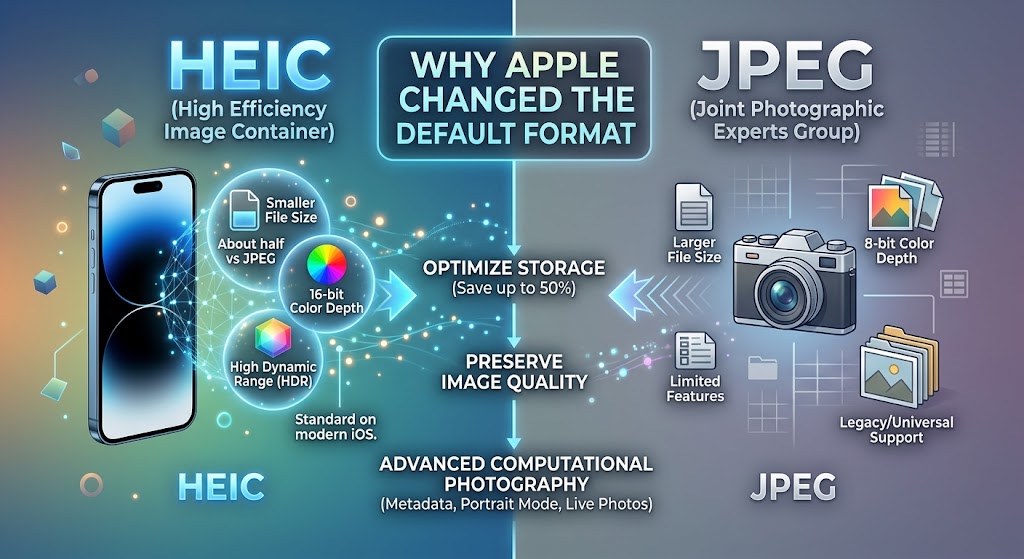
- Limited Color Depth: JPEG supports only 8-bit color, capping the palette at approximately 16.7 million colors.
- No Native Support for Advanced Data: JPEG cannot store image bursts, depth maps, transparency, or auxiliary audio in a single file container.
What Is HEIC? The Modern Heavyweight
HEIC stands for High Efficiency Image Container. It is Apple’s implementation of the broader HEIF (High Efficiency Image File Format) standard developed by the Moving Picture Experts Group (MPEG)—the same consortium behind modern video standards like MP4 and AVC.
Instead of relying on 1990s compression logic, HEIC utilizes HEVC (High Efficiency Video Coding / H.265) compression algorithms tailored specifically for still images and image sequences.
Key Technical Advantages of HEIC
- Next-Gen Compression (HEVC/H.265): HEIC cuts file sizes by roughly 40% to 50% compared to an equivalent quality JPEG.
- 16-Bit Color Capability: While JPEG is locked to 8-bit, HEIC supports up to 16-bit color, eliminating color banding in skies and gradients.
- Advanced Container Architecture: A single
.heicfile can hold:- Burst photo sequences
- Dual-lens stereoscopic depth maps (essential for Portrait Mode adjustments)
- Live Photos (storing both the still image and short video clip in one package)
- Non-destructive editing metadata (rotations, crops, filters)
- Alpha channel transparency (similar to PNG)
- Wider Dynamic Range (HDR): HEIC natively accommodates Apple’s Smart HDR and Deep Fusion pipelines, preserving highlight and shadow details far better than standard JPEG.
Direct Comparison: HEIC vs JPEG
| Feature / Metric | JPEG (.jpg / .jpeg) | HEIC (.heic) | Winner |
|---|---|---|---|
| File Size (Same Quality) | Baseline (~3–5 MB per 12MP shot) | ~40–50% smaller (~1.5–2.5 MB) | HEIC |
| Color Depth | 8-bit (16.7 Million Colors) | Up to 16-bit (Billions of Colors) | HEIC |
| Dynamic Range / Highlights | Standard Dynamic Range (SDR) | High Dynamic Range (HDR) Native | HEIC |
| Container Features | Single static image | Multi-image, Depth Maps, Live Photos, Audio | HEIC |
| Universal Compatibility | 100% across all devices and web | Requires modern OS / decoders | JPEG |
| Transparency Support | No (requires PNG) | Yes (Alpha channel supported) | HEIC |
| Non-Destructive Edits | No (requires re-encoding) | Yes (stores transform history) | HEIC |
Why Apple Changed the Default: The 4 Strategic Reasons
1. Storage Optimization on iPhones and iCloud
Smartphone camera sensors evolve constantly—from 12 megapixels to 48 megapixels, with computational photography capturing multiple frames for every shutter press.
If iPhones had stayed on standard JPEG, users’ local device storage and 5GB free iCloud quotas would have filled up twice as fast. By halving image footprint with HEIC, Apple effectively doubled the photo storage capacity of every iPhone overnight without costing users visual quality.
2. Powering Computational Photography and Depth Maps
Modern smartphone photography is not just about a single exposure. Features like Portrait Mode require depth mapping—storing precise distance calculations between foreground subjects and the background.
JPEG cannot store depth layers natively. HEIC acts as a flexible container, bundling the primary image, depth map, and alpha channels into one neat file. This allows users to alter depth-of-field blur (bokeh) and lighting effects long after the photo is captured.
3. Native Support for Live Photos and Bursts
Before HEIC, an Apple Live Photo required saving a separate .jpg and a matching .mov video file. HEIC streamlines this by holding image sequences and accompanying audio within a single container, drastically reducing file system clutter and transfer overhead.
4. True HDR and 10-Bit / 16-Bit Color Fidelity
Displays on modern iPhones, iPads, and MacBooks use OLED and mini-LED screens capable of wide color gamuts (P3) and extreme peak brightness. JPEG’s 8-bit color palette simply cannot represent the high-contrast highlights and nuanced shadow gradients produced by Apple’s HDR camera sensors. HEIC provides the bit depth required to make HDR photos pop.
The Catch: Compatibility and Licensing
If HEIC is so clearly superior, why hasn’t the entire internet switched over completely?
- Licensing and Royalties: HEVC (H.265), the compression engine underlying HEIC, is tangled in complex licensing pools (MPEG LA, HEVC Advance, Velos Media). Web browsers and open-source software developers have hesitated to pay licensing royalties, favoring open, royalty-free alternatives like AVIF and WebP.
- Legacy Platform Support: While Windows 10/11 and modern Android versions now support HEIC (sometimes requiring a free or $0.99 codec extension from the Microsoft Store), legacy software, specialized content management systems (CMS), and online forums still reject
.heicuploads.
How to Switch Back to JPEG on Your iPhone
If you frequently transfer photos to older computers or web services that do not recognize HEIC, Apple lets you switch back to JPEG with a single setting:
- Open Settings on your iPhone.
- Scroll down and tap Camera.
- Tap Formats.
- Select Most Compatible (saves as JPEG) instead of High Efficiency (saves as HEIC).
Pro Tip for PC Transfers: You can keep taking photos in HEIC to save phone storage, but have your iPhone automatically convert them to JPEG when transferring via USB cable. Go to Settings > Photos > Transfer to Mac or PC and select Automatic.
Final Verdict: Is HEIC the Future?
Apple’s transition to HEIC was a forward-thinking engineering choice designed to support advanced computational photography, dynamic HDR imagery, and efficient storage management. While compatibility hiccups still surface occasionally in non-Apple environments, the compression efficiency and feature richness of HEIC make it a vastly superior format for modern smartphone photography.
Leading Open Source APIs for Image Procssing
Frequently Asked Questions (FAQ)
Q1: Does converting HEIC to JPEG reduce image quality?
Converting HEIC to JPEG involves re-compressing 10/16-bit color data down to 8-bit, which can cause minor dynamic range loss, but visual differences are virtually imperceptible to the naked eye.
Q2: Can Windows 11 open HEIC files without third-party software?
Yes, Windows 11 supports HEIC natively if you have the free HEIF Image Extensions package installed from the Microsoft Store.
Q3: Is HEIC better than PNG for transparent graphics?
Yes, HEIC supports transparency while offering dramatically higher compression rates than PNG, resulting in much smaller file sizes.
Q4: Why don’t web browsers like Chrome natively display HEIC files?
Web browsers avoid HEIC due to complex H.265 patent licensing fees, preferring royalty-free next-gen formats like WebP and AVIF instead.
Q5: Will Google Photos and social media apps accept HEIC uploads?
Yes, major platforms like Google Photos, Instagram, and Facebook automatically decode and convert HEIC files during upload without requiring manual user conversion.