Last Updated: 23 Jun, 2026
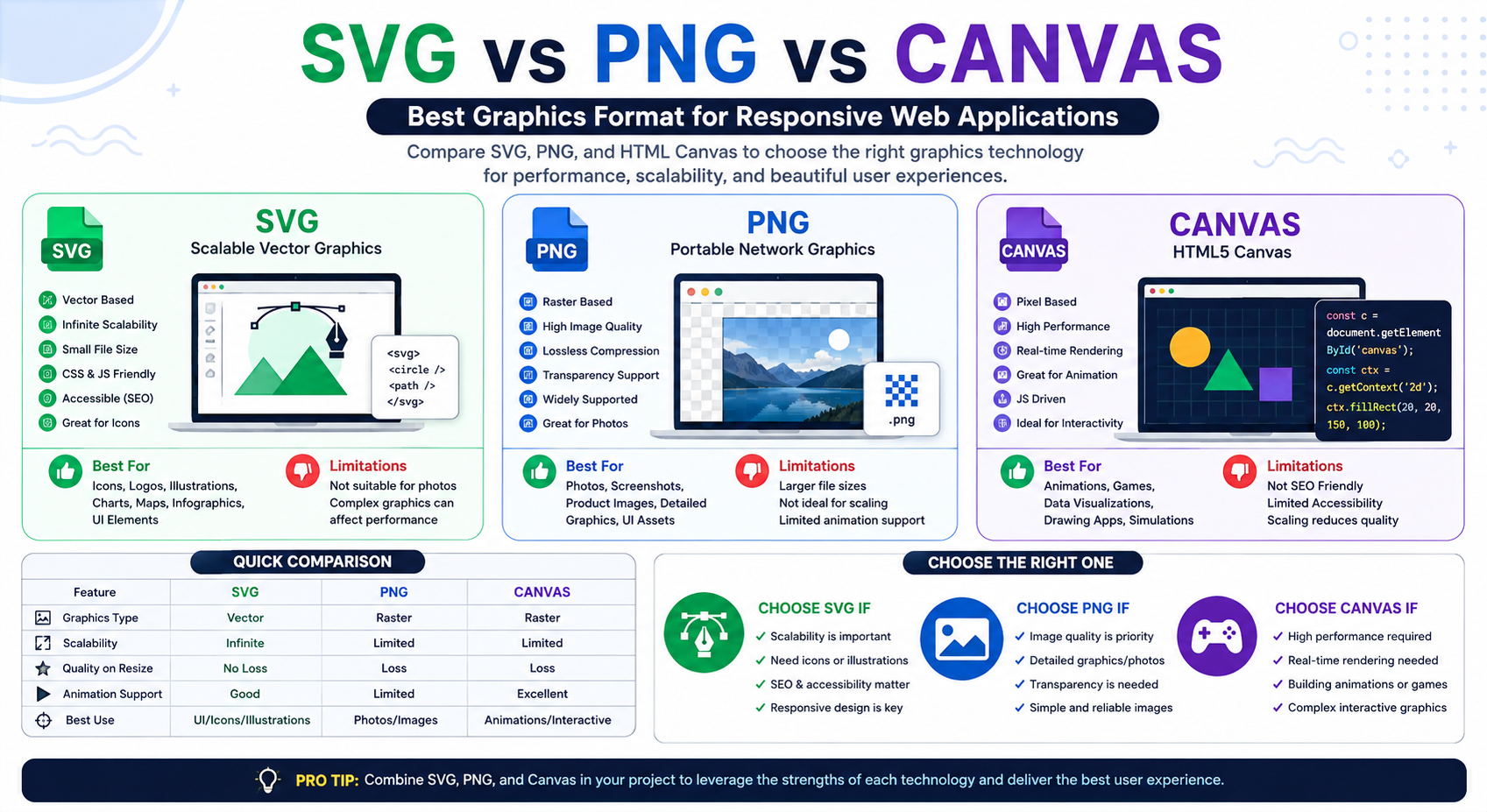
Modern web applications rely heavily on graphics for icons, logos, images, charts, animations, and interactive visual elements. Choosing the right graphics technology is important because it affects scalability, performance, responsiveness, accessibility, and user experience.
Three of the most commonly used options are SVG (Scalable Vector Graphics), PNG (Portable Network Graphics), and HTML Canvas. Although all three are capable of displaying visual content, they differ significantly in how they render graphics and where they perform best.
In this guide, we’ll compare SVG, PNG, and Canvas in detail, highlighting their advantages, limitations, and ideal use cases.
What is SVG?
SVG (Scalable Vector Graphics) is an XML-based vector graphics format developed by the W3C. Unlike pixel-based images, SVG uses mathematical paths and shapes, allowing graphics to scale infinitely without losing quality.
SVG is widely used for:
- Logos
- Icons
- Illustrations
- Maps
- Charts
- Infographics
Because SVG is text-based, it can easily be manipulated with CSS and JavaScript.
Main Characteristics of SVG
- Vector-based format
- XML structure
- Infinite scalability
- Small file sizes for simple graphics
- CSS and JavaScript support
- SEO and accessibility friendly
What is PNG?
PNG (Portable Network Graphics) is a raster image format that stores graphics as pixels. It is widely used because of its lossless compression and transparency support.
PNG is commonly used for:
- Screenshots
- Product images
- Transparent backgrounds
- Detailed illustrations
- UI elements
Unlike SVG, PNG images lose quality when enlarged because they are resolution dependent.
Main Characteristics of PNG
- Raster image format
- Lossless compression
- Transparency support
- Excellent browser compatibility
- Suitable for detailed images
- Resolution dependent
What is Canvas?
Canvas is an HTML5 element that allows graphics to be generated dynamically using JavaScript.
Unlike SVG, Canvas draws pixels directly onto a bitmap surface, making it highly efficient for rendering animations and interactive graphics.
Canvas is widely used for:
- Browser games
- Drawing applications
- Data visualizations
- Image editors
- Simulations
- Interactive effects
Main Characteristics of Canvas
- HTML5-based graphics API
- Pixel-oriented rendering
- High performance
- Excellent animation support
- JavaScript-driven
- Suitable for dynamic graphics
SVG vs PNG vs Canvas: Quick Comparison
| Feature | SVG | PNG | Canvas |
|---|---|---|---|
| Graphics Type | Vector | Raster | Raster |
| Scalability | Infinite | Limited | Limited |
| Quality Loss on Resize | No | Yes | Yes |
| Transparency Support | Yes | Yes | Yes |
| CSS Styling | Native | No | No |
| JavaScript Interaction | Excellent | Limited | Excellent |
| Animation Support | Good | Limited | Excellent |
| SEO Friendly | Yes | Moderate | No |
| Accessibility | Excellent | Moderate | Limited |
| Best for Photos | No | Yes | Moderate |
| Real-Time Rendering | Moderate | No | Excellent |
| Performance for Dynamic Graphics | Moderate | Good | Excellent |
Rendering Approach Comparison
SVG Rendering
SVG graphics are rendered through the browser’s DOM. Each shape, line, and path becomes an individual element that can be styled and manipulated.
Advantages
- Resolution independent
- Easy to animate
- Accessible
- Search engine friendly
Limitations
- Performance decreases with highly complex graphics
- Large SVG files can become difficult to manage
PNG Rendering
PNG images are pre-rendered bitmap images that browsers display directly.
Advantages
- High image quality
- Excellent transparency support
- Ideal for detailed graphics
Limitations
- Larger file sizes
- Scaling causes quality loss
- Cannot be manipulated with CSS
Canvas Rendering
Canvas uses immediate-mode rendering. Graphics are drawn directly onto a bitmap surface through JavaScript.
Advantages
- Extremely fast rendering
- Ideal for animations
- Efficient for thousands of objects
Limitations
- No DOM elements
- Limited accessibility
- Not SEO friendly
Developer Perspective
Why Developers Prefer SVG
SVG provides:
- Infinite scalability
- CSS styling support
- JavaScript interactivity
- SEO benefits
- Accessibility support
It is ideal for:
- Icons
- Logos
- Infographics
- Charts
- Maps
- User interfaces
Why Developers Prefer PNG
PNG offers:
- Lossless image quality
- Transparency support
- Broad compatibility
- Excellent support for detailed images
It is commonly used in:
- Product catalogs
- Screenshots
- UI assets
- Graphic design projects
Why Developers Prefer Canvas
Canvas provides:
- High rendering performance
- Real-time graphics capabilities
- Pixel-level manipulation
- Animation support
It is commonly used in:
- Browser games
- Whiteboard applications
- Image editors
- Scientific simulations
- Interactive visualizations
Performance
SVG
Strengths:
- Lightweight for simple graphics
- Excellent responsiveness
- Small file sizes
Weaknesses:
- Performance decreases with thousands of elements
PNG
Strengths:
- Excellent image quality
- Reliable browser support
- Easy rendering
Weaknesses:
- Larger file sizes
- Requires multiple resolutions
Canvas
Strengths:
- Outstanding rendering speed
- Smooth animations
- Excellent for interactive graphics
Weaknesses:
- Accessibility limitations
- Increased CPU usage for complex scenes
When to Choose SVG
SVG is a good choice when:
- Icons and logos are required.
- Responsive design is important.
- Accessibility matters.
- SEO is a priority.
- Interactive graphics are needed.
When to Choose PNG
PNG is ideal when:
- High image quality is required.
- Detailed graphics are involved.
- Transparency support is necessary.
- Screenshots need to be preserved.
When to Choose Canvas
Canvas is ideal when:
- Animations are required.
- Browser games are being developed.
- Thousands of objects must be rendered.
- Image editing capabilities are needed.
- Real-time visualizations are important.
SVG vs PNG vs Canvas: Which Option Wins?
There is no universal winner.
Choose SVG if:
✅ Scalability is important.
✅ Accessibility matters.
✅ You need icons and illustrations.
Choose PNG if:
✅ Image quality is the priority.
✅ Detailed graphics are involved.
✅ Transparency support is required.
Choose Canvas if:
✅ Performance is critical.
✅ Real-time rendering is required.
✅ You are building animations or games.
For most responsive web applications, SVG is usually the preferred choice for UI graphics, while PNG remains ideal for detailed images, and Canvas dominates animation and interactive rendering scenarios.
Conclusion
SVG, PNG, and Canvas each serve different purposes in modern web development. SVG excels in scalability and responsiveness, PNG provides excellent image quality for detailed graphics, and Canvas offers superior performance for dynamic rendering and animations.
Rather than viewing them as competing technologies, many modern web applications combine all three to achieve the best balance between performance, quality, and flexibility. Choosing the right option ultimately depends on your application’s requirements, target devices, and user experience goals.
FAQ
1. What is the difference between SVG, PNG, and Canvas?
A: SVG is a vector graphics format, PNG is a raster image format, and Canvas is an HTML5 API for dynamically rendering graphics.
2. Which graphics format is best for responsive web applications?
A: SVG is generally the best choice for responsive interfaces because it scales without losing quality.
3. When should developers use Canvas instead of SVG?
A: Canvas is ideal for games, animations, and applications that require high-performance real-time rendering.
4. Is PNG better than SVG for photographs?
A: Yes. PNG is better suited for detailed images and photographs because SVG is designed primarily for vector graphics.
5. Can SVG, PNG, and Canvas be used together in the same application?
A: Yes. Many modern web applications combine SVG, PNG, and Canvas to leverage the strengths of each technology.