마지막 업데이트: 30 Jun, 2026
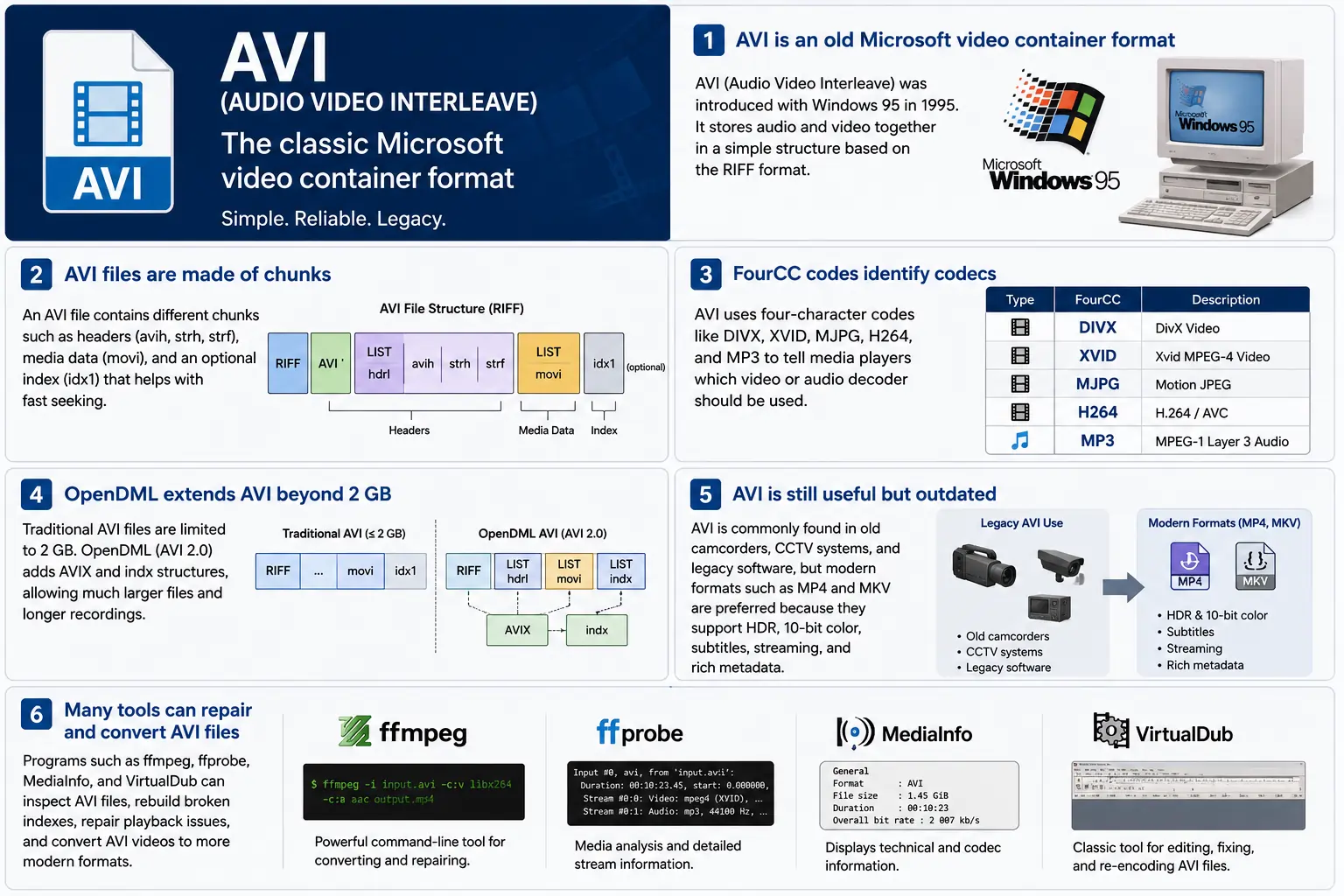
TL;DR – AVI (Audio Video Interleave) 은 Microsoft의 최초 “디지털 비디오” 컨테이너로, Windows 95와 함께 탄생했습니다. 이것은 압축된 비디오와 오디오 청크를 교차 배치하는 단순한 RIFF‑based 파일로, 플레이어가 동시에 읽을 수 있게 합니다. 이 포맷은 아직도 Windows Media Player와 다수의 오픈‑source 도구에서 지원되지만, HDR, 10‑bit 색상, 강력한 스트리밍 메타데이터와 같은 현대적인 기능이 부족합니다. 레거시 영상을 파고들어야 할 경우, 청크 레이아웃, FourCC 코드, 그리고 2 GB 제한을 뛰어넘는 OpenDML 확장에 대해 이해하는 것이 AVI의 핵심입니다.
1. AVI 파일이 정확히 무엇인가요?
- 전체 이름: Audio Video Interleave
- 첫 등장: Windows 95 (1995) – 소비자 PC용 “디지털 비디오”에 대한 Microsoft의 답변.
- 사양: 1991년 RIFF (Resource Interchange File Format) 사양을 기반으로 구축되었습니다. RIFF는 일반적인 “청크‑based” 컨테이너이며, AVI는 오디오, 비디오 및 인덱싱 데이터를 담는 청크 집합을 정의합니다.
- 파일 확장자 / MIME:
.avi–video/x-msvideo. - 주요 목표: 오디오와 비디오 스트림을 디스크에 긴밀히 교차 배치하여, 단순 재생 루프가 비디오 프레임을 읽은 다음 일치하는 오디오 샘플을 비용이 많이 드는 탐색 없이 읽을 수 있도록 합니다.
- 레거시 상태: Windows Media Player, DirectShow, VLC 및 수많은 다른 플레이어에서 여전히 재생 가능하지만, “현대적인” 컨테이너는 아닙니다. 기본 HDR, 10‑비트, 가변 비트레이트, 풍부한 메타데이터 지원이 없습니다.
2. 박스 안에서 – AVI는 어떻게 작동하나요
RIFF 청크 골격
AVI 파일은 단순히 청크들의 연속일 뿐입니다:
RIFF <size> "AVI "          ; file header
  LIST "hdrl"               ; header list
    avih ...                ; main AVI header (global info)
    LIST "strl"             ; stream list (one per stream)
      strh ...              ; stream header (type, codec, timing)
      strf ...              ; stream format (codec‑specific data)
  LIST "movi"               ; interleaved media data
    00dc <size> <video frame>
    01wb <size> <audio block>
    …
  idx1 ...                  ; optional index for fast seeking
- 청크 ID (4 바이트) – 예:
avih,strh,movi. - 청크 크기 (4 바이트) – 뒤따르는 데이터의 길이(ID와 크기 필드를 제외).
- 데이터 – 실제 페이로드(헤더, 원시 프레임 등).
RIFF가 확장 가능하기 때문에, 기존 파서를 깨뜨리지 않고 새로운 청크 유형을 추가할 수 있습니다 – 이는 AVI가 수십 년 동안 살아남을 수 있게 한 설계입니다.
FourCC – 코덱 속삭이는 사람
Four‑character codes (FourCC)는 플레이어에게 어떤 디코더를 로드할지 알려주는 접착제 역할을 합니다. AVI 파일에서 볼 수 있는 일반적인 몇 가지 예는 다음과 같습니다:
| FourCC | 코덱 (ffmpeg) | 일반적인 사용 |
|---|---|---|
DIVX | mpeg4 (DivX) | 초기 MPEG‑4 Part 2 |
XVID | mpeg4 (Xvid) | 오픈 소스 MPEG‑4 |
MJPG | mjpeg | 모션‑JPEG (디지털 캠코더) |
H264 | h264 | H.264/AVC (희귀하지만 가능) |
MP3 | mp3 | MP3 오디오 스트림 |
PCM | pcm_s16le | 압축되지 않은 PCM 오디오 |
FourCC는 strh 청크(코덱 식별자)에 존재하며 때때로 strf 블록(픽셀 형식, 오디오 샘플 형식)에도 포함됩니다.
타이밍 및 동기화
AVI는 간단한 time‑base 시스템을 사용합니다:
- Global header (
avih):dwRate/dwScale→ 초당 프레임 수. - Per‑stream header (
strh): 오디오 또는 보조 비디오 스트림에 대한 자체dwRate/dwScale.
플레이어는 프레임 번호에 scale/rate를 곱해 프레젠테이션 타임스탬프(PTS)를 계산합니다. 스케일이 맞지 않으면 레거시 도구를 괴롭히는 고전적인 “오디오가 동기에서 벗어남” 버그가 나타납니다.
movi 청크 – 미디어가 살아있는 곳
모든 압축된 프레임은 movi LIST에 들어 있습니다. 각 프레임 앞에는 비디오(00dc)인지 오디오(01wb)인지 알려주는 청크 ID가 있습니다. 이 ID는 스트림 번호도 인코딩하므로, 두 개의 오디오 트랙이 있는 파일은 01wb와 02wb를 갖게 됩니다.
데이터가 이미 인터리브되어 있기 때문에, 플레이어는 비디오 프레임을 읽고 다음 오디오 블록을 읽은 뒤, 멀리 탐색하지 않고 함께 재생할 수 있습니다. 이러한 결정적인 쓰기 패턴 덕분에 낮은 지연 시간의 디스크 쓰기가 필요한 초기 캡처 장치에서 AVI가 인기를 끌었습니다.
인덱싱 (idx1) – 빨리 감기, 빨리 되감기
선택적인 idx1 청크는 movi의 모든 프레임에 대한 오프셋과 크기의 표입니다. 존재할 경우, 탐색은 간단한 테이블 조회가 됩니다. 없을 경우, 플레이어는 파일을 실시간으로 스캔해야 하며 – 이는 큰 파일에서 눈에 띄는 “버퍼링” 일시 정지를 일으킬 수 있습니다.
OpenDML (AVI 2.0) – 2 GB 장벽 돌파
원래 RIFF 사양은 청크의 크기 필드를 32‑bit 부호 없는 정수로 제한하여 → 2 GB 최대 파일 크기를 지정합니다. OpenDML(때때로 AVI 2.0이라고도 함)은 다음을 도입했습니다:
AVIXLISTs – 첫 번째 2 GB 뒤에 올 수 있는 추가 “확장” RIFF 섹션입니다.indx청크 – 64‑bit 지원 인덱스입니다.- 긴 재생 시간을 위한 추가 헤더 필드.
대부분의 최신 도구(ffmpeg, VLC)는 출력이 2 GB를 초과하면 자동으로 OpenDML로 전환하지만, 많은 구형 플레이어는 여전히 AVIX 청크에서 오류가 발생하므로 긴 캡처를 여러 개의 2 GB AVI 파일로 나누는 호환성 해킹을 종종 볼 수 있습니다.
3. AVI는 2024년에 어디에 존재합니까?
| 추세 | AVI에 대한 의미 |
|---|---|
| MP4/MKV/ProRes로 전환 | 새로운 제작물은 HDR, 10‑bit, VBR 및 풍부한 메타데이터를 기본적으로 지원하는 컨테이너를 선호합니다. 최신 콘텐츠에서는 AVI가 거의 선택되지 않습니다. |
| 레거시 하드웨어 | 오래된 CCTV 카메라, 2000년대 초반 캠코더, 그리고 일부 게임 엔진은 여전히 AVI를 출력합니다. 현대 워크플로우에서 이러한 파일을 받아들여야 합니다. |
| 오픈소스 지원 | ffmpeg, libav, VLC, HandBrake, 및 GStreamer는 AVI 파서를 유지하지만, 배포를 위해 종종 재인코딩하여 MP4/MKV로 변환합니다. |
| OpenDML 부활 | 며칠 동안 지속되는 4K 감시 녹화는 빠르게 2 GB를 초과합니다. OpenDML (AVIX)은 여전히 주요 해결책이지만, 많은 도구가 이를 제대로 처리하지 못합니다. |
| 보안 강화 | 과거 AVI 파서는 잘못된 청크 크기를 허용하여 CVE(예: CVE‑2020‑13144)를 초래했습니다. 이제 Windows는 Media Foundation을 선호하며, 이는 많은 레거시 특이성을 거부하고 개발자를 보다 안전한 파이프라인으로 유도합니다. |
| 컨테이너에 구애받지 않는 파이프라인 | 현대 미디어 프레임워크는 AVI를 단순히 또 다른 소스 요소로 취급합니다. 데이터가 원시 버퍼로 디멀티플렉스되면, 컨테이너는 하위 처리에 있어 무관해집니다. |
요약하면, AVI는 살아 있지만 노후하고 – 오래된 하드웨어나 단순한 인터리브 저장이 필요할 때는 여전히 사용되지만, 새로운 프로젝트에서는 첫 번째 선택이 아닙니다.
4. 실습: 오늘날 AVI 작업하기
A. 최소 헤더 살펴보기 (hex)
52 49 46 46  00 00 00 00  41 56 49 20   ; "RIFF" + size + "AVI "
4C 49 53 54  20 00 00 00  68 64 72 6C   ; LIST "hdrl"
...
RIFF 매직(52 49 46 46)은 모든 파서에게 “이 파일은 RIFF 파일이다”라고 알려줍니다. 다음 네 바이트는 전체 파일 크기(8바이트를 제외한)입니다. "AVI " 식별자는 파일을 AVI 계열에 고정합니다.
B. 최신 MP4 → 레거시 AVI 변환
ffmpeg -i input.mp4 \
       -c:v mpeg4 -q

```bash
ffmpeg -i input.mp4 \\ -c:v mpeg4 -qscale:v 5 \\   # MPEG‑4 Part 2 (DivX/Xvid 호환) -c:a mp3 -b:a 192k \\      # MP3 오디오 (대부분의 AVI 플레이어가 이를 이해함) -f avi output.avi
The command above forces MPEG‑4 Part 2 video (the codec most legacy AVI players recognize) and MP3 audio, then writes an AVI container. If you need OpenDML support for files larger than 2 GB, add the -movflags +faststart‑style flag that tells FFmpeg to use the extended AVIX chunks:
ffmpeg -i input.mp4 \\ -c:v mpeg4 -qscale:v 5 \\ -c:a mp3 -b:a 192k \\ -f avi -flags +global_header -movflags +faststart output.avi
Tip: Some older Windows Media Player versions still choke on the
AVIXextension. If you must stay under 2 GB, split the source into multiple AVIs using the-segment_timeand-f segmentmuxer.
5. Common Pitfalls & How to Fix Them
| Symptom | Likely Cause | Fix |
|---|---|---|
| Audio drifts out of sync after a few minutes | Mismatched dwRate/dwScale between avih and strh (or a VBR audio stream) | Re‑encode audio to a constant‑bitrate format (e.g., MP3 128 kbps) or use -vsync 2 in FFmpeg to force frame‑accurate timestamps. |
| “Cannot play this video” on Windows Media Player | Missing or corrupt idx1 index, or OpenDML (AVIX) chunks not recognized | Run ffmpeg -i broken.avi -c copy -map 0 -f avi repaired.avi to rebuild the index; or use aviindex (part of mplayer) to generate a fresh idx1. |
| File size capped at 2 GB despite long footage | Encoder used classic AVI (no OpenDML) | Add -use\_open\_dml 1 (FFmpeg) or -format avi2 (VirtualDub) to enable OpenDML extensions. |
| Green or corrupted frames | Incompatible FourCC (e.g., H.264 in an AVI without proper headers) | Stick to codecs known to work in AVI (mpeg4, msmpeg4v2, MJPG, XVID). If you must store H.264, use the h264 FourCC and ensure the strf chunk contains the SPS/PPS extradata. |
| Playback stalls on network streams | AVI’s lack of robust streaming metadata (no moov atom) | Wrap the AVI in a streaming protocol (e.g., RTSP) that handles byte‑range requests, or convert to MP4/MKV for smoother streaming. |
6. Debugging Tools You Should Keep Handy
| Tool | Platform | What It Does |
|---|---|---|
| ffprobe / ffmpeg | Cross‑platform | Dumps every chunk, FourCC, timestamps, and can rebuild indexes (-c copy). |
| MediaInfo | Windows/macOS/Linux | Human‑readable summary of streams, codecs, and container flags. |
| VirtualDub | Windows | Classic AVI editor; can rebuild headers, add OpenDML, and preview frame‑by‑frame. |
| GSpot (legacy) | Windows | Identifies obscure FourCCs and suggests appropriate codecs. |
| aviindex (part of MPlayer) | Linux/macOS | Generates a fresh idx1 chunk for broken files. |
| Hex editors (HxD, Bless) | Any | Directly inspect RIFF headers when you suspect malformed chunk sizes. |
A typical workflow when an AVI refuses to play:
- Inspect with
ffprobe -show_format -show_streams file.avi. - Check the index:
ffmpeg -i file.avi -c copy -f avi -y temp.avi(FFmpeg will rebuild it automatically). - Validate FourCCs:
mediainfo file.avi. If you see an unknown codec, consider re‑encoding that stream. - Repair with VirtualDub → “File → Re‑open as AVI (OpenDML)”. Save a fresh copy.
7. When (and When Not) to Use AVI
Good Use‑Cases
| Scenario | Why AVI Works |
|---|---|
| Legacy camcorder ingest | The device outputs native AVI; transcoding adds unnecessary quality loss. |
| Simple interleaved capture | Low‑latency write to disk without needing complex container features. |
| Compatibility with old Windows‑only software | Some industrial automation tools only understand AVI. |
| Archiving raw, uncompressed video | AVI can hold PCM audio and uncompressed RGB24 video without extra overhead. |
Bad Use‑Cases
| Scenario | Why AVI Fails |
|---|---|
| HDR or 10‑bit color | No standard way to store those pixel formats; you’d need a custom FourCC that most players ignore. |
| Variable‑bit‑rate streaming | Lack of a proper moov‑like atom makes adaptive bitrate impossible. |
| Rich metadata (chapters, subtitles, tags) | AVI’s chunk model doesn’t define standard containers for subtitles or extensive tags. |
| Cross‑platform mobile distribution | Modern mobile players expect MP4/MKV; AVI may not be hardware‑accelerated. |
If you’re starting a new project, treat AVI as a fallback for legacy pipelines, not a primary delivery format.
8. Future Outlook – Will AVI Ever Make a Comeback?
The short answer: unlikely. The industry has coalesced around ISO‑BMFF‑based containers (MP4, MOV, HEVC‑MP4, etc.) because they support:
- Extensible metadata (ISO‑UserData, UUID boxes).
- Fragmented streaming (moof/mdat) for adaptive bitrate.
- Native HDR/10‑bit/12‑bit video definitions.
AVI’s design, while elegant for its time, is fundamentally limited by its 32‑bit size fields and its reliance on external FourCC‑driven codecs. Even though OpenDML extended the size limit, it never gained widespread adoption beyond niche surveillance and archival tools.
That said, software preservation will keep AVI parsers alive for decades. Projects like FFmpeg, GStreamer, and VLC will continue to support the format, ensuring that the massive archive of 1990s‑2000s footage remains accessible. In a world where “digital archaeology” is becoming a real discipline, knowing how to read and repair AVI files is still a valuable skill.
9. Quick Reference Cheat‑Sheet
| Item | Command / Setting | Explanation |
|---|---|---|
| Create classic AVI | ffmpeg -i src -c:v mpeg4 -qscale:v 5 -c:a mp3 -b:a 192k -f avi out.avi | Simple, widely compatible. |
| Enable OpenDML | ffmpeg -i src -c:v mpeg4 -qscale:v 5 -c:a mp3 -b:a 192k -f avi -use_open_dml 1 out.avi | Allows >2 GB files. |
| Re‑index broken AVI | ffmpeg -i broken.avi -c copy -f avi repaired.avi | Rewrites idx1. |
| Split >2 GB into chunks | ffmpeg -i long.avi -c copy -map 0 -segment_time 1800 -f segment part_%03d.avi | 30‑minute segments stay under the limit. |
| Inspect header | ffprobe -show_format -show_streams file.avi | Dumps all RIFF chunks and stream info. |
| Add a subtitle track (non‑standard) | ffmpeg -i video.avi -i subs.srt -c copy -metadata:s:s:0 language=eng out.avi | Works only with players that read the txt stream; not universally supported. |
Keep this table bookmarked; it covers 80 % of everyday AVI tasks.
10. Best Practices for Archiving AVI Files
Even though AVI is a legacy container, many institutions still have petabytes of it sitting on tape or in cold‑storage. Treating those assets with a disciplined workflow will save you headaches down the line.
| Practice | Why It Matters | How to Implement |
|---|---|---|
| Validate on ingest | Corrupt headers or missing indexes can go unnoticed until playback. | Run ffprobe -v error -show_format -show_streams file.avi immediately after copying. Log any non‑zero exit codes. |
| Generate a checksum | Guarantees bit‑exact preservation across media migrations. | Use SHA‑256 (sha256sum file.avi > file.avi.sha256). Store the checksum alongside the file in your catalog. |
| Create a modern proxy | Most downstream workflows (editing, streaming) expect MP4/MKV. | Encode a low‑bitrate MP4 proxy (ffmpeg -i file.avi -c:v libx264 -crf 23 -c:a aac -b:a 128k proxy.mp4). Keep the proxy in the same directory with a clear naming convention (*_proxy.mp4). |
| Document FourCCs and codec versions | Some FourCCs map to multiple codec implementations (e.g., DIVX could be DivX 5, 6, or 7). | Extract the codec private data (ffprobe -show_private_data) and store it in a side‑car JSON file (file.avi.codec.json). |
| Migrate to OpenDML for large files | Files >2 GB will become unreadable on older players. | When transcoding, always pass -use_open_dml 1. If you’re only copying, use aviindex to rebuild an OpenDML‑compatible index. |
| Store metadata in a side‑car | AVI has no standard for extensive tags (e.g., creator, location). | Use XMP side‑car files (file.avi.xmp) or embed a small INFO LIST chunk manually if you need minimal in‑container metadata. |
| Regularly test playback | Bit‑rot can affect codecs as well as containers. | Schedule a quarterly job that runs a headless player (e.g., ffplay -autoexit -frames 10 file.avi) and reports any failures. |
By applying these steps at the moment of acquisition, you avoid costly “repair‑the‑archive” projects later.
11. Frequently Asked Questions (FAQ)
Q1: Can I store H.265/HEVC video inside an AVI file?
Short answer: Technically yes, if you supply the correct FourCC (HEVC or HVC1) and include the SPS/PPS NAL units in the strf chunk. In practice, very few players support it, and many will treat the stream as unknown. For reliable playback, stick to MPEG‑4 Part 2 or Motion‑JPEG.
Q2: Why does Windows Media Player sometimes show a black screen but still plays audio?
Explanation: The player has successfully opened the audio stream but failed to locate a usable video decoder for the FourCC. This can happen when the FourCC is custom or when the required codec isn’t installed. Installing a codec pack (e.g., K-Lite) or re‑encoding the video to a known FourCC resolves the issue.
Q3: Is there any way to embed subtitles directly into an AVI file?
Answer: AVI does not define a standard subtitle stream. Some tools cheat by adding a “txt” stream (FourCC txt ) that contains plain‑text subtitles, but only a handful of players (e.g., VirtualDub with a plugin) will render them. The recommended approach is to keep subtitles in a separate .srt or .ass file, or to re‑mux into a container that officially supports subtitles (MP4, MKV).
Q4: My video shows a “frame rate mismatch” warning in MediaInfo. What should I do?
Solution: Verify that the dwRate/dwScale values in both the global avih and per‑stream strh headers are consistent. If they differ, re‑mux with FFmpeg using -video_track_timescale to force a uniform time base:
ffmpeg -i broken.avi -c copy -video_track_timescale 1000 fixed.avi
Q5: Does AVI support multiple audio languages?
Yes, but with caveats. You can add several audio streams, each with its own strh/strf pair and a distinct stream number (01wb, 02wb, …). However, there is no standardized way to label the language; you must rely on external metadata (e.g., an accompanying .xml file) or embed a custom INFO chunk.
Q6: How can I extract raw frames from an AVI without re‑encoding?
Command:
ffmpeg -i source.avi -c:v copy -f image2 frame_%05d.bmp
Replace bmp with png or tiff if you prefer lossless image formats. The -c:v copy flag tells FFmpeg to dump the compressed frames as‑is; if the codec is MJPEG, the output will already be JPEG images.
Q7: Are there any security concerns when opening AVI files from untrusted sources?
Yes. Malformed chunk sizes can trigger buffer overflows in legacy parsers (e.g., older DirectShow filters). Always open unknown AVIs in a sandboxed environment or use a modern library like FFmpeg that performs strict bounds checking. Updating Windows Media Foundation and disabling legacy DirectShow filters further mitigates risk.
12. TL;DR 요약 (조급한 분들을 위해)
- AVI = RIFF‑based, interleaved container introduced with Windows 95.
- FourCC tells the player which codec to use; common ones are
DIVX,XVID,MJPG,H264,MP3. - Timing is driven by
dwRate/dwScalein the global and stream headers. moviholds the actual media;idx1(optional) speeds up seeking.- OpenDML (
AVIX) lifts the 2 GB limit but isn’t universally supported. - Use cases today: legacy camcorder ingest, simple interleaved capture, archival of raw PCM video.
- Avoid for new projects: no HDR, 10‑bit, VBR, subtitles, or rich metadata.
- Toolbox:
ffprobe,ffmpeg, MediaInfo, VirtualDub, aviindex, hex editors. - Best practice: validate, checksum, generate modern proxies, and migrate large files to OpenDML.
13. 마무리 생각
AVI’s simplicity is both its strength and its Achilles’ heel. It gave early PC users a straightforward way to store synchronized audio‑video pairs, and that design philosophy—interleaved chunks, a clear header layout, and extensible FourCC identifiers—still influences modern containers. While the industry has moved on to more feature‑rich formats, the sheer volume of legacy footage means AVI will remain a “must‑know” for anyone working in video preservation, forensic analysis, or any field that must bridge the past with today’s workflows.
If you ever find yourself staring at a dusty .avi on a hard drive from the late‑90s, you now have the conceptual map, the command‑line recipes, and the troubleshooting checklist to bring that footage back to life—whether you choose to keep it in its original container or transcode it into a modern, HDR‑ready format.
Happy demuxing!