Kemas Kini Terakhir: 30 Jun, 2026
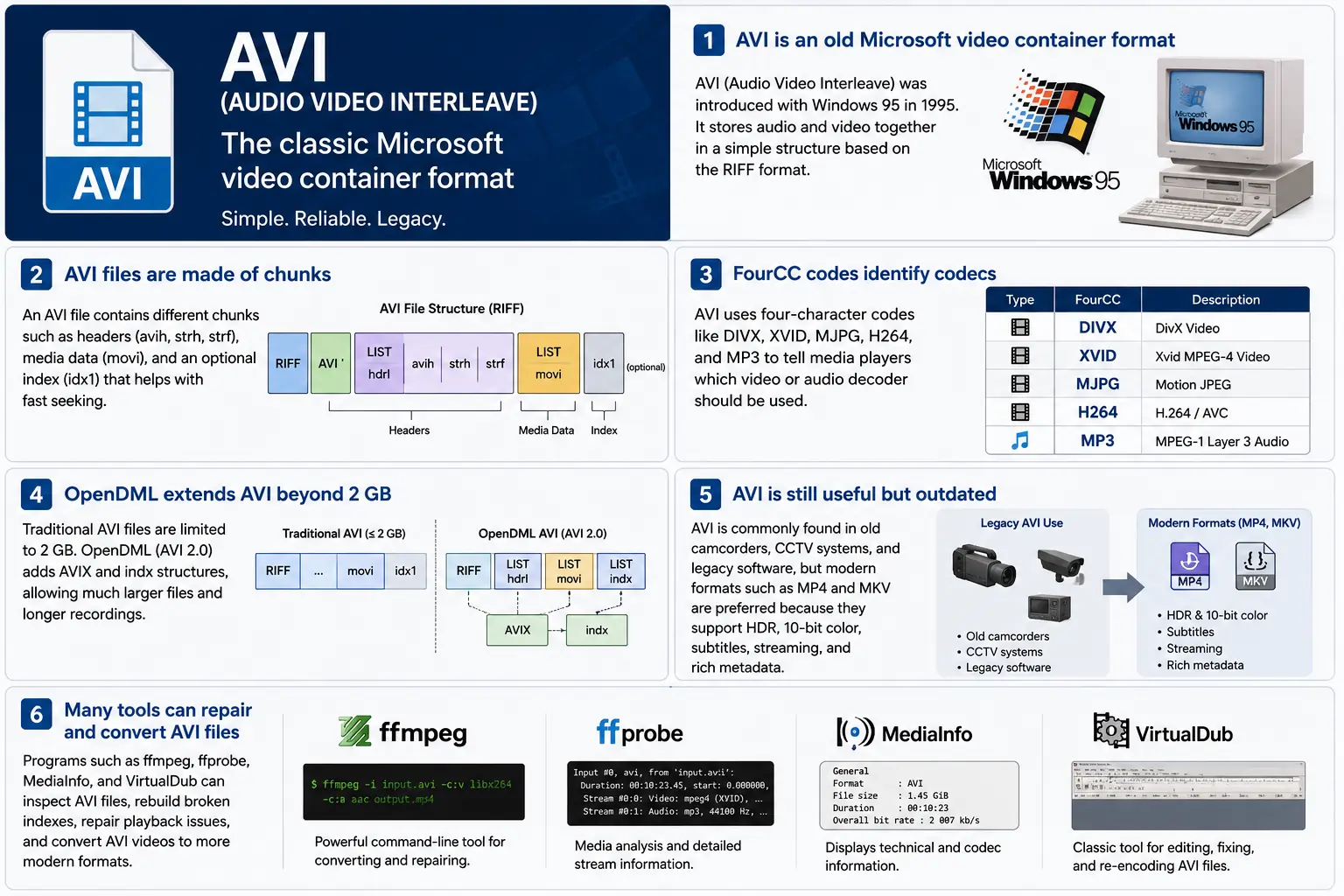
TL;DR – AVI (Audio Video Interleave) ialah kontena “video digital” pertama Microsoft, lahir bersama Windows 95. Ia ialah fail berasaskan RIFF yang menyelitkan kepingan video dan audio termampat supaya pemain dapat membacanya secara serentak. Format ini masih difahami oleh Windows Media Player dan pelbagai alat sumber terbuka, tetapi ia tidak mempunyai ciri moden seperti HDR, warna 10‑bit, dan metadata penstriman yang kukuh. Jika anda perlu meneliti rakaman warisan, fahami susun atur kepingan, kod FourCC, dan sambungan OpenDML yang mengangkat had 2 GB – itulah inti AVI.
1. Apa Itu Fail AVI Sebenarnya?
- Nama penuh: Audio Video Interleave
- Penampilan pertama: Windows 95 (1995) – Jawapan Microsoft kepada “video digital” pada PC pengguna.
- Spesifikasi: Dibina atas spesifikasi RIFF (Resource Interchange File Format) sejak 1991. RIFF ialah kontena generik berasaskan “kepingan”; AVI hanya mentakrifkan satu set kepingan yang menyimpan audio, video, dan data indeks.
- Sambungan fail / MIME:
.avi–video/x-msvideo. - Matlamat utama: Menyimpan aliran audio dan video berinterleasi rapat pada cakera supaya gelung main balik yang naïve dapat membaca satu bingkai video, kemudian sampel audio yang sepadan, tanpa pencarian yang mahal.
- Status warisan: Masih boleh dimainkan dalam Windows Media Player, DirectShow, VLC, dan banyak lagi pemain lain, tetapi ia bukan kontena “moden”. Tiada sokongan HDR asli, 10‑bit, kadar bit berubah-ubah, atau metadata kaya.
2. Di Dalam Kotak – Bagaimana AVI Berfungsi
Rangka Chunk RIFF
Fail AVI hanyalah satu siri bahagian:
RIFF <size> "AVI "          ; file header
  LIST "hdrl"               ; header list
    avih ...                ; main AVI header (global info)
    LIST "strl"             ; stream list (one per stream)
      strh ...              ; stream header (type, codec, timing)
      strf ...              ; stream format (codec‑specific data)
  LIST "movi"               ; interleaved media data
    00dc <size> <video frame>
    01wb <size> <audio block>
    …
  idx1 ...                  ; optional index for fast seeking
- ID Bahagian (4 bait) – contohnya
avih,strh,movi. - Saiz Bahagian (4 bait) – panjang data yang mengikutnya (tidak termasuk medan ID dan saiz).
- Data – muatan sebenar (pengepala, bingkai mentah, dll.).
Kerana RIFF boleh diperluas, anda boleh menambah jenis bahagian baru tanpa merosakkan pengurai lama – satu reka bentuk yang mengekalkan AVI hidup selama beberapa dekad.
FourCC – Pembisik Codec
Kod empat aksara (FourCC) adalah pengikat yang memberitahu pemain yang mana decoder untuk dimuatkan. Beberapa contoh biasa yang anda akan lihat dalam fail AVI:
| FourCC | Kodek (ffmpeg) | Penggunaan Biasa |
|---|---|---|
DIVX | mpeg4 (DivX) | MPEG‑4 Bahagian 2 Awal |
XVID | mpeg4 (Xvid) | Sumber terbuka MPEG‑4 |
MJPG | mjpeg | Motion‑JPEG (kamera video digital) |
H264 | h264 | H.264/AVC (jarang tetapi mungkin) |
MP3 | mp3 | Strim audio MP3 |
PCM | pcm_s16le | Audio PCM tidak dimampatkan |
FourCC berada dalam bahagian strh (pengenal codec) dan kadang‑kadang dalam blok strf (format piksel, format sampel audio).
Masa & Penyelarasan
AVI menggunakan sistem time‑base yang mudah:
- Pengepala global (
avih):dwRate/dwScale→ bingkai per saat. - Pengepala per‑stream (
strh):dwRate/dwScalesendiri untuk aliran audio atau video sekunder.
Pemain menggandakan nombor bingkai dengan scale/rate untuk mengira tanda masa persembahan (PTS). Jika skala tidak sepadan, anda akan melihat pepijat klasik “audio melayang keluar dari sinkronisasi” yang menghantui alat warisan.
Bahagian movi – Di Mana Media Tinggal
Semua bingkai termampat berada dalam LIST movi. Setiap bingkai didahului oleh ID bahagian yang memberitahu anda sama ada ia video (00dc) atau audio (01wb). ID tersebut juga mengekodkan nombor aliran, jadi fail dengan dua trek audio akan mempunyai 01wb dan 02wb.
Oleh kerana data sudah diinterleav, pemain boleh membaca satu bingkai video, kemudian blok audio seterusnya, dan memaparkannya bersama tanpa perlu mencari jauh ke depan. Corak penulisan deterministik itu menjadikan AVI popular untuk peranti rakaman awal yang memerlukan penulisan cakera latensi rendah.
Pengindeksan (idx1) – Majukan Cepat, Undur Cepat
Bahagian idx1 pilihan ialah jadual ofset dan saiz bagi setiap bingkai dalam movi. Apabila ada, pencarian menjadi hanya carian jadual mudah. Jika tiada, pemain mesti mengimbas fail secara langsung – yang boleh menyebabkan jeda “penyangga” yang ketara pada fail besar.
OpenDML (AVI 2.0) – Memecahkan Halangan 2 GB
Spesifikasi RIFF asal mengehadkan medan saiz chunk kepada integer tak bertanda 32‑bit → 2 GB saiz fail maksimum. OpenDML (kadang‑kadang dipanggil AVI 2.0) memperkenalkan:
AVIXLISTs – bahagian RIFF “lanjutan” tambahan yang boleh mengikut 2 GB pertama.indxchunk – indeks yang menyokong 64‑bit.- Medan pengepala tambahan untuk durasi yang lebih panjang.
Kebanyakan alat moden (ffmpeg, VLC) secara automatik beralih ke OpenDML apabila output melebihi 2 GB, tetapi banyak pemain lama masih mengalami masalah dengan chunk AVIX, jadi anda kadang‑kadang akan melihat hack keserasian yang memecah rakaman panjang menjadi beberapa fail AVI 2 GB.
3. Di Mana AVI Berada pada 2024?
| Trend | Apa Maksudnya untuk AVI |
|---|---|
| Beralih ke MP4/MKV/ProRes | Pengeluaran baru lebih suka kontena yang secara asli menyokong HDR, 10‑bit, VBR, dan metadata yang kaya. AVI jarang dipilih untuk kandungan baru. |
| Perkakasan warisan | Kamera CCTV lama, camcorder awal‑2000an, dan beberapa enjin permainan masih menghasilkan AVI. Anda masih perlu memasukkan fail‑fail tersebut dalam aliran kerja moden. |
| Sokongan sumber terbuka | ffmpeg, libav, VLC, HandBrake, dan GStreamer mengekalkan parser AVI tetap hidup, tetapi mereka sering menyahkod semula kepada MP4/MKV untuk pengedaran. |
| Kebangkitan OpenDML | Rakaman pengawasan 4K yang berjalan selama berhari‑hari melebihi 2 GB dengan cepat. OpenDML (AVIX) masih menjadi penyelesaian utama, walaupun banyak alat tidak mengendalikannya dengan betul. |
| Pengukuhan keselamatan | Pengurai AVI bersejarah menerima saiz kepingan yang cacat, menyebabkan CVE (contohnya, CVE‑2020‑13144). Windows kini lebih suka Media Foundation, yang menolak banyak keanehan warisan, mendorong pembangun ke arah saluran yang lebih selamat. |
| Saluran bebas kontena | Kerangka media moden menganggap AVI sebagai elemen sumber lain. Setelah data di-demux menjadi penampan mentah, bekas kontena menjadi tidak relevan untuk pemprosesan hiliran. |
Ringkasnya, AVI masih hidup tetapi menua – ia bertahan di mana perkakasan lama atau penyimpanan berselang sederhana diperlukan, tetapi ia bukan pilihan utama untuk projek baru.
4. Praktikal: Bekerja dengan AVI Hari Ini
A. Intip Header Minimum (hex)
52 49 46 46  00 00 00 00  41 56 49 20   ; "RIFF" + size + "AVI "
4C 49 53 54  20 00 00 00  68 64 72 6C   ; LIST "hdrl"
...
Magik RIFF (52 49 46 46) memberitahu mana-mana pengurai “ini adalah fail RIFF”. Empat bait seterusnya ialah saiz fail keseluruhan (tolak 8). Pengenal "AVI " mengunci fail ke dalam keluarga AVI.
B. Menukar MP4 Moden → AVI Warisan
ffmpeg -i input.mp4 \
       -c:v mpeg4 -q

```bash
ffmpeg -i input.mp4 \\ -c:v mpeg4 -qscale:v 5 \\   # MPEG‑4 Bahagian 2 (serasi dengan DivX/Xvid) -c:a mp3 -b:a 192k \\      # audio MP3 (kebanyakan pemain AVI memahami ini) -f avi output.avi
The command above forces MPEG‑4 Part 2 video (the codec most legacy AVI players recognize) and MP3 audio, then writes an AVI container. If you need OpenDML support for files larger than 2 GB, add the -movflags +faststart‑style flag that tells FFmpeg to use the extended AVIX chunks:
ffmpeg -i input.mp4 \\ -c:v mpeg4 -qscale:v 5 \\ -c:a mp3 -b:a 192k \\ -f avi -flags +global_header -movflags +faststart output.avi
Tip: Some older Windows Media Player versions still choke on the
AVIXextension. If you must stay under 2 GB, split the source into multiple AVIs using the-segment_timeand-f segmentmuxer.
5. Common Pitfalls & How to Fix Them
| Symptom | Likely Cause | Fix |
|---|---|---|
| Audio drifts out of sync after a few minutes | Mismatched dwRate/dwScale between avih and strh (or a VBR audio stream) | Re‑encode audio to a constant‑bitrate format (e.g., MP3 128 kbps) or use -vsync 2 in FFmpeg to force frame‑accurate timestamps. |
| “Cannot play this video” on Windows Media Player | Missing or corrupt idx1 index, or OpenDML (AVIX) chunks not recognized | Run ffmpeg -i broken.avi -c copy -map 0 -f avi repaired.avi to rebuild the index; or use aviindex (part of mplayer) to generate a fresh idx1. |
| File size capped at 2 GB despite long footage | Encoder used classic AVI (no OpenDML) | Add -use\_open\_dml 1 (FFmpeg) or -format avi2 (VirtualDub) to enable OpenDML extensions. |
| Green or corrupted frames | Incompatible FourCC (e.g., H.264 in an AVI without proper headers) | Stick to codecs known to work in AVI (mpeg4, msmpeg4v2, MJPG, XVID). If you must store H.264, use the h264 FourCC and ensure the strf chunk contains the SPS/PPS extradata. |
| Playback stalls on network streams | AVI’s lack of robust streaming metadata (no moov atom) | Wrap the AVI in a streaming protocol (e.g., RTSP) that handles byte‑range requests, or convert to MP4/MKV for smoother streaming. |
6. Debugging Tools You Should Keep Handy
| Tool | Platform | What It Does |
|---|---|---|
| ffprobe / ffmpeg | Cross‑platform | Dumps every chunk, FourCC, timestamps, and can rebuild indexes (-c copy). |
| MediaInfo | Windows/macOS/Linux | Human‑readable summary of streams, codecs, and container flags. |
| VirtualDub | Windows | Classic AVI editor; can rebuild headers, add OpenDML, and preview frame‑by‑frame. |
| GSpot (legacy) | Windows | Identifies obscure FourCCs and suggests appropriate codecs. |
| aviindex (part of MPlayer) | Linux/macOS | Generates a fresh idx1 chunk for broken files. |
| Hex editors (HxD, Bless) | Any | Directly inspect RIFF headers when you suspect malformed chunk sizes. |
A typical workflow when an AVI refuses to play:
- Inspect with
ffprobe -show_format -show_streams file.avi. - Check the index:
ffmpeg -i file.avi -c copy -f avi -y temp.avi(FFmpeg will rebuild it automatically). - Validate FourCCs:
mediainfo file.avi. If you see an unknown codec, consider re‑encoding that stream. - Repair with VirtualDub → “File → Re‑open as AVI (OpenDML)”. Save a fresh copy.
7. When (and When Not) to Use AVI
Good Use‑Cases
| Scenario | Why AVI Works |
|---|---|
| Legacy camcorder ingest | The device outputs native AVI; transcoding adds unnecessary quality loss. |
| Simple interleaved capture | Low‑latency write to disk without needing complex container features. |
| Compatibility with old Windows‑only software | Some industrial automation tools only understand AVI. |
| Archiving raw, uncompressed video | AVI can hold PCM audio and uncompressed RGB24 video without extra overhead. |
Bad Use‑Cases
| Scenario | Why AVI Fails |
|---|---|
| HDR or 10‑bit color | No standard way to store those pixel formats; you’d need a custom FourCC that most players ignore. |
| Variable‑bit‑rate streaming | Lack of a proper moov‑like atom makes adaptive bitrate impossible. |
| Rich metadata (chapters, subtitles, tags) | AVI’s chunk model doesn’t define standard containers for subtitles or extensive tags. |
| Cross‑platform mobile distribution | Modern mobile players expect MP4/MKV; AVI may not be hardware‑accelerated. |
If you’re starting a new project, treat AVI as a fallback for legacy pipelines, not a primary delivery format.
8. Future Outlook – Will AVI Ever Make a Comeback?
The short answer: unlikely. The industry has coalesced around ISO‑BMFF‑based containers (MP4, MOV, HEVC‑MP4, etc.) because they support:
- Extensible metadata (ISO‑UserData, UUID boxes).
- Fragmented streaming (moof/mdat) for adaptive bitrate.
- Native HDR/10‑bit/12‑bit video definitions.
AVI’s design, while elegant for its time, is fundamentally limited by its 32‑bit size fields and its reliance on external FourCC‑driven codecs. Even though OpenDML extended the size limit, it never gained widespread adoption beyond niche surveillance and archival tools.
That said, software preservation will keep AVI parsers alive for decades. Projects like FFmpeg, GStreamer, and VLC will continue to support the format, ensuring that the massive archive of 1990s‑2000s footage remains accessible. In a world where “digital archaeology” is becoming a real discipline, knowing how to read and repair AVI files is still a valuable skill.
9. Quick Reference Cheat‑Sheet
| Item | Command / Setting | Explanation |
|---|---|---|
| Create classic AVI | ffmpeg -i src -c:v mpeg4 -qscale:v 5 -c:a mp3 -b:a 192k -f avi out.avi | Simple, widely compatible. |
| Enable OpenDML | ffmpeg -i src -c:v mpeg4 -qscale:v 5 -c:a mp3 -b:a 192k -f avi -use_open_dml 1 out.avi | Allows >2 GB files. |
| Re‑index broken AVI | ffmpeg -i broken.avi -c copy -f avi repaired.avi | Rewrites idx1. |
| Split >2 GB into chunks | ffmpeg -i long.avi -c copy -map 0 -segment_time 1800 -f segment part_%03d.avi | 30‑minute segments stay under the limit. |
| Inspect header | ffprobe -show_format -show_streams file.avi | Dumps all RIFF chunks and stream info. |
| Add a subtitle track (non‑standard) | ffmpeg -i video.avi -i subs.srt -c copy -metadata:s:s:0 language=eng out.avi | Works only with players that read the txt stream; not universally supported. |
Keep this table bookmarked; it covers 80 % of everyday AVI tasks.
10. Best Practices for Archiving AVI Files
Even though AVI is a legacy container, many institutions still have petabytes of it sitting on tape or in cold‑storage. Treating those assets with a disciplined workflow will save you headaches down the line.
| Practice | Why It Matters | How to Implement |
|---|---|---|
| Validate on ingest | Corrupt headers or missing indexes can go unnoticed until playback. | Run ffprobe -v error -show_format -show_streams file.avi immediately after copying. Log any non‑zero exit codes. |
| Generate a checksum | Guarantees bit‑exact preservation across media migrations. | Use SHA‑256 (sha256sum file.avi > file.avi.sha256). Store the checksum alongside the file in your catalog. |
| Create a modern proxy | Most downstream workflows (editing, streaming) expect MP4/MKV. | Encode a low‑bitrate MP4 proxy (ffmpeg -i file.avi -c:v libx264 -crf 23 -c:a aac -b:a 128k proxy.mp4). Keep the proxy in the same directory with a clear naming convention (*_proxy.mp4). |
| Document FourCCs and codec versions | Some FourCCs map to multiple codec implementations (e.g., DIVX could be DivX 5, 6, or 7). | Extract the codec private data (ffprobe -show_private_data) and store it in a side‑car JSON file (file.avi.codec.json). |
| Migrate to OpenDML for large files | Files >2 GB will become unreadable on older players. | When transcoding, always pass -use_open_dml 1. If you’re only copying, use aviindex to rebuild an OpenDML‑compatible index. |
| Store metadata in a side‑car | AVI has no standard for extensive tags (e.g., creator, location). | Use XMP side‑car files (file.avi.xmp) or embed a small INFO LIST chunk manually if you need minimal in‑container metadata. |
| Regularly test playback | Bit‑rot can affect codecs as well as containers. | Schedule a quarterly job that runs a headless player (e.g., ffplay -autoexit -frames 10 file.avi) and reports any failures. |
By applying these steps at the moment of acquisition, you avoid costly “repair‑the‑archive” projects later.
11. Frequently Asked Questions (FAQ)
Q1: Can I store H.265/HEVC video inside an AVI file?
Short answer: Technically yes, if you supply the correct FourCC (HEVC or HVC1) and include the SPS/PPS NAL units in the strf chunk. In practice, very few players support it, and many will treat the stream as unknown. For reliable playback, stick to MPEG‑4 Part 2 or Motion‑JPEG.
Q2: Why does Windows Media Player sometimes show a black screen but still plays audio?
Explanation: The player has successfully opened the audio stream but failed to locate a usable video decoder for the FourCC. This can happen when the FourCC is custom or when the required codec isn’t installed. Installing a codec pack (e.g., K-Lite) or re‑encoding the video to a known FourCC resolves the issue.
Q3: Is there any way to embed subtitles directly into an AVI file?
Answer: AVI does not define a standard subtitle stream. Some tools cheat by adding a “txt” stream (FourCC txt ) that contains plain‑text subtitles, but only a handful of players (e.g., VirtualDub with a plugin) will render them. The recommended approach is to keep subtitles in a separate .srt or .ass file, or to re‑mux into a container that officially supports subtitles (MP4, MKV).
Q4: My video shows a “frame rate mismatch” warning in MediaInfo. What should I do?
Solution: Verify that the dwRate/dwScale values in both the global avih and per‑stream strh headers are consistent. If they differ, re‑mux with FFmpeg using -video_track_timescale to force a uniform time base:
ffmpeg -i broken.avi -c copy -video_track_timescale 1000 fixed.avi
Q5: Does AVI support multiple audio languages?
Yes, but with caveats. You can add several audio streams, each with its own strh/strf pair and a distinct stream number (01wb, 02wb, …). However, there is no standardized way to label the language; you must rely on external metadata (e.g., an accompanying .xml file) or embed a custom INFO chunk.
Q6: How can I extract raw frames from an AVI without re‑encoding?
Command:
ffmpeg -i source.avi -c:v copy -f image2 frame_%05d.bmp
Replace bmp with png or tiff if you prefer lossless image formats. The -c:v copy flag tells FFmpeg to dump the compressed frames as‑is; if the codec is MJPEG, the output will already be JPEG images.
Q7: Are there any security concerns when opening AVI files from untrusted sources?
Yes. Malformed chunk sizes can trigger buffer overflows in legacy parsers (e.g., older DirectShow filters). Always open unknown AVIs in a sandboxed environment or use a modern library like FFmpeg that performs strict bounds checking. Updating Windows Media Foundation and disabling legacy DirectShow filters further mitigates risk.
12. TL;DR Ringkasan (untuk yang Tidak Sabar)
- AVI = RIFF‑based, interleaved container introduced with Windows 95.
- FourCC tells the player which codec to use; common ones are
DIVX,XVID,MJPG,H264,MP3. - Timing is driven by
dwRate/dwScalein the global and stream headers. moviholds the actual media;idx1(optional) speeds up seeking.- OpenDML (
AVIX) lifts the 2 GB limit but isn’t universally supported. - Use cases today: legacy camcorder ingest, simple interleaved capture, archival of raw PCM video.
- Avoid for new projects: no HDR, 10‑bit, VBR, subtitles, or rich metadata.
- Toolbox:
ffprobe,ffmpeg, MediaInfo, VirtualDub, aviindex, hex editors. - Best practice: validate, checksum, generate modern proxies, and migrate large files to OpenDML.
13. Pemikiran Penutup
AVI’s simplicity is both its strength and its Achilles’ heel. It gave early PC users a straightforward way to store synchronized audio‑video pairs, and that design philosophy—interleaved chunks, a clear header layout, and extensible FourCC identifiers—still influences modern containers. While the industry has moved on to more feature‑rich formats, the sheer volume of legacy footage means AVI will remain a “must‑know” for anyone working in video preservation, forensic analysis, or any field that must bridge the past with today’s workflows.
If you ever find yourself staring at a dusty .avi on a hard drive from the late‑90s, you now have the conceptual map, the command‑line recipes, and the troubleshooting checklist to bring that footage back to life—whether you choose to keep it in its original container or transcode it into a modern, HDR‑ready format.
Happy demuxing!