Last Updated: 04 May, 2026
Introduction
Binary PPT vs XML-Based PPTX: Performance, Size, and Compatibility
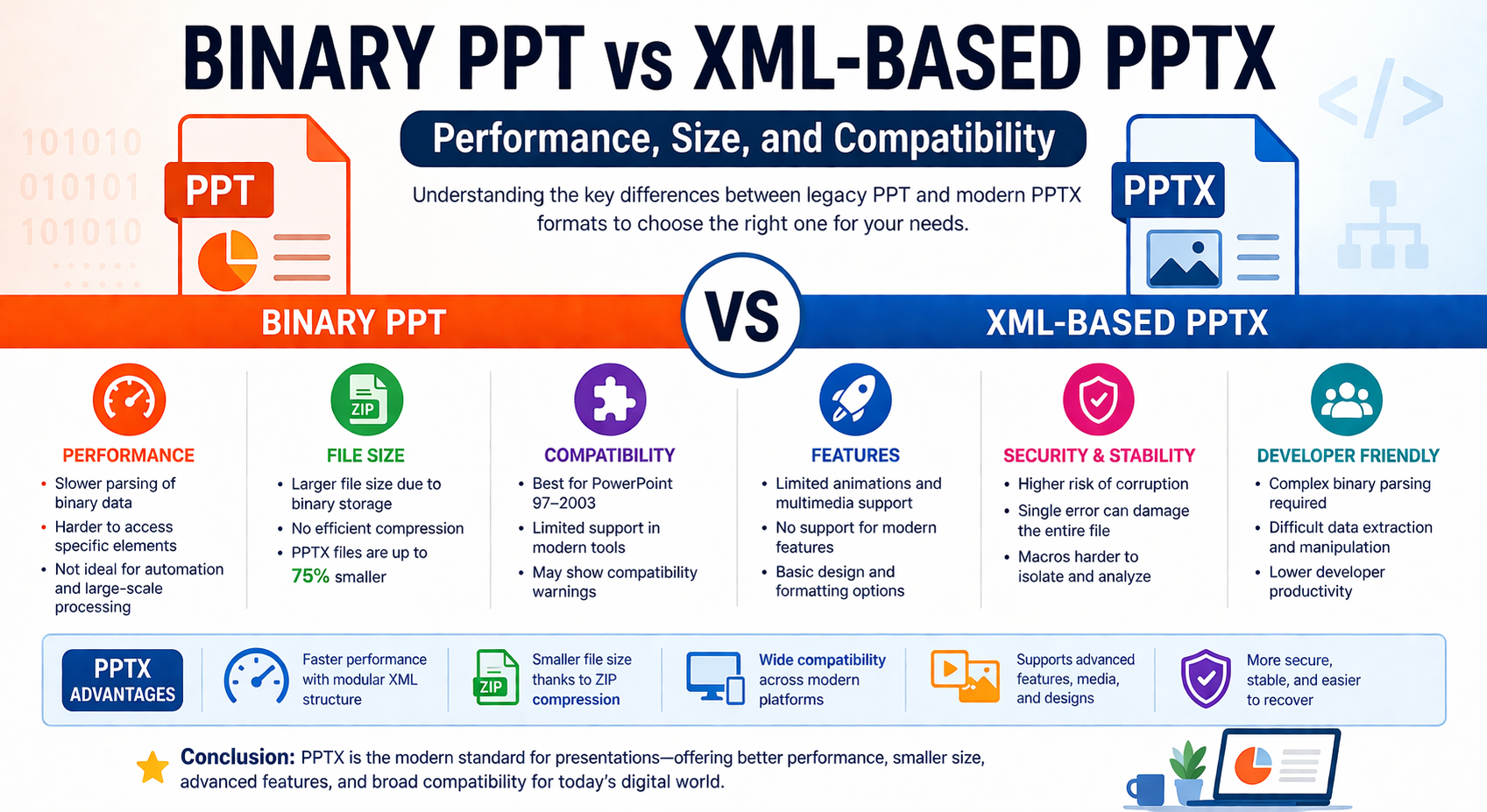
In the world of presentation file formats, the transition from legacy binary PPT to modern XML-based PPTX represents one of the most important evolutions in document technology. Whether you’re a developer building document-processing tools or a business user sharing presentations, understanding the differences between these formats is critical for performance, file size optimization, and compatibility.
This detailed guide breaks down Binary PPT vs XML-based PPTX from a technical and practical perspective.
📌 What is a Binary PPT File?
The PPT (.ppt) format was the default file type used by Microsoft PowerPoint from 1997 to 2003. It is based on a binary structure, meaning all data—text, images, formatting, and media—is stored in a single continuous stream of bytes.
Key Characteristics:
- Uses proprietary binary encoding (Compound File Binary Format)
- Stores all presentation elements in one file block
- Requires PowerPoint or specialized tools to interpret content
- Limited extensibility and modern feature support
While PPT served its purpose for decades, its architecture creates several limitations in today’s cloud-first and data-driven environments.
📌 What is an XML-Based PPTX File?
The PPTX (.pptx) format was introduced with Microsoft PowerPoint 2007 and is based on the Office Open XML (OOXML) standard. Unlike PPT, a PPTX file is essentially a ZIP archive containing multiple XML files and media assets.
Key Characteristics:
- Uses structured XML for storing content
- Separates slides, media, and metadata into modular components
- Supports compression via ZIP
- Easier to parse, edit, and recover
This architectural shift significantly impacts performance, file size, and compatibility.
⚡ Performance Comparison
1. Processing Speed
PPT (Binary):
-	Requires full parsing of the binary stream
-	Harder to selectively access data
-	Slower for large-scale processing or automation
PPTX (XML-Based):
-	Modular structure allows partial loading
-	Easier to manipulate specific elements (slides, images)
-	Better suited for APIs and automation tools
👉 PPTX generally offers better performance in modern applications, especially when working with large files or cloud-based systems.
2. Error Recovery & Stability
** PPT: **
- Single corrupted byte can damage the entire file
- Difficult to recover partial content
**PPTX: **
- XML structure enables partial recovery
- Damaged components can often be isolated
👉 PPTX is more robust and fault-tolerant.
3. Developer Performance (APIs & Automation)
For developers using libraries like Open XML SDK or Aspose APIs:
- PPT requires complex binary parsing logic
**PPTX enables: **
-	Easy XML traversal
-	Structured data extraction
-	Faster document transformation
👉 PPTX dramatically improves developer productivity and processing efficiency.
📦 File Size Comparison
Why PPTX Files Are Smaller
- PPT stores everything in binary format without efficient compression
**- PPTX uses: **
- XML structuring
- ZIP compression
👉 Result: PPTX files can be up to 75% smaller than equivalent PPT files.
Example:
| No. | Format | Size | Behavior |
|---|---|---|---|
| 1 | PPT | Larger due to binary overhead | |
| 2 | PPTX | Smaller due to compression + modular storage |
Smaller files mean:
- Faster uploads/downloads
- Reduced storage costs
- Better email and cloud sharing
🔄 Compatibility Comparison
1. Software Compatibility
PPT:
- Best for PowerPoint 97–2003
- Limited support in modern tools
- May trigger compatibility warnings
PPTX:
- Supported by modern PowerPoint, Google Slides, and cloud platforms
- Cross-platform compatibility (Windows, macOS, web)
2. Feature Compatibility
PPT Limitations:
- No support for advanced animations
- Limited multimedia capabilities
- No modern design features
PPTX Advantages:
- Supports videos, audio, SmartArt, 3D models
- Better formatting and styling
- Enhanced collaboration features
👉 PPTX is the standard for modern presentations.
3. Backward Compatibility
- PPTX can often be opened in older versions using compatibility packs
- PPT cannot fully support modern PPTX features
👉 PPT is useful only in legacy environments.
🔐 Security Differences
PPT:
- Higher risk of corruption
- Embedded macros harder to isolate
PPTX:
- Safer structure (separates executable content)
- Easier to detect malicious elements
👉 PPTX provides better security and data integrity.
📊 Summary Table
| No. | Feature | Binary PPT | XML-Based PPTX |
|---|---|---|---|
| 1 | Format Type | Binary | XML (OOXML) |
| 2 | File Size | Larger | Smaller (ZIP compressed) |
| 3 | Performance | Slower parsing | Faster, modular processing |
| 4 | Compatibility | Legacy systems | Modern platforms |
| 5 | Feature Support | Limited | Advanced multimedia & design |
| 6 | Error Recovery | Poor | Strong |
| 7 | Developer Friendly | Low | High |
🚀 When Should You Use PPT vs PPTX?
Use PPT When:
- You must support legacy systems (PowerPoint 2003 or older)
- Working in restricted environments with old software
Use PPTX When:
- You need smaller file sizes
- You require better performance and automation
- You want modern features and compatibility
- You’re building document-processing applications
🧠 Final Thoughts
The shift from binary PPT to XML-based PPTX is more than just a file extension change—it reflects a broader transformation in how digital documents are structured, processed, and shared.
- PPT = Legacy, rigid, and bulky
- PPTX = Modern, efficient, and flexible
For developers, businesses, and content creators, PPTX is the clear winner in terms of performance, size optimization, and cross-platform compatibility.
Free PowerPoint Processing APIs
FAQ
Q1: What is the main difference between PPT and PPTX?
A: PPT is a binary file format, while PPTX is based on XML and uses ZIP compression for better structure and efficiency
Q2: Why are PPTX files smaller than PPT files?
A: PPTX files are compressed and store data in separate XML components, reducing overall file size significantly.
Q3: Is PPTX faster to process than PPT?
A: Yes, PPTX allows faster and more efficient processing due to its structured and modular XML format.
Q4: Can older versions of PowerPoint open PPTX files?
A: Older versions can open PPTX files with compatibility packs, but some features may not be fully supported.
Q5: Which format is better for modern presentations?
A: PPTX is better due to its smaller size, improved performance, advanced features, and broader compatibility.