Last Updated: 12 Jun, 2026
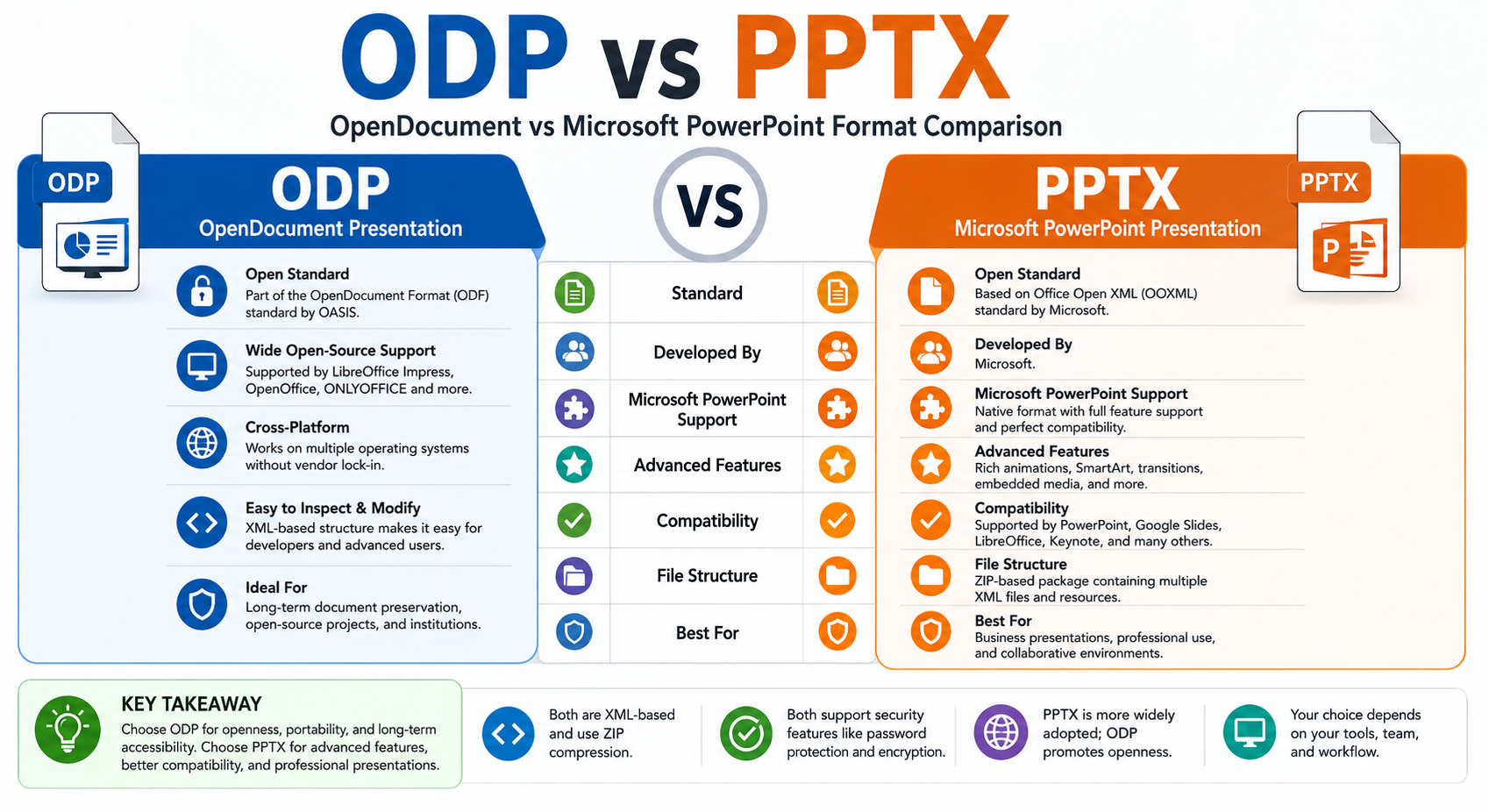
ODP vs PPTX: OpenDocument vs Microsoft PowerPoint Format Comparison
Presentation files are used everywhere, from business meetings and educational lectures to marketing campaigns and technical documentation. Two of the most popular presentation formats are ODP (OpenDocument Presentation) and PPTX (Microsoft PowerPoint Open XML Presentation).
Although both formats serve the same purpose, they differ significantly in compatibility, features, ecosystem support, and use cases. Understanding these differences helps developers, businesses, and content creators choose the right format for their needs.
In this guide, we’ll compare ODP and PPTX in detail, highlighting their advantages, limitations, and ideal applications.
What is ODP?
ODP (OpenDocument Presentation) is an open standard presentation format developed by OASIS. It is part of the OpenDocument Format (ODF) family and is widely used by office suites such as:
- LibreOffice Impress
- Apache OpenOffice Impress
- ONLYOFFICE
- Calligra Suite
Because ODP is an open standard, it is platform-independent and free from vendor lock-in.
Main Characteristics of ODP
- XML-based format
- Open standard (ISO/IEC 26300)
- Vendor-neutral
- Supported by many open-source office suites
- Suitable for long-term document preservation
What is PPTX?
PPTX (PowerPoint Open XML Presentation) is Microsoft’s default presentation format introduced with Office 2007. It replaced the older PPT binary format and is based on Office Open XML (OOXML).
PPTX files are widely used across organizations and educational institutions because of their rich features and extensive compatibility with Microsoft Office applications.
Main Characteristics of PPTX
- XML-based structure
- Compressed ZIP package
- Supports advanced animations and multimedia
- Native format of Microsoft PowerPoint
- Industry standard for professional presentations
ODP vs PPTX: Quick Comparison
| Feature | ODP | PPTX |
|---|---|---|
| Standard | OpenDocument (ODF) | Office Open XML (OOXML) |
| Maintained By | OASIS | Microsoft |
| Extension | .odp | .pptx |
| Compression | ZIP-based | ZIP-based |
| Open Standard | Yes | Yes |
| Microsoft PowerPoint Support | Partial | Native |
| LibreOffice Support | Native | Excellent |
| Advanced Animations | Limited | Extensive |
| SmartArt Support | Minimal | Full |
| Multimedia Features | Basic | Advanced |
| Collaboration Features | Moderate | Rich |
| Popularity | Moderate | Very High |
File Structure Comparison
ODP Structure
An ODP file is actually a ZIP archive containing XML files and resources.
Typical contents include:
- content.xml
- styles.xml
- settings.xml
- meta.xml
- Pictures folder
The open structure makes it easy for developers to inspect and manipulate presentation data.
PPTX Structure
PPTX files are also compressed ZIP archives containing multiple XML components:
- presentation.xml
- slide1.xml
- theme files
- media folder
- charts
- notes
- relationships
Its modular architecture enables advanced presentation features and easier programmatic processing.
Compatibility Comparison
ODP Compatibility
ODP works well with:
- LibreOffice
- OpenOffice
- ONLYOFFICE
- Google Slides
However, when opened in Microsoft PowerPoint, some formatting or animation elements may not render perfectly.
Advantages
- Open ecosystem
- Cross-platform support
- No licensing restrictions
Limitations
- Some compatibility issues with PowerPoint
- Fewer advanced presentation capabilities
PPTX Compatibility
PPTX is supported by:
- Microsoft PowerPoint
- Google Slides
- LibreOffice
- Apple Keynote
- WPS Office
Since PPTX has become the industry standard, file sharing is usually more reliable.
Advantages
- Excellent compatibility
- Rich formatting support
- Widely accepted
Limitations
- Certain advanced features are PowerPoint-specific
- Vendor ecosystem dependence
Animation and Multimedia Support
ODP
ODP provides:
- Slide transitions
- Basic animations
- Image embedding
- Audio and video insertion
However, complex effects may not be supported across all applications.
PPTX
PPTX offers:
- Morph transitions
- SmartArt
- Advanced animation effects
- Embedded media
- Interactive presentations
- Charts and diagrams
- Presenter notes
For visually rich presentations, PPTX generally provides more capabilities.
File Size Comparison
Both formats use ZIP compression, making them efficient.
ODP
- Usually smaller for simple presentations
- Lightweight structure
PPTX
- Efficient compression
- Better optimization for multimedia content
- Slightly larger when advanced effects are used
Developer Perspective
Why Developers Prefer ODP
ODP provides:
- Open standards
- Easy XML inspection
- Long-term preservation
- Freedom from proprietary dependencies
It is ideal for:
- Open-source applications
- Government archives
- Academic institutions
- Cross-platform solutions
Why Developers Prefer PPTX
PPTX offers:
- Extensive software support
- Rich formatting features
- Better compatibility with enterprise environments
- Advanced presentation capabilities
It is commonly used in:
- Corporate workflows
- Business presentations
- Educational content
- Reporting systems
Performance
ODP
Strengths:
- Lightweight
- Efficient for simple presentations
- Good interoperability
Weaknesses:
- Limited support for advanced elements
PPTX
Strengths:
- Feature-rich
- Excellent rendering
- Better multimedia handling
Weaknesses:
- Slightly more complex structure
Security
Both formats support:
- Password protection
- Encryption
- Digital signatures
However, security features depend largely on the software being used rather than the file format itself.
When to Choose ODP
ODP is a good choice when:
- Open standards are important.
- Long-term accessibility is required.
- You rely on LibreOffice or OpenOffice.
- Vendor independence is preferred.
- Open-source ecosystems are a priority.
When to Choose PPTX
PPTX is ideal when:
- Microsoft Office is part of your workflow.
- Advanced animations are needed.
- Maximum compatibility is important.
- Business presentations require rich formatting.
- Collaboration with PowerPoint users is common.
ODP vs PPTX: Which Format Wins?
There is no universal winner.
Choose ODP if:
✅ Open standards matter.
✅ You want vendor independence.
✅ Long-term preservation is a priority.
Choose PPTX if:
✅ You need advanced presentation features.
✅ Compatibility with Microsoft Office is essential.
✅ Professional business presentations are your primary use case.
For most organizations and users, PPTX remains the dominant presentation format, while ODP provides a powerful open-source alternative for those seeking flexibility and interoperability.
Conclusion
Both ODP and PPTX are modern XML-based presentation formats that provide efficient storage and broad functionality. ODP emphasizes openness, portability, and long-term accessibility, whereas PPTX excels in advanced features and widespread adoption.
The best choice ultimately depends on your environment, collaboration requirements, and software ecosystem. Organizations heavily invested in Microsoft Office will benefit from PPTX, while users who value open standards and vendor neutrality may find ODP to be the better option.
FAQ
1. What is the difference between ODP and PPTX files?
ODP is an open-standard presentation format used primarily by LibreOffice and OpenOffice, while PPTX is Microsoft’s PowerPoint format that offers broader adoption and more advanced presentation features.
2. Can Microsoft PowerPoint open ODP presentations?
Yes. Microsoft PowerPoint can open ODP files, but certain animations, layouts, or formatting elements may not be displayed exactly as they appear in LibreOffice or other OpenDocument applications.
3. Which format is better for business presentations, ODP or PPTX?
PPTX is generally better for business presentations because it provides richer features, advanced animations, and superior compatibility with Microsoft Office environments.
4. Are ODP and PPTX both XML-based presentation formats?
Yes. Both ODP and PPTX are XML-based formats that store presentation content in compressed ZIP packages containing multiple XML files and related resources.
5. Which presentation format offers better compatibility across devices and software?
PPTX offers better overall compatibility because it is supported by Microsoft PowerPoint, Google Slides, LibreOffice, Apple Keynote, and many other presentation applications.
- Presentation File Formats at FileFormat.com?
- Java API to Access PowerPoint File Formats
- [Searchable PDF vs regular PDF? How to Convert Regular PDF to Searchable PDF?][12]
- Difference Between PPT and PPTX
- Create PowerPoint Presentation in Java with Apache POI API