Last Updated: 16 Sept, 2026
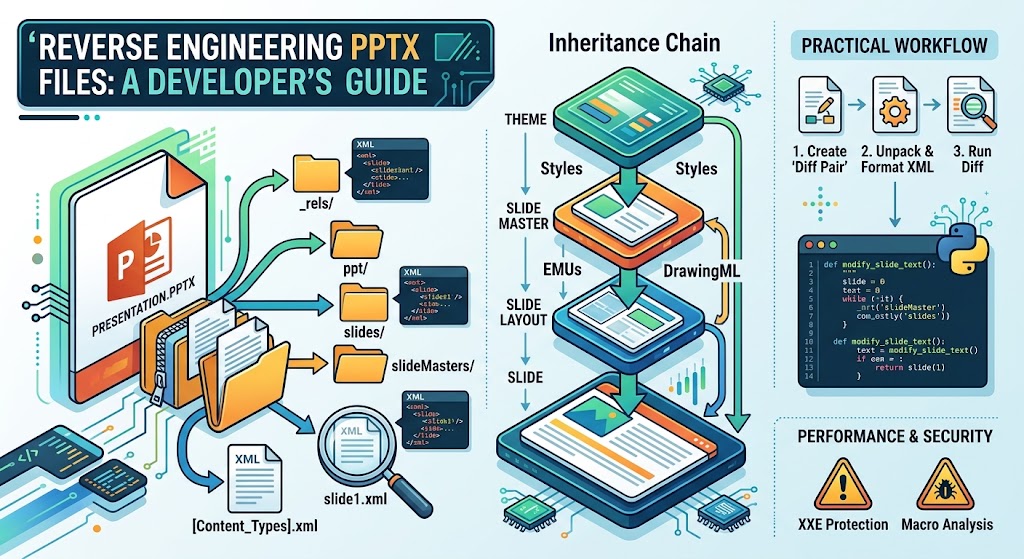
Reverse Engineering PPTX Files: A Developer’s Guide
Modern presentation decks power everything from investor pitches to internal quarterly metrics. But if you’ve ever had to programmatically extract text, replace templates at runtime, build automated slide generators, or sanitize confidential presentations, you’ve probably realized something quickly: standard high-level presentation libraries can feel like an unpredictable black box.
When libraries like python-pptx, Apache POI, or OpenXML SDK hit their limits—or introduce undocumented layout bugs—the only way out is through. You need to understand what a PowerPoint presentation actually is at the byte and schema level.
In this deep dive, we will pull back the curtain on the .pptx format, unpack its internal structure, trace its relationship graph, dissect its drawing hierarchies, and look at practical strategies for reverse engineering, inspecting, and manipulating presentations with raw code.
1. What Is a .pptx File Really?
At its core, a .pptx file is not a proprietary monolithic binary like the ancient .ppt format of the 1990s. Ever since Microsoft introduced Office Open XML (ECMA-376 and ISO/IEC 29500), modern Office documents are Open Packaging Conventions (OPC) archives.
In plain English: a .pptx file is simply a zip archive containing XML documents and media assets organized in a deterministic directory tree.
You can prove this in seconds using standard terminal tooling:
# Rename the extension and unpack it
cp presentation.pptx presentation.zip
unzip presentation.zip -d presentation_unpacked/
cd presentation_unpacked/
tree -L 2
The resulting directory tree looks remarkably consistent:
.
├── [Content_Types].xml
├── _rels/
│   └── .rels
├── docProps/
│   ├── app.xml
│   └── core.xml
└── ppt/
    ├── presentation.xml
    ├── _rels/
    ├── slides/
    ├── slideLayouts/
    ├── slideMasters/
    ├── theme/
    └── media/
Every single visual asset, transition, slide master inheritance, text box coordinate, and vector graphic is codified in this file hierarchy.
2. Anatomy of the Package: Key Subsystems
To reverse engineer presentations effectively, you must understand the responsibilities of each top-level component.
[Content_Types].xml
This is the entry manifest for the OPC reader. It maps file extensions and explicit internal part names to standardized MIME/content types. If you create a new slide or add an image and fail to declare it in [Content_Types].xml, PowerPoint will declare the deck corrupted and prompt for recovery.
Example snippet:
<Types xmlns="http://schemas.openxmlformats.org/package/2006/content-types">
  <Default Extension="xml" ContentType="application/xml"/>
  <Default Extension="rels" ContentType="application/vnd.openxmlformats-package.relationships+xml"/>
  <Default Extension="png" ContentType="image/png"/>
  <Override PartName="/ppt/presentation.xml"
            ContentType="application/vnd.openxmlformats-officedocument.presentationml.presentation.main+xml"/>
</Types>
The _rels/ Relationship Graph
One of the most crucial concepts in OpenXML is indirection through relationships. Parts rarely point directly to raw file paths. Instead, a file (e.g., slide1.xml) has an associated relationship file located in a sibling _rels folder (e.g., _rels/slide1.xml.rels).
Relationships define:
- Hyperlinks (
r:id="rId2", TargetMode=“External”) - Images and audio tracks stored in
ppt/media/ - Layout inheritance pointers (
slideLayout1.xml) - Notes slides, comments, and embedded fonts
docProps/ (Metadata)
core.xml: Dublin Core metadata—author, title, creation date, modification timestamp.app.xml: Application-specific statistics—PowerPoint version, total slide count, hidden slide counts, word count, presentation template names.
ppt/ (The Presentation Engine)
This is where the actual presentation lives:
presentation.xml: The master spine. It registers slide IDs, slide size dimensions, notes master references, and default font settings.slides/: The individual slides (slide1.xml,slide2.xml, etc.).slideLayouts/: Master structural presets (Title Slide, Two Column, Section Header).slideMasters/: Global styles, default palettes, background fills, and placeholder inheritance.theme/: Color palettes (accent 1 through 6, dark/light variations) and font schemes (major/minor fonts).media/: Raw images (PNG, JPEG, SVG), audio, and video files.
3. Dissecting a Slide: The PresentationML (p:) & DrawingML (a:) Dialects
When you open ppt/slides/slide1.xml, you encounter two primary XML namespaces:
- PresentationML (
p:): Governs structural presentation elements (slides, shape trees, canvas groups). - DrawingML (
a:): Governs typography, geometry, 2D coordinates, gradient fills, and vector rendering.
Here is a stripped-down example of what a standard text shape looks like:
<p:sp>
  <!-- 1. Non-visual shape properties (Identifiers, names) -->
  <p:nvSpPr>
    <p:cNvPr id="4" name="Title Box 1"/>
    <p:cNvSpPr>
      <a:spLocks noGrp="1"/>
    </p:cNvSpPr>
    <p:nvPr>
      <p:ph type="title"/>
    </p:nvPr>
  </p:nvSpPr>

  <!-- 2. Visual shape properties (Position, size, geometry) -->
  <p:spPr>
    <a:xfrm>
      <a:off x="1524000" y="1143000"/>
      <a:ext cx="9144000" cy="1828800"/>
    </a:xfrm>
    <a:prstGeom prst="rect">
      <a:avLst/>
    </a:prstGeom>
    <a:solidFill>
      <a:schemeClr val="accent1"/>
    </a:solidFill>
  </p:spPr>

  <!-- 3. Text Body (Paragraphs, runs, styling) -->
  <p:txBody>
    <a:bodyPr rtlCol="0" anchor="ctr"/>
    <a:lstStyle/>
    <a:p>
      <a:r>
        <a:rPr lang="en-US" sz="3200" b="1"/>
        <a:t>Mission Critical Architecture</a:t>
      </a:r>
    </a:p>
  </p:txBody>
</p:sp>
Crucial Units of Measure: EMUs and Hundredths of a Point
Notice the coordinate numbers in <a:xfrm>:
x="1524000"cx="9144000"
These are English Metric Units (EMUs).
- $1 \text{ inch} = 914,400 \text{ EMUs}$
- $1 \text{ cm} = 360,000 \text{ EMUs}$
- $1 \text{ pt} = 12,700 \text{ EMUs}$
EMUs allow integers to represent exact fractions of both inches and millimeters without floating-point rounding errors across different hardware architectures.
Notice also the font size:
sz="3200"means 32.00 pt. Font sizes in DrawingML are measured in hundredths of a point.
4. The Inheritance Chain: Why Shapes Inherit Invisible Styles
One of the most common pitfalls when reverse engineering PPTX files is assuming that a shape’s visual styling is fully declared inside its own slideX.xml.
In reality, OpenXML relies on a strict 4-tier cascading inheritance model:
[Theme: ppt/theme/theme1.xml]
              │
              ▼
[Slide Master: ppt/slideMasters/slideMaster1.xml]
              │
              ▼
[Slide Layout: ppt/slideLayouts/slideLayout1.xml]
              │
              ▼
[Slide: ppt/slides/slide1.xml]
If a text box on slide1.xml contains:
<a:p>
  <a:r>
    <a:t>Revenue Projections</a:t>
  </a:r>
</a:p>
There is no font family, no explicit color, and no size declared on the run (<a:r>). To figure out how PowerPoint renders this text, your parser must:
- Identify the placeholder type (
<p:ph type="title"/>). - Read the layout referenced in
slide1.xml.rels. - Check if
slideLayout1.xmlprovides styling overrides for that placeholder. - Fall back to
slideMaster1.xmlfor default title text body styles. - Trace color tokens like
accent1ortx1intotheme1.xmlto find the hexadecimal color code.
If you skip this inheritance graph, your parser will misread styles, missing fonts, font sizes, and layout anchors.
5. Practical Reverse Engineering Workflow
When you need to investigate how a particular PowerPoint feature works under the hood (e.g., morph transitions, complex tables, vector paths), follow this empirical approach:
Step 1: Create a Minimal “Diff Pair”
- Open PowerPoint and create a blank slide.
- Save it as
before.pptx. - Apply the exact single change you wish to reverse engineer (e.g., add a drop shadow to a circle, change a bullet style, insert an embedded video).
- Save it as
after.pptx.
Step 2: Unpack Both Archives
unzip before.pptx -d before/
unzip after.pptx -d after/
Step 3: Format the XML
Raw XML inside Office archives is usually stripped of indentation and newline characters. Before diffing, format the files:
find before/ after/ -name "*.xml" -exec xmllint --format {} --output {} \;
Step 4: Run a Unified Diff
diff -uNr before/ after/ > changes.patch
Reviewing changes.patch reveals the exact tag name, namespace attribute, and container hierarchy PowerPoint introduced. This is the fastest way to discover undocumented or obscure schema properties without digging through thousands of pages of ECMA-376 documentation.
6. Building a Custom Micro-Engine: Unpack, Modify, Repack
Sometimes you don’t want a heavy enterprise dependency like Apache POI or the Microsoft OpenXML SDK—especially in lightweight serverless runtimes (AWS Lambda, Cloudflare Workers, edge nodes).
Here is a self-contained Python pattern demonstrating how to safely unzip an in-memory PPTX, inject custom data using standard library tools, and repackage it:
import zipfile
import io
import xml.etree.ElementTree as ET

def modify_slide_title(input_pptx_bytes: bytes, new_title: str) -> bytes:
    input_zip = zipfile.ZipFile(io.BytesIO(input_pptx_bytes))
    output_buffer = io.BytesIO()

    with zipfile.ZipFile(output_buffer, "w", zipfile.ZIP_DEFLATED) as output_zip:
        for item in input_zip.infolist():
            content = input_zip.read(item.filename)

            # Target slide 1
            if item.filename == "ppt/slides/slide1.xml":
                namespaces = {
                    'p': 'http://schemas.openxmlformats.org/presentationml/2006/main',
                    'a': 'http://schemas.openxmlformats.org/drawingml/2006/main'
                }

                # Register namespaces to preserve prefixes
                for prefix, uri in namespaces.items():
                    ET.register_namespace(prefix, uri)

                root = ET.fromstring(content)

                # Find title placeholder text run
                for title_run in root.findall(".//p:sp[p:nvSpPr/p:nvPr/p:ph[@type='title']]//a:t", namespaces):
                    title_run.text = new_title
                    break

                content = ET.tostring(root, encoding="utf-8", xml_declaration=True)

            output_zip.writestr(item, content)

    return output_buffer.getvalue()
Key Gotchas When Modifying Files at the Raw Byte Level:
- Namespace Preservation: XML parsers often rewrite prefixes (
xmlns:pmight becomexmlns:ns0). While valid XML, PowerPoint’s strict internal schema validation occasionally rejects non-standard prefix aliases. Register namespaces explicitly. - ZIP Compression Methods: Ensure you write files back using standard deflate compression (
zipfile.ZIP_DEFLATED). - Stream Flushing: Always check that your zip buffer closes and flushes completely before sending bytes downstream.
- Preserve Relationships: If you remove a slide, you must also remove its entry from
ppt/presentation.xml, delete its relationship inppt/_rels/presentation.xml.rels, and scrub its content type from[Content_Types].xml.
7. Performance & Security Considerations
Reverse engineering PPTX files isn’t just about editing slides; it’s also about auditing what enters your systems.
Security: Billion Laughs & XXE
Because PPTX files parse XML, any server-side pipeline ingesting user-submitted presentations is vulnerable to:
- XML External Entity (XXE) Injection: Malicious XML attempting to access
/etc/passwdor query internal cloud metadata endpoints (http://169.254.169.254/). - Entity Expansion Attacks (Billion Laughs): Exponential entity loops exhausting system RAM.
Mitigation: Always disable resolve_entities, load_dtd, and external network resolution in your XML parser (e.g., using defusedxml in Python).
Security: Macro Payloads and Hidden Streams
Inspect files for .pptm content masquerading under .pptx extensions. Look out for ppt/vbaProject.bin, which contains compiled visual basic code. In standard .pptx files, VBA code is banned; finding binary payload references in relationships should immediately trigger quarantine flags.
Conclusion
Reverse engineering .pptx files demystifies presentation software. Once you recognize that PowerPoint files are simply structured zip packages filled with coordinates, schema references, and XML relationship trees, you are no longer constrained by existing third-party abstractions.
Whether you are optimizing slide generation throughput, writing custom automated sanitizers, or troubleshooting rendering glitches, looking directly at the underlying OpenXML architecture gives you total control over the presentation pipeline.
Frequently Asked Questions (FAQ)
Q: Can you convert a .pptx to a standard folder and edit files directly in an IDE?
A1: Yes, you can extract the archive, edit the XML in an editor like VS Code, and re-zip the directory contents to open it back up in PowerPoint.
Q: Why does PowerPoint say my manually modified PPTX file needs repair?
A2: This usually happens if you introduced malformed XML, omitted a new asset from [Content_Types].xml, or left a dangling reference in an associated .rels file.
Q: What measurement unit does PowerPoint use for shape positions and margins?
A3: PowerPoint uses English Metric Units (EMUs), where 1 inch equals 914,400 EMUs and 1 point equals 12,700 EMUs.
Q: How can I programmatically extract all images from a presentation without external libraries?
A4: Simply open the .pptx file with any standard zip utility and extract all binary files located inside the ppt/media/ directory.
Q: Is it safe to parse user-uploaded PPTX files with standard XML parsers?
A5: No, you must harden your parser or use safe wrappers like defusedxml to block XML External Entity (XXE) and zip-bomb attacks.