Son Güncelleme: 30 Haz, 2026
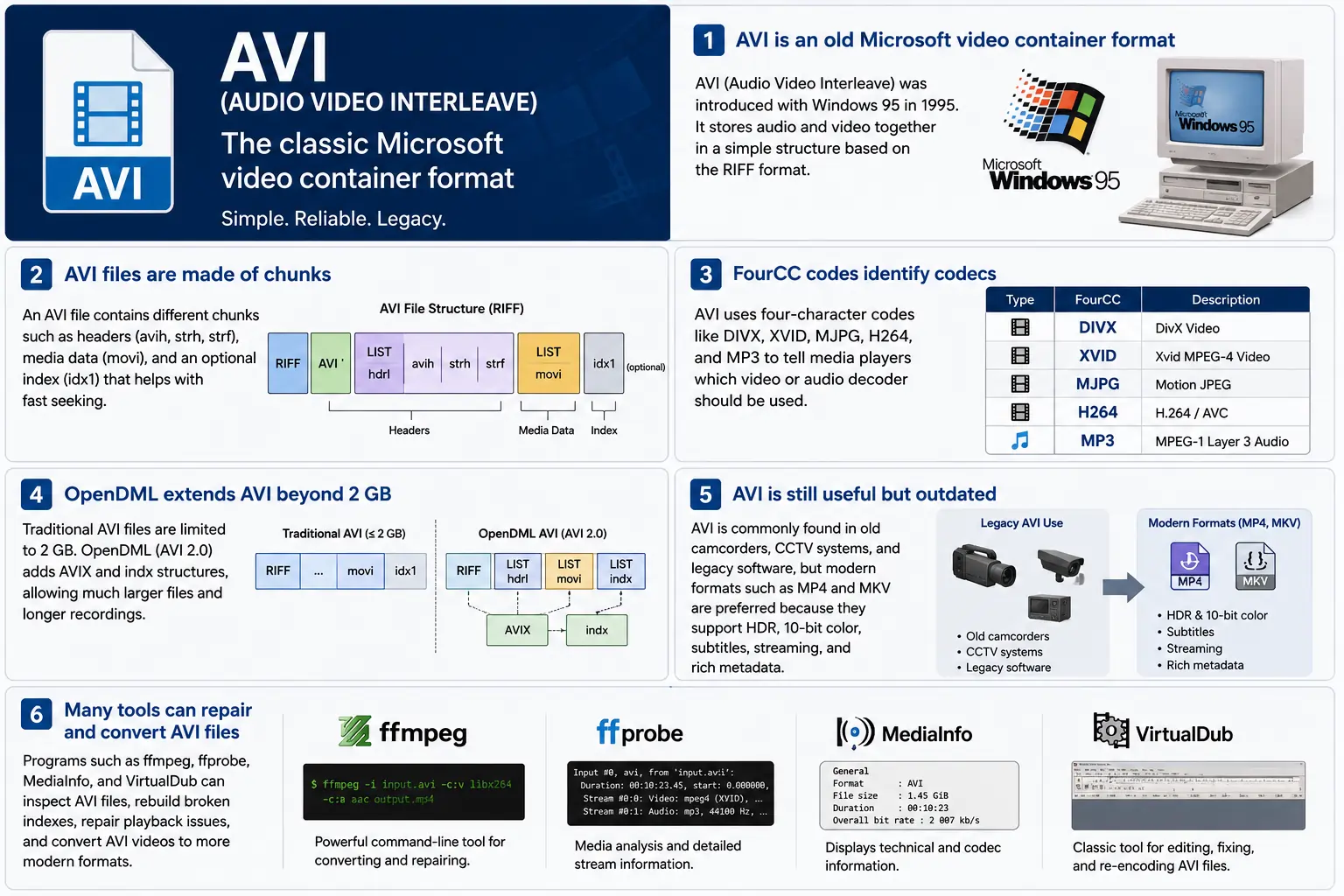
TL;DR – AVI (Audio Video Interleave), Microsoft’un ilk “dijital video” kapsayıcısıdır ve Windows 95 ile doğmuştur. Bu, sıkıştırılmış video ve ses parçacıklarını birbirine geçecek şekilde sıralayan basit bir RIFF‑tabanlı dosyadır, böylece bir oynatıcı bunları eşzamanlı okuyabilir. Format hâlâ Windows Media Player ve birçok açık‑kaynak araç tarafından anlaşılmaktadır, ancak HDR, 10‑bit renk ve sağlam akış meta verileri gibi modern özelliklerden yoksundur. Eğer eski görüntülere dalmanız gerekirse, parçacık düzenini, FourCC kodlarını ve 2 GB sınırını kaldıran OpenDML uzantılarını anlamalısınız – işte AVI’nin özü budur.
1. AVI Dosyası Tam Olarak Nedir?
- Tam ad: Audio Video Interleave
- İlk ortaya çıkış: Windows 95 (1995) – Microsoft’un tüketici PC’sinde “dijital video”ya cevabı.
- Şartname: 1991’den beri RIFF (Resource Interchange File Format) spesifikasyonu üzerine inşa edilmiştir. RIFF, genel bir “parçacık‑tabanlı” kapsayıcıdır; AVI sadece ses, video ve indeksleme verilerini tutan bir dizi parçacık tanımlar.
- Dosya uzantısı / MIME:
.avi–video/x-msvideo. - Ana hedef: Ses ve video akışlarını diskte sıkı bir şekilde iç içe tutmak, böylece basit bir oynatma döngüsü bir video çerçevesini, ardından eşleşen ses örneğini, maliyetli aramalara gerek kalmadan okuyabilsin.
- Miras durumu: Windows Media Player, DirectShow, VLC ve sayısız diğer oynatıcıda hâlâ oynatılabilir, ancak “modern” bir kapsayıcı değildir. Yerel HDR, 10‑bit, değişken bit hızı veya zengin meta veri desteği yoktur.
2. Kutunun İçinde – AVI Nasıl Çalışır
RIFF Parça İskeleti
Bir AVI dosyası sadece bir dizi parçadan oluşur:
RIFF <size> "AVI "          ; file header
  LIST "hdrl"               ; header list
    avih ...                ; main AVI header (global info)
    LIST "strl"             ; stream list (one per stream)
      strh ...              ; stream header (type, codec, timing)
      strf ...              ; stream format (codec‑specific data)
  LIST "movi"               ; interleaved media data
    00dc <size> <video frame>
    01wb <size> <audio block>
    …
  idx1 ...                  ; optional index for fast seeking
- Parça ID’si (4 bayt) – ör.,
avih,strh,movi. - Parça boyutu (4 bayt) – ardından gelen verinin uzunluğu (ID ve boyut alanları hariç).
- Veri – gerçek yük (başlıklar, ham çerçeveler, vb.).
RIFF genişletilebilir olduğu için, eski ayrıştırıcıları bozmadan yeni parça türleri ekleyebilirsiniz – bu tasarım AVI’yi on yıllar boyunca canlı tutmuştur.
FourCC – Codec Fısıldayanı
Dört karakterli kodlar (FourCC), bir oynatıcıya hangi çözücüyü yükleyeceğini söyleyen yapıştırıcıdır. AVI dosyalarında göreceğiniz bazı yaygın kodlar:
| FourCC | Kodek (ffmpeg) | Tipik Kullanım |
|---|---|---|
DIVX | mpeg4 (DivX) | Erken MPEG‑4 Bölüm 2 |
XVID | mpeg4 (Xvid) | Açık kaynak MPEG‑4 |
MJPG | mjpeg | Motion‑JPEG (dijital kamera) |
H264 | h264 | H.264/AVC (nadiren ama mümkün) |
MP3 | mp3 | MP3 ses akışı |
PCM | pcm_s16le | Sıkıştırılmamış PCM ses |
FourCC, strh bölümünde (kodek tanımlayıcısı) bulunur ve bazen strf bloğunda (piksel formatı, ses örnek formatı) yer alır.
Zamanlama ve Senkronizasyon
AVI, basit bir zaman‑tabanı sistemi kullanır:
- Global başlık (
avih):dwRate/dwScale→ saniyedeki kare sayısı. - Akış başına başlık (
strh): ses veya ikincil video akışları için kendidwRate/dwScaledeğerleri.
Oynatıcı, çerçeve numarasını scale/rate ile çarparak sunum zaman damgasını (PTS) hesaplar. Ölçekler uyumlu değilse, eski araçları rahatsız eden klasik “ses senkronizasyonu kaybolur” hatasını göreceksiniz.
movi Parçası – Medyanın Yaşadığı Yer
Tüm sıkıştırılmış çerçeveler movi LIST içinde bulunur. Her çerçeveyi, videoyu (00dc) ya da sesi (01wb) belirten bir parça kimliği (chunk ID) izler. Kimlik aynı zamanda akış numarasını da kodlar, bu yüzden iki ses izine sahip bir dosyada 01wb ve 02wb bulunur.
Veri zaten iç içe geçmiş olduğundan, bir oynatıcı bir video çerçevesini okuyup ardından sonraki ses bloğunu okuyarak ikisini de uzakta arama yapmadan birlikte sunabilir. Bu deterministik yazma deseni, düşük gecikmeli disk yazımları gerektiren erken nesil yakalama cihazları için AVI’yi popüler yaptı.
İndeksleme (idx1) – Hızlı İleri, Hızlı Geri
İsteğe bağlı idx1 parçası, movi içindeki her çerçeve için ofset ve boyutları içeren bir tablodur. Mevcut olduğunda, arama basit bir tablo sorgulaması olur. Eksikse, oynatıcıların dosyayı anlık olarak taraması gerekir – bu da büyük dosyalarda fark edilir bir “buffering” (tamponlama) duraklamasına neden olabilir.
OpenDML (AVI 2.0) – 2 GB Sınırını Aşmak
Orijinal RIFF spesifikasyonu, bir chunk’ın boyut alanını 32‑bit işaretsiz tamsayı ile sınırlar → 2 GB maksimum dosya boyutu. OpenDML (bazen AVI 2.0 olarak adlandırılır) şunları tanıttı:
AVIXLIST’ler – ilk 2 GB’den sonra gelebilen ek “genişletilmiş” RIFF bölümleri.indxchunk – 64‑bit destekli bir indeks.- Daha uzun süreler için ek başlık alanları.
Çoğu modern araç (ffmpeg, VLC), çıktı 2 GB’yi aştığında otomatik olarak OpenDML’ye geçer, ancak birçok eski oynatıcı hâlâ AVIX chunk’larında takılır, bu yüzden uzun bir kaydı birkaç 2 GB AVI dosyasına bölen uyumluluk hileleri görebilirsiniz.
3. AVI 2024’te Nerede Yaşıyor?
| Trend | AVI için Ne Anlama Geliyor |
|---|---|
| MP4/MKV/ProRes’e Geçiş | Yeni prodüksiyonlar, yerel olarak HDR, 10‑bit, VBR ve zengin meta verileri destekleyen konteynerleri tercih eder. AVI, yeni içerik için nadiren seçilir. |
| Eski donanım | Eski CCTV kameraları, 2000’lerin başındaki kamera kayıt cihazları ve bazı oyun motorları hâlâ AVI üretir. Bu dosyaları modern bir iş akışında yine de almanız gerekecek. |
| Açık kaynak desteği | ffmpeg, libav, VLC, HandBrake ve GStreamer AVI ayrıştırıcılarını canlı tutar, ancak genellikle dağıtım için MP4/MKV’ye yeniden kodlar. |
| OpenDML yeniden canlanması | Günlerce süren 4K gözetim kayıtları hızla 2 GB’yi aşar. OpenDML (AVIX) hâlâ tercih edilen çözümdür, ancak birçok araç bunu yanlış işler. |
| Güvenlik güçlendirme | Tarihsel AVI ayrıştırıcıları hatalı parça boyutlarını kabul ediyordu, bu da CVE’lere (ör. CVE‑2020‑13144) yol açıyordu. Windows artık Media Foundation’ı tercih ediyor; bu, birçok eski tuhaflığı reddederek geliştiricileri daha güvenli işlem hatlarına yönlendiriyor. |
| Kapsayıcı‑bağımsız işlem hatları | Modern medya çerçeveleri AVI’yi sadece başka bir kaynak öğesi olarak ele alır. Veri ham tamponlara demüks edildiğinde, kapsayıcı aşağı akış işleme için önemsiz hale gelir. |
Kısacası, AVI yaşamasına rağmen yaşlanıyor – eski donanımın veya basit iç içe depolamanın gerektiği yerlerde hayatta kalır, ancak yeni projeler için birincil tercih değildir.
4. Uygulamalı: AVI ile Bugün Çalışmak
A. Minimal Bir Başlığa Göz At (hex)
52 49 46 46  00 00 00 00  41 56 49 20   ; "RIFF" + size + "AVI "
4C 49 53 54  20 00 00 00  68 64 72 6C   ; LIST "hdrl"
...
RIFF sihri (52 49 46 46) herhangi bir ayrıştırıcıya “bu bir RIFF dosyasıdır” der. Sonraki dört bayt toplam dosya boyutudur (8 çıkarıldı). "AVI " tanımlayıcısı dosyayı AVI ailesine kilitler.
B. Modern MP4’ü Legacy AVI’ye Dönüştürme
ffmpeg -i input.mp4 \
       -c:v mpeg4 -q

```bash
ffmpeg -i input.mp4 \\ -c:v mpeg4 -qscale:v 5 \\   # MPEG‑4 Bölüm 2 (DivX/Xvid uyumlu) -c:a mp3 -b:a 192k \\      # MP3 ses (çoğu AVI oynatıcı bunu anlar) -f avi output.avi
The command above forces MPEG‑4 Part 2 video (the codec most legacy AVI players recognize) and MP3 audio, then writes an AVI container. If you need OpenDML support for files larger than 2 GB, add the -movflags +faststart‑style flag that tells FFmpeg to use the extended AVIX chunks:
ffmpeg -i input.mp4 \\ -c:v mpeg4 -qscale:v 5 \\ -c:a mp3 -b:a 192k \\ -f avi -flags +global_header -movflags +faststart output.avi
Tip: Some older Windows Media Player versions still choke on the
AVIXextension. If you must stay under 2 GB, split the source into multiple AVIs using the-segment_timeand-f segmentmuxer.
5. Common Pitfalls & How to Fix Them
| Symptom | Likely Cause | Fix |
|---|---|---|
| Audio drifts out of sync after a few minutes | Mismatched dwRate/dwScale between avih and strh (or a VBR audio stream) | Re‑encode audio to a constant‑bitrate format (e.g., MP3 128 kbps) or use -vsync 2 in FFmpeg to force frame‑accurate timestamps. |
| “Cannot play this video” on Windows Media Player | Missing or corrupt idx1 index, or OpenDML (AVIX) chunks not recognized | Run ffmpeg -i broken.avi -c copy -map 0 -f avi repaired.avi to rebuild the index; or use aviindex (part of mplayer) to generate a fresh idx1. |
| File size capped at 2 GB despite long footage | Encoder used classic AVI (no OpenDML) | Add -use\_open\_dml 1 (FFmpeg) or -format avi2 (VirtualDub) to enable OpenDML extensions. |
| Green or corrupted frames | Incompatible FourCC (e.g., H.264 in an AVI without proper headers) | Stick to codecs known to work in AVI (mpeg4, msmpeg4v2, MJPG, XVID). If you must store H.264, use the h264 FourCC and ensure the strf chunk contains the SPS/PPS extradata. |
| Playback stalls on network streams | AVI’s lack of robust streaming metadata (no moov atom) | Wrap the AVI in a streaming protocol (e.g., RTSP) that handles byte‑range requests, or convert to MP4/MKV for smoother streaming. |
6. Debugging Tools You Should Keep Handy
| Tool | Platform | What It Does |
|---|---|---|
| ffprobe / ffmpeg | Cross‑platform | Dumps every chunk, FourCC, timestamps, and can rebuild indexes (-c copy). |
| MediaInfo | Windows/macOS/Linux | Human‑readable summary of streams, codecs, and container flags. |
| VirtualDub | Windows | Classic AVI editor; can rebuild headers, add OpenDML, and preview frame‑by‑frame. |
| GSpot (legacy) | Windows | Identifies obscure FourCCs and suggests appropriate codecs. |
| aviindex (part of MPlayer) | Linux/macOS | Generates a fresh idx1 chunk for broken files. |
| Hex editors (HxD, Bless) | Any | Directly inspect RIFF headers when you suspect malformed chunk sizes. |
A typical workflow when an AVI refuses to play:
- Inspect with
ffprobe -show_format -show_streams file.avi. - Check the index:
ffmpeg -i file.avi -c copy -f avi -y temp.avi(FFmpeg will rebuild it automatically). - Validate FourCCs:
mediainfo file.avi. If you see an unknown codec, consider re‑encoding that stream. - Repair with VirtualDub → “File → Re‑open as AVI (OpenDML)”. Save a fresh copy.
7. When (and When Not) to Use AVI
Good Use‑Cases
| Scenario | Why AVI Works |
|---|---|
| Legacy camcorder ingest | The device outputs native AVI; transcoding adds unnecessary quality loss. |
| Simple interleaved capture | Low‑latency write to disk without needing complex container features. |
| Compatibility with old Windows‑only software | Some industrial automation tools only understand AVI. |
| Archiving raw, uncompressed video | AVI can hold PCM audio and uncompressed RGB24 video without extra overhead. |
Bad Use‑Cases
| Scenario | Why AVI Fails |
|---|---|
| HDR or 10‑bit color | No standard way to store those pixel formats; you’d need a custom FourCC that most players ignore. |
| Variable‑bit‑rate streaming | Lack of a proper moov‑like atom makes adaptive bitrate impossible. |
| Rich metadata (chapters, subtitles, tags) | AVI’s chunk model doesn’t define standard containers for subtitles or extensive tags. |
| Cross‑platform mobile distribution | Modern mobile players expect MP4/MKV; AVI may not be hardware‑accelerated. |
If you’re starting a new project, treat AVI as a fallback for legacy pipelines, not a primary delivery format.
8. Future Outlook – Will AVI Ever Make a Comeback?
The short answer: unlikely. The industry has coalesced around ISO‑BMFF‑based containers (MP4, MOV, HEVC‑MP4, etc.) because they support:
- Extensible metadata (ISO‑UserData, UUID boxes).
- Fragmented streaming (moof/mdat) for adaptive bitrate.
- Native HDR/10‑bit/12‑bit video definitions.
AVI’s design, while elegant for its time, is fundamentally limited by its 32‑bit size fields and its reliance on external FourCC‑driven codecs. Even though OpenDML extended the size limit, it never gained widespread adoption beyond niche surveillance and archival tools.
That said, software preservation will keep AVI parsers alive for decades. Projects like FFmpeg, GStreamer, and VLC will continue to support the format, ensuring that the massive archive of 1990s‑2000s footage remains accessible. In a world where “digital archaeology” is becoming a real discipline, knowing how to read and repair AVI files is still a valuable skill.
9. Quick Reference Cheat‑Sheet
| Item | Command / Setting | Explanation |
|---|---|---|
| Create classic AVI | ffmpeg -i src -c:v mpeg4 -qscale:v 5 -c:a mp3 -b:a 192k -f avi out.avi | Simple, widely compatible. |
| Enable OpenDML | ffmpeg -i src -c:v mpeg4 -qscale:v 5 -c:a mp3 -b:a 192k -f avi -use_open_dml 1 out.avi | Allows >2 GB files. |
| Re‑index broken AVI | ffmpeg -i broken.avi -c copy -f avi repaired.avi | Rewrites idx1. |
| Split >2 GB into chunks | ffmpeg -i long.avi -c copy -map 0 -segment_time 1800 -f segment part_%03d.avi | 30‑minute segments stay under the limit. |
| Inspect header | ffprobe -show_format -show_streams file.avi | Dumps all RIFF chunks and stream info. |
| Add a subtitle track (non‑standard) | ffmpeg -i video.avi -i subs.srt -c copy -metadata:s:s:0 language=eng out.avi | Works only with players that read the txt stream; not universally supported. |
Keep this table bookmarked; it covers 80 % of everyday AVI tasks.
10. Best Practices for Archiving AVI Files
Even though AVI is a legacy container, many institutions still have petabytes of it sitting on tape or in cold‑storage. Treating those assets with a disciplined workflow will save you headaches down the line.
| Practice | Why It Matters | How to Implement |
|---|---|---|
| Validate on ingest | Corrupt headers or missing indexes can go unnoticed until playback. | Run ffprobe -v error -show_format -show_streams file.avi immediately after copying. Log any non‑zero exit codes. |
| Generate a checksum | Guarantees bit‑exact preservation across media migrations. | Use SHA‑256 (sha256sum file.avi > file.avi.sha256). Store the checksum alongside the file in your catalog. |
| Create a modern proxy | Most downstream workflows (editing, streaming) expect MP4/MKV. | Encode a low‑bitrate MP4 proxy (ffmpeg -i file.avi -c:v libx264 -crf 23 -c:a aac -b:a 128k proxy.mp4). Keep the proxy in the same directory with a clear naming convention (*_proxy.mp4). |
| Document FourCCs and codec versions | Some FourCCs map to multiple codec implementations (e.g., DIVX could be DivX 5, 6, or 7). | Extract the codec private data (ffprobe -show_private_data) and store it in a side‑car JSON file (file.avi.codec.json). |
| Migrate to OpenDML for large files | Files >2 GB will become unreadable on older players. | When transcoding, always pass -use_open_dml 1. If you’re only copying, use aviindex to rebuild an OpenDML‑compatible index. |
| Store metadata in a side‑car | AVI has no standard for extensive tags (e.g., creator, location). | Use XMP side‑car files (file.avi.xmp) or embed a small INFO LIST chunk manually if you need minimal in‑container metadata. |
| Regularly test playback | Bit‑rot can affect codecs as well as containers. | Schedule a quarterly job that runs a headless player (e.g., ffplay -autoexit -frames 10 file.avi) and reports any failures. |
By applying these steps at the moment of acquisition, you avoid costly “repair‑the‑archive” projects later.
11. Frequently Asked Questions (FAQ)
Q1: Can I store H.265/HEVC video inside an AVI file?
Short answer: Technically yes, if you supply the correct FourCC (HEVC or HVC1) and include the SPS/PPS NAL units in the strf chunk. In practice, very few players support it, and many will treat the stream as unknown. For reliable playback, stick to MPEG‑4 Part 2 or Motion‑JPEG.
Q2: Why does Windows Media Player sometimes show a black screen but still plays audio?
Explanation: The player has successfully opened the audio stream but failed to locate a usable video decoder for the FourCC. This can happen when the FourCC is custom or when the required codec isn’t installed. Installing a codec pack (e.g., K-Lite) or re‑encoding the video to a known FourCC resolves the issue.
Q3: Is there any way to embed subtitles directly into an AVI file?
Answer: AVI does not define a standard subtitle stream. Some tools cheat by adding a “txt” stream (FourCC txt ) that contains plain‑text subtitles, but only a handful of players (e.g., VirtualDub with a plugin) will render them. The recommended approach is to keep subtitles in a separate .srt or .ass file, or to re‑mux into a container that officially supports subtitles (MP4, MKV).
Q4: My video shows a “frame rate mismatch” warning in MediaInfo. What should I do?
Solution: Verify that the dwRate/dwScale values in both the global avih and per‑stream strh headers are consistent. If they differ, re‑mux with FFmpeg using -video_track_timescale to force a uniform time base:
ffmpeg -i broken.avi -c copy -video_track_timescale 1000 fixed.avi
Q5: Does AVI support multiple audio languages?
Yes, but with caveats. You can add several audio streams, each with its own strh/strf pair and a distinct stream number (01wb, 02wb, …). However, there is no standardized way to label the language; you must rely on external metadata (e.g., an accompanying .xml file) or embed a custom INFO chunk.
Q6: How can I extract raw frames from an AVI without re‑encoding?
Command:
ffmpeg -i source.avi -c:v copy -f image2 frame_%05d.bmp
Replace bmp with png or tiff if you prefer lossless image formats. The -c:v copy flag tells FFmpeg to dump the compressed frames as‑is; if the codec is MJPEG, the output will already be JPEG images.
Q7: Are there any security concerns when opening AVI files from untrusted sources?
Yes. Malformed chunk sizes can trigger buffer overflows in legacy parsers (e.g., older DirectShow filters). Always open unknown AVIs in a sandboxed environment or use a modern library like FFmpeg that performs strict bounds checking. Updating Windows Media Foundation and disabling legacy DirectShow filters further mitigates risk.
12. TL;DR Özeti (Sabırsızlar İçin)
- AVI = RIFF‑based, interleaved container introduced with Windows 95.
- FourCC tells the player which codec to use; common ones are
DIVX,XVID,MJPG,H264,MP3. - Timing is driven by
dwRate/dwScalein the global and stream headers. moviholds the actual media;idx1(optional) speeds up seeking.- OpenDML (
AVIX) lifts the 2 GB limit but isn’t universally supported. - Use cases today: legacy camcorder ingest, simple interleaved capture, archival of raw PCM video.
- Avoid for new projects: no HDR, 10‑bit, VBR, subtitles, or rich metadata.
- Toolbox:
ffprobe,ffmpeg, MediaInfo, VirtualDub, aviindex, hex editors. - Best practice: validate, checksum, generate modern proxies, and migrate large files to OpenDML.
13. Kapanış Düşünceleri
AVI’s simplicity is both its strength and its Achilles’ heel. It gave early PC users a straightforward way to store synchronized audio‑video pairs, and that design philosophy—interleaved chunks, a clear header layout, and extensible FourCC identifiers—still influences modern containers. While the industry has moved on to more feature‑rich formats, the sheer volume of legacy footage means AVI will remain a “must‑know” for anyone working in video preservation, forensic analysis, or any field that must bridge the past with today’s workflows.
If you ever find yourself staring at a dusty .avi on a hard drive from the late‑90s, you now have the conceptual map, the command‑line recipes, and the troubleshooting checklist to bring that footage back to life—whether you choose to keep it in its original container or transcode it into a modern, HDR‑ready format.
Happy demuxing!