Cập Nhật Cuối Cùng: 30 Jun, 2026
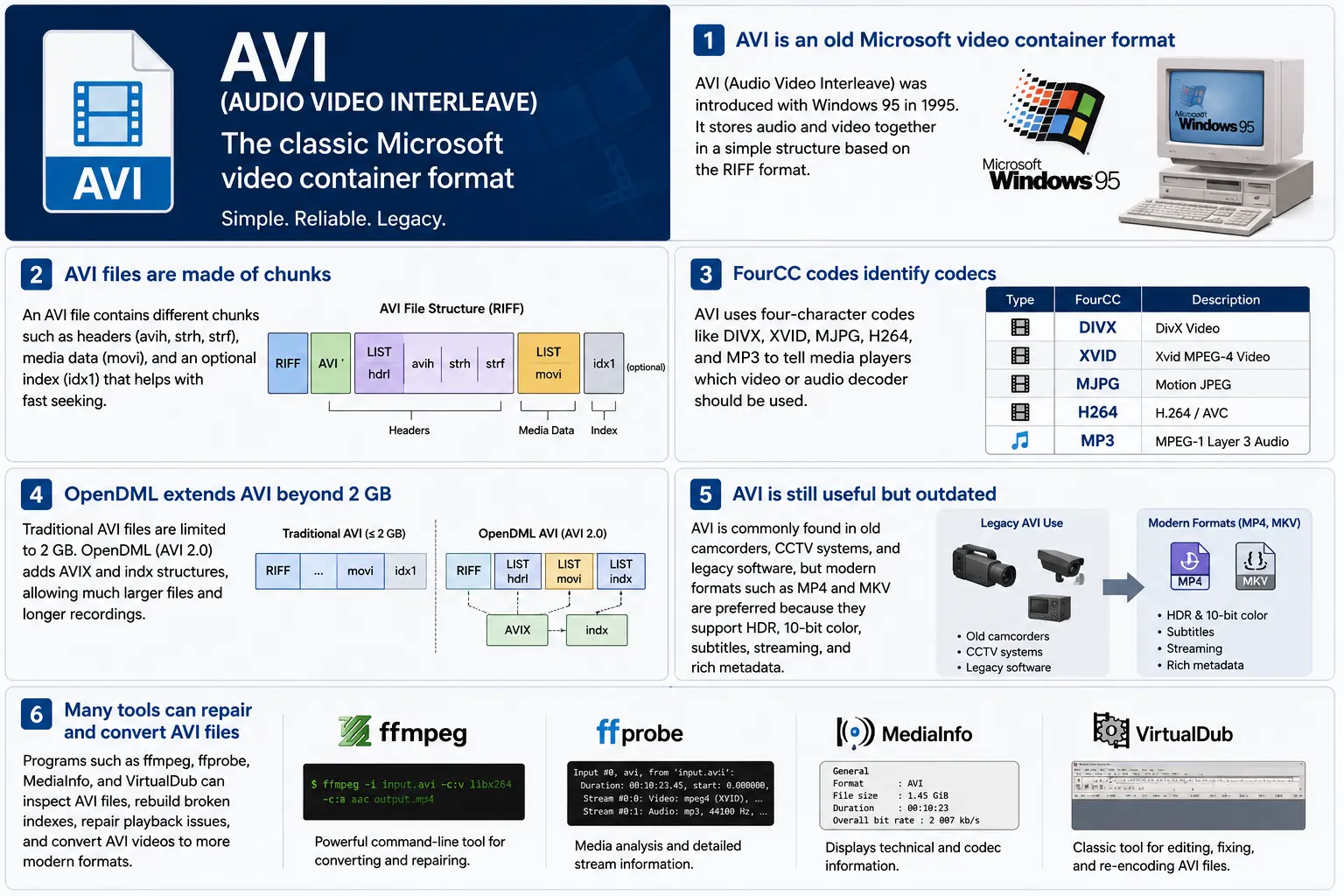
TL;DR – AVI (Audio Video Interleave) là container “video kỹ thuật số” đầu tiên của Microsoft, ra đời cùng Windows 95. Đây là một tệp dựa trên RIFF đơn giản, xen kẽ các khối video và âm thanh đã nén để trình phát có thể đọc chúng đồng thời. Định dạng này vẫn được Windows Media Player và nhiều công cụ mã nguồn mở hỗ trợ, nhưng thiếu các tính năng hiện đại như HDR, màu 10‑bit và siêu dữ liệu streaming mạnh mẽ. Nếu bạn cần khám phá các đoạn video cũ, hãy hiểu cấu trúc khối, mã FourCC và các phần mở rộng OpenDML giúp nâng giới hạn 2 GB – đó là nội dung cốt lõi của AVI.
1. Tệp AVI là gì chính xác?
- Tên đầy đủ: Audio Video Interleave
- Lần xuất hiện đầu tiên: Windows 95 (1995) – Câu trả lời của Microsoft cho “video kỹ thuật số” trên máy tính cá nhân.
- Thông số kỹ thuật: Dựa trên đặc tả RIFF (Resource Interchange File Format) từ năm 1991. RIFF là một container “dựa trên khối” chung; AVI chỉ định một tập hợp các khối chứa âm thanh, video và dữ liệu chỉ mục.
- Phần mở rộng tệp / MIME:
.avi–video/x-msvideo. - Mục tiêu chính: Giữ các luồng âm thanh và video được xen kẽ chặt chẽ trên đĩa để một vòng lặp phát lại đơn giản có thể đọc một khung video, sau đó mẫu âm thanh tương ứng, mà không cần các thao tác tìm kiếm tốn kém.
- Trạng thái kế thừa: Vẫn có thể phát được trong Windows Media Player, DirectShow, VLC và vô số trình phát khác, nhưng nó không phải là một container “hiện đại”. Không hỗ trợ HDR gốc, 10‑bit, bitrate biến đổi, hoặc siêu dữ liệu phong phú.
2. Bên trong Hộp – Cách AVI hoạt động
Khung xương Chunk RIFF
Một tệp AVI chỉ là một chuỗi các khối:
RIFF <size> "AVI "          ; file header
  LIST "hdrl"               ; header list
    avih ...                ; main AVI header (global info)
    LIST "strl"             ; stream list (one per stream)
      strh ...              ; stream header (type, codec, timing)
      strf ...              ; stream format (codec‑specific data)
  LIST "movi"               ; interleaved media data
    00dc <size> <video frame>
    01wb <size> <audio block>
    …
  idx1 ...                  ; optional index for fast seeking
- ID khối (4 byte) – ví dụ:
avih,strh,movi. - Kích thước khối (4 byte) – độ dài của dữ liệu tiếp theo (không bao gồm các trường ID và kích thước).
- Dữ liệu – phần tải thực tế (đầu mục, khung thô, v.v.).
Vì RIFF có khả năng mở rộng, bạn có thể thêm các loại khối mới mà không làm hỏng các trình phân tích cũ – một thiết kế đã giữ cho AVI tồn tại trong nhiều thập kỷ.
FourCC – Người thầm thì codec
Mã bốn ký tự (FourCC) là chất keo cho biết trình phát bộ giải mã nào cần tải. Một số mã phổ biến mà bạn sẽ thấy trong các tệp AVI:
| FourCC | Bộ mã (ffmpeg) | Sử dụng thường gặp |
|---|---|---|
DIVX | mpeg4 (DivX) | MPEG‑4 Phần 2 sớm |
XVID | mpeg4 (Xvid) | MPEG‑4 mã nguồn mở |
MJPG | mjpeg | Motion‑JPEG (máy quay kỹ thuật số) |
H264 | h264 | H.264/AVC (hiếm nhưng có thể) |
MP3 | mp3 | Luồng âm thanh MP3 |
PCM | pcm_s16le | Âm thanh PCM không nén |
FourCC nằm trong khối strh (định danh codec) và đôi khi trong khối strf (định dạng pixel, định dạng mẫu âm thanh).
Thời gian & Đồng bộ hoá
AVI sử dụng một hệ thống time‑base đơn giản:
- Tiêu đề toàn cục (
avih):dwRate/dwScale→ khung hình trên giây. - Tiêu đề mỗi luồng (
strh):dwRate/dwScaleriêng cho âm thanh hoặc các luồng video phụ.
Trình phát nhân số khung hình với scale/rate để tính thời gian trình bày (PTS). Nếu các tỉ lệ không khớp, bạn sẽ gặp lỗi kinh điển “audio drifts out of sync” mà các công cụ cũ thường gặp.
Phân đoạn movi – Nơi phương tiện tồn tại
Tất cả các khung đã nén nằm trong LIST movi. Mỗi khung được đi trước bởi một chunk ID cho biết nó là video (00dc) hay âm thanh (01wb). ID này cũng mã hoá số luồng, vì vậy một tệp có hai track âm thanh sẽ có 01wb và 02wb.
Vì dữ liệu đã được xen kẽ sẵn, trình phát có thể đọc một khung video, sau đó khối âm thanh tiếp theo, và hiển thị chúng đồng thời mà không cần tìm kiếm xa. Mô hình ghi quyết định này đã làm cho AVI trở nên phổ biến với các thiết bị ghi đầu tiên cần ghi đĩa độ trễ thấp.
Chỉ mục (idx1) – Tua nhanh, Tua lại
Chunk tùy chọn idx1 là một bảng các offset và kích thước cho mỗi khung trong movi. Khi có, việc tìm kiếm chỉ là tra cứu bảng đơn giản. Nếu thiếu, trình phát phải quét tệp trong thời gian thực – điều này có thể gây ra một khoảng dừng “buffering” đáng chú ý trên các tệp lớn.
OpenDML (AVI 2.0) – Phá vỡ rào cản 2 GB
Đặc tả RIFF gốc giới hạn trường kích thước của một chunk ở mức số nguyên không dấu 32‑bit → 2 GB là kích thước tệp tối đa. OpenDML (đôi khi được gọi là AVI 2.0) đã giới thiệu:
AVIXLISTs – các phần “mở rộng” RIFF bổ sung có thể theo sau 2 GB đầu tiên.indxchunk – một chỉ mục hỗ trợ 64‑bit.- Các trường tiêu đề bổ sung cho thời lượng dài hơn.
Hầu hết các công cụ hiện đại (ffmpeg, VLC) tự động chuyển sang OpenDML khi đầu ra vượt quá 2 GB, nhưng nhiều trình phát cũ vẫn gặp khó khăn với các chunk AVIX, vì vậy đôi khi bạn sẽ thấy các biện pháp tương thích chia một đoạn ghi dài thành nhiều tệp AVI 2 GB.
3. AVI sống ở đâu vào năm 2024?
| Xu hướng | Ý nghĩa đối với AVI |
|---|---|
| Chuyển sang MP4/MKV/ProRes | Các sản phẩm mới ưu tiên các định dạng hỗ trợ HDR, 10‑bit, VBR và siêu dữ liệu phong phú một cách tự nhiên. AVI hiếm khi được chọn cho nội dung mới. |
| Phần cứng cũ | Các camera CCTV cũ, máy quay video đầu những năm 2000 và một số engine game vẫn xuất ra AVI. Bạn vẫn cần nhập các tệp này vào quy trình làm việc hiện đại. |
| Hỗ trợ mã nguồn mở | ffmpeg, libav, VLC, HandBrake, và GStreamer duy trì các bộ phân tích AVI, nhưng chúng thường mã lại sang MP4/MKV để phân phối. |
| Sự hồi sinh OpenDML | Các bản ghi giám sát 4K chạy trong nhiều ngày nhanh chóng vượt quá 2 GB. OpenDML (AVIX) vẫn là giải pháp ưu tiên, mặc dù nhiều công cụ xử lý sai. |
| Tăng cường bảo mật | Các trình phân tích AVI lịch sử chấp nhận kích thước chunk sai định dạng, dẫn đến các lỗ hổng CVE (ví dụ, CVE‑2020‑13144). Windows hiện nay ưu tiên Media Foundation, vốn từ chối nhiều quirks cổ điển, đẩy các nhà phát triển hướng tới các pipeline an toàn hơn. |
| Pipeline không phụ thuộc vào container | Các khung phương tiện hiện đại xem AVI chỉ là một phần tử nguồn nữa. Khi dữ liệu đã được demux thành các buffer thô, container trở nên không liên quan đối với các xử lý hạ nguồn. |
Tóm lại, AVI vẫn còn sống nhưng đang lão hoá – nó tồn tại khi phần cứng cũ hoặc lưu trữ xen kẽ đơn giản được yêu cầu, nhưng không phải là lựa chọn đầu tiên cho các dự án mới.
4. Thực hành: Làm việc với AVI hiện nay
A. Nhìn nhanh vào tiêu đề tối thiểu (hex)
52 49 46 46  00 00 00 00  41 56 49 20   ; "RIFF" + size + "AVI "
4C 49 53 54  20 00 00 00  68 64 72 6C   ; LIST "hdrl"
...
Phép magic RIFF (52 49 46 46) thông báo cho bất kỳ trình phân tích nào “đây là một tệp RIFF”. Bốn byte tiếp theo là kích thước tổng cộng của tệp (trừ 8). Bộ định danh \"AVI \" khóa tệp vào họ AVI.
B. Chuyển Đổi MP4 Hiện Đại → AVI Cũ
ffmpeg -i input.mp4 \
       -c:v mpeg4 -q

```bash
ffmpeg -i input.mp4 \\ -c:v mpeg4 -qscale:v 5 \\   # MPEG‑4 Phần 2 (tương thích DivX/Xvid) -c:a mp3 -b:a 192k \\      # âm thanh MP3 (hầu hết các trình phát AVI hiểu được điều này) -f avi output.avi
The command above forces MPEG‑4 Part 2 video (the codec most legacy AVI players recognize) and MP3 audio, then writes an AVI container. If you need OpenDML support for files larger than 2 GB, add the -movflags +faststart‑style flag that tells FFmpeg to use the extended AVIX chunks:
ffmpeg -i input.mp4 \\ -c:v mpeg4 -qscale:v 5 \\ -c:a mp3 -b:a 192k \\ -f avi -flags +global_header -movflags +faststart output.avi
Tip: Some older Windows Media Player versions still choke on the
AVIXextension. If you must stay under 2 GB, split the source into multiple AVIs using the-segment_timeand-f segmentmuxer.
5. Common Pitfalls & How to Fix Them
| Symptom | Likely Cause | Fix |
|---|---|---|
| Audio drifts out of sync after a few minutes | Mismatched dwRate/dwScale between avih and strh (or a VBR audio stream) | Re‑encode audio to a constant‑bitrate format (e.g., MP3 128 kbps) or use -vsync 2 in FFmpeg to force frame‑accurate timestamps. |
| “Cannot play this video” on Windows Media Player | Missing or corrupt idx1 index, or OpenDML (AVIX) chunks not recognized | Run ffmpeg -i broken.avi -c copy -map 0 -f avi repaired.avi to rebuild the index; or use aviindex (part of mplayer) to generate a fresh idx1. |
| File size capped at 2 GB despite long footage | Encoder used classic AVI (no OpenDML) | Add -use\_open\_dml 1 (FFmpeg) or -format avi2 (VirtualDub) to enable OpenDML extensions. |
| Green or corrupted frames | Incompatible FourCC (e.g., H.264 in an AVI without proper headers) | Stick to codecs known to work in AVI (mpeg4, msmpeg4v2, MJPG, XVID). If you must store H.264, use the h264 FourCC and ensure the strf chunk contains the SPS/PPS extradata. |
| Playback stalls on network streams | AVI’s lack of robust streaming metadata (no moov atom) | Wrap the AVI in a streaming protocol (e.g., RTSP) that handles byte‑range requests, or convert to MP4/MKV for smoother streaming. |
6. Debugging Tools You Should Keep Handy
| Tool | Platform | What It Does |
|---|---|---|
| ffprobe / ffmpeg | Cross‑platform | Dumps every chunk, FourCC, timestamps, and can rebuild indexes (-c copy). |
| MediaInfo | Windows/macOS/Linux | Human‑readable summary of streams, codecs, and container flags. |
| VirtualDub | Windows | Classic AVI editor; can rebuild headers, add OpenDML, and preview frame‑by‑frame. |
| GSpot (legacy) | Windows | Identifies obscure FourCCs and suggests appropriate codecs. |
| aviindex (part of MPlayer) | Linux/macOS | Generates a fresh idx1 chunk for broken files. |
| Hex editors (HxD, Bless) | Any | Directly inspect RIFF headers when you suspect malformed chunk sizes. |
A typical workflow when an AVI refuses to play:
- Inspect with
ffprobe -show_format -show_streams file.avi. - Check the index:
ffmpeg -i file.avi -c copy -f avi -y temp.avi(FFmpeg will rebuild it automatically). - Validate FourCCs:
mediainfo file.avi. If you see an unknown codec, consider re‑encoding that stream. - Repair with VirtualDub → “File → Re‑open as AVI (OpenDML)”. Save a fresh copy.
7. When (and When Not) to Use AVI
Good Use‑Cases
| Scenario | Why AVI Works |
|---|---|
| Legacy camcorder ingest | The device outputs native AVI; transcoding adds unnecessary quality loss. |
| Simple interleaved capture | Low‑latency write to disk without needing complex container features. |
| Compatibility with old Windows‑only software | Some industrial automation tools only understand AVI. |
| Archiving raw, uncompressed video | AVI can hold PCM audio and uncompressed RGB24 video without extra overhead. |
Bad Use‑Cases
| Scenario | Why AVI Fails |
|---|---|
| HDR or 10‑bit color | No standard way to store those pixel formats; you’d need a custom FourCC that most players ignore. |
| Variable‑bit‑rate streaming | Lack of a proper moov‑like atom makes adaptive bitrate impossible. |
| Rich metadata (chapters, subtitles, tags) | AVI’s chunk model doesn’t define standard containers for subtitles or extensive tags. |
| Cross‑platform mobile distribution | Modern mobile players expect MP4/MKV; AVI may not be hardware‑accelerated. |
If you’re starting a new project, treat AVI as a fallback for legacy pipelines, not a primary delivery format.
8. Future Outlook – Will AVI Ever Make a Comeback?
The short answer: unlikely. The industry has coalesced around ISO‑BMFF‑based containers (MP4, MOV, HEVC‑MP4, etc.) because they support:
- Extensible metadata (ISO‑UserData, UUID boxes).
- Fragmented streaming (moof/mdat) for adaptive bitrate.
- Native HDR/10‑bit/12‑bit video definitions.
AVI’s design, while elegant for its time, is fundamentally limited by its 32‑bit size fields and its reliance on external FourCC‑driven codecs. Even though OpenDML extended the size limit, it never gained widespread adoption beyond niche surveillance and archival tools.
That said, software preservation will keep AVI parsers alive for decades. Projects like FFmpeg, GStreamer, and VLC will continue to support the format, ensuring that the massive archive of 1990s‑2000s footage remains accessible. In a world where “digital archaeology” is becoming a real discipline, knowing how to read and repair AVI files is still a valuable skill.
9. Quick Reference Cheat‑Sheet
| Item | Command / Setting | Explanation |
|---|---|---|
| Create classic AVI | ffmpeg -i src -c:v mpeg4 -qscale:v 5 -c:a mp3 -b:a 192k -f avi out.avi | Simple, widely compatible. |
| Enable OpenDML | ffmpeg -i src -c:v mpeg4 -qscale:v 5 -c:a mp3 -b:a 192k -f avi -use_open_dml 1 out.avi | Allows >2 GB files. |
| Re‑index broken AVI | ffmpeg -i broken.avi -c copy -f avi repaired.avi | Rewrites idx1. |
| Split >2 GB into chunks | ffmpeg -i long.avi -c copy -map 0 -segment_time 1800 -f segment part_%03d.avi | 30‑minute segments stay under the limit. |
| Inspect header | ffprobe -show_format -show_streams file.avi | Dumps all RIFF chunks and stream info. |
| Add a subtitle track (non‑standard) | ffmpeg -i video.avi -i subs.srt -c copy -metadata:s:s:0 language=eng out.avi | Works only with players that read the txt stream; not universally supported. |
Keep this table bookmarked; it covers 80 % of everyday AVI tasks.
10. Best Practices for Archiving AVI Files
Even though AVI is a legacy container, many institutions still have petabytes of it sitting on tape or in cold‑storage. Treating those assets with a disciplined workflow will save you headaches down the line.
| Practice | Why It Matters | How to Implement |
|---|---|---|
| Validate on ingest | Corrupt headers or missing indexes can go unnoticed until playback. | Run ffprobe -v error -show_format -show_streams file.avi immediately after copying. Log any non‑zero exit codes. |
| Generate a checksum | Guarantees bit‑exact preservation across media migrations. | Use SHA‑256 (sha256sum file.avi > file.avi.sha256). Store the checksum alongside the file in your catalog. |
| Create a modern proxy | Most downstream workflows (editing, streaming) expect MP4/MKV. | Encode a low‑bitrate MP4 proxy (ffmpeg -i file.avi -c:v libx264 -crf 23 -c:a aac -b:a 128k proxy.mp4). Keep the proxy in the same directory with a clear naming convention (*_proxy.mp4). |
| Document FourCCs and codec versions | Some FourCCs map to multiple codec implementations (e.g., DIVX could be DivX 5, 6, or 7). | Extract the codec private data (ffprobe -show_private_data) and store it in a side‑car JSON file (file.avi.codec.json). |
| Migrate to OpenDML for large files | Files >2 GB will become unreadable on older players. | When transcoding, always pass -use_open_dml 1. If you’re only copying, use aviindex to rebuild an OpenDML‑compatible index. |
| Store metadata in a side‑car | AVI has no standard for extensive tags (e.g., creator, location). | Use XMP side‑car files (file.avi.xmp) or embed a small INFO LIST chunk manually if you need minimal in‑container metadata. |
| Regularly test playback | Bit‑rot can affect codecs as well as containers. | Schedule a quarterly job that runs a headless player (e.g., ffplay -autoexit -frames 10 file.avi) and reports any failures. |
By applying these steps at the moment of acquisition, you avoid costly “repair‑the‑archive” projects later.
11. Frequently Asked Questions (FAQ)
Q1: Can I store H.265/HEVC video inside an AVI file?
Short answer: Technically yes, if you supply the correct FourCC (HEVC or HVC1) and include the SPS/PPS NAL units in the strf chunk. In practice, very few players support it, and many will treat the stream as unknown. For reliable playback, stick to MPEG‑4 Part 2 or Motion‑JPEG.
Q2: Why does Windows Media Player sometimes show a black screen but still plays audio?
Explanation: The player has successfully opened the audio stream but failed to locate a usable video decoder for the FourCC. This can happen when the FourCC is custom or when the required codec isn’t installed. Installing a codec pack (e.g., K-Lite) or re‑encoding the video to a known FourCC resolves the issue.
Q3: Is there any way to embed subtitles directly into an AVI file?
Answer: AVI does not define a standard subtitle stream. Some tools cheat by adding a “txt” stream (FourCC txt ) that contains plain‑text subtitles, but only a handful of players (e.g., VirtualDub with a plugin) will render them. The recommended approach is to keep subtitles in a separate .srt or .ass file, or to re‑mux into a container that officially supports subtitles (MP4, MKV).
Q4: My video shows a “frame rate mismatch” warning in MediaInfo. What should I do?
Solution: Verify that the dwRate/dwScale values in both the global avih and per‑stream strh headers are consistent. If they differ, re‑mux with FFmpeg using -video_track_timescale to force a uniform time base:
ffmpeg -i broken.avi -c copy -video_track_timescale 1000 fixed.avi
Q5: Does AVI support multiple audio languages?
Yes, but with caveats. You can add several audio streams, each with its own strh/strf pair and a distinct stream number (01wb, 02wb, …). However, there is no standardized way to label the language; you must rely on external metadata (e.g., an accompanying .xml file) or embed a custom INFO chunk.
Q6: How can I extract raw frames from an AVI without re‑encoding?
Command:
ffmpeg -i source.avi -c:v copy -f image2 frame_%05d.bmp
Replace bmp with png or tiff if you prefer lossless image formats. The -c:v copy flag tells FFmpeg to dump the compressed frames as‑is; if the codec is MJPEG, the output will already be JPEG images.
Q7: Are there any security concerns when opening AVI files from untrusted sources?
Yes. Malformed chunk sizes can trigger buffer overflows in legacy parsers (e.g., older DirectShow filters). Always open unknown AVIs in a sandboxed environment or use a modern library like FFmpeg that performs strict bounds checking. Updating Windows Media Foundation and disabling legacy DirectShow filters further mitigates risk.
12. Tóm Tắt TL;DR (cho người vội vàng)
- AVI = RIFF‑based, interleaved container introduced with Windows 95.
- FourCC tells the player which codec to use; common ones are
DIVX,XVID,MJPG,H264,MP3. - Timing is driven by
dwRate/dwScalein the global and stream headers. moviholds the actual media;idx1(optional) speeds up seeking.- OpenDML (
AVIX) lifts the 2 GB limit but isn’t universally supported. - Use cases today: legacy camcorder ingest, simple interleaved capture, archival of raw PCM video.
- Avoid for new projects: no HDR, 10‑bit, VBR, subtitles, or rich metadata.
- Toolbox:
ffprobe,ffmpeg, MediaInfo, VirtualDub, aviindex, hex editors. - Best practice: validate, checksum, generate modern proxies, and migrate large files to OpenDML.
13. Những Suy Nghĩ Kết Thúc
AVI’s simplicity is both its strength and its Achilles’ heel. It gave early PC users a straightforward way to store synchronized audio‑video pairs, and that design philosophy—interleaved chunks, a clear header layout, and extensible FourCC identifiers—still influences modern containers. While the industry has moved on to more feature‑rich formats, the sheer volume of legacy footage means AVI will remain a “must‑know” for anyone working in video preservation, forensic analysis, or any field that must bridge the past with today’s workflows.
If you ever find yourself staring at a dusty .avi on a hard drive from the late‑90s, you now have the conceptual map, the command‑line recipes, and the troubleshooting checklist to bring that footage back to life—whether you choose to keep it in its original container or transcode it into a modern, HDR‑ready format.
Happy demuxing!