最后更新: 30 Jun, 2026
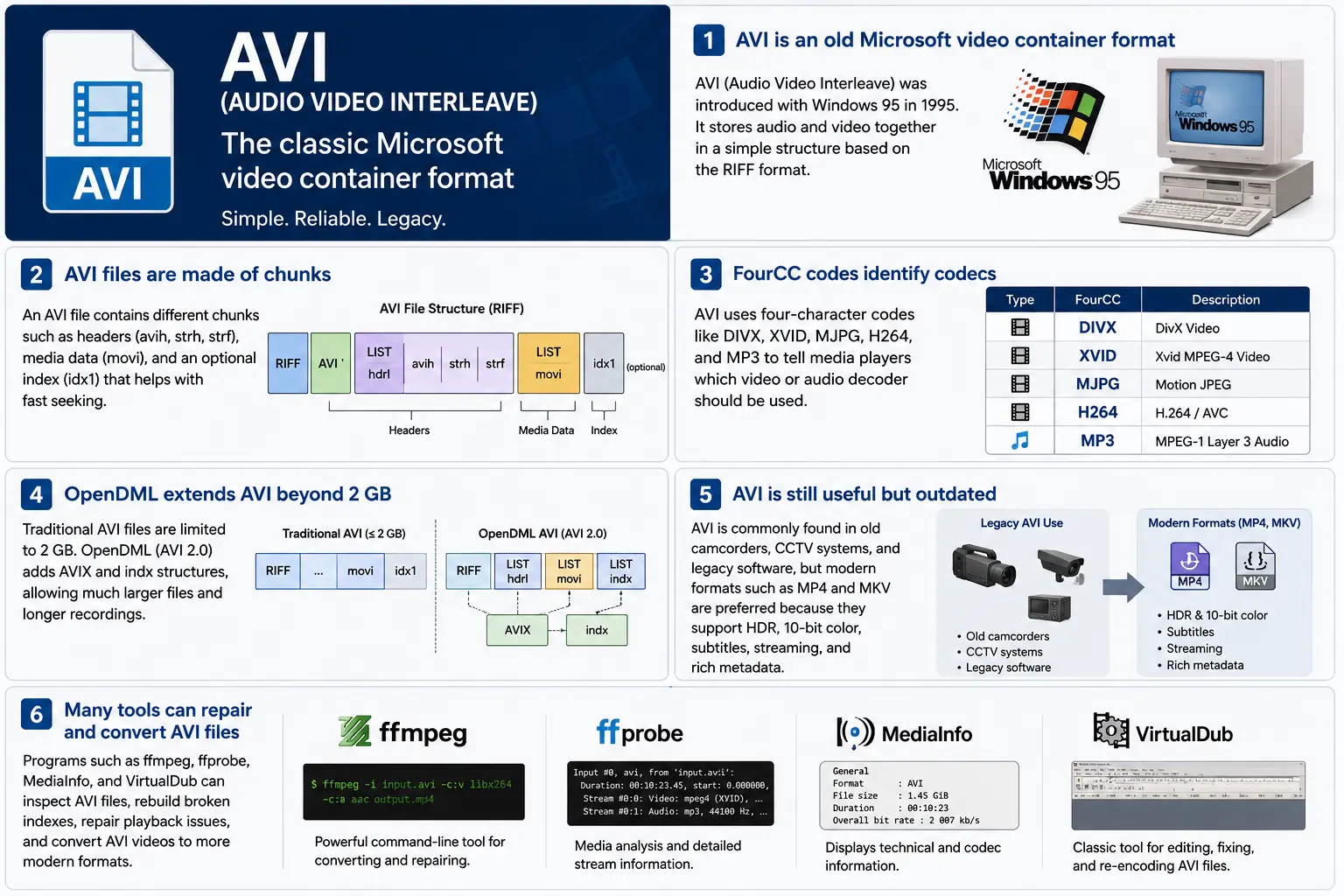
TL;DR – AVI(Audio Video Interleave)是微软的首个“数字视频”容器,诞生于 Windows 95。它是一个基于 RIFF 的简单文件,将压缩后的视频和音频块交错存放,以便播放器能够同步读取。该格式仍被 Windows Media Player 和众多开源工具支持,但缺乏 HDR、10 位色彩以及健全的流媒体元数据等现代特性。如果你需要深入研究旧版素材,了解块布局、FourCC 代码以及提升 2 GB 限制的 OpenDML 扩展——这就是 AVI 的核心所在。
1. AVI 文件到底是什么?
- 全称: Audio Video Interleave
- 首次出现: Windows 95 (1995) – 微软对消费级 PC 上“数字视频”的回应。
- 规格: 基于 1991 年的 RIFF(资源交换文件格式)规范构建。RIFF 是一种通用的“块式”容器;AVI 仅定义了一组用于存放音频、视频和索引数据的块。
- 文件扩展名 / MIME:
.avi–video/x-msvideo. - 主要目标: 将音频和视频流在磁盘上紧密交错,以便一个简单的播放循环能够读取视频帧,然后读取匹配的音频样本,而无需昂贵的寻址。
- 遗留状态: 仍可在 Windows Media Player、DirectShow、VLC 以及无数其他播放器中播放,但它并非“现代”容器。没有原生 HDR、10‑bit、可变比特率或丰富的元数据支持。
2. 盒子内部——AVI 如何工作
RIFF 块骨架
AVI 文件只是一系列 块:
RIFF <size> "AVI "          ; file header
  LIST "hdrl"               ; header list
    avih ...                ; main AVI header (global info)
    LIST "strl"             ; stream list (one per stream)
      strh ...              ; stream header (type, codec, timing)
      strf ...              ; stream format (codec‑specific data)
  LIST "movi"               ; interleaved media data
    00dc <size> <video frame>
    01wb <size> <audio block>
    …
  idx1 ...                  ; optional index for fast seeking
- 块 ID(4 字节) – 例如,
avih、strh、movi。 - 块大小(4 字节) – 随后数据的长度(不包括 ID 和大小字段)。
- 数据 – 实际负载(头部、原始帧等)。
由于 RIFF 可扩展,您可以添加新块类型而不会破坏旧的解析器——这种设计使 AVI 能够存活了数十年。
FourCC – 编解码器低语者
四字符代码(FourCC)是告诉播放器 加载哪个 解码器的关键。您在 AVI 文件中常见的一些示例有:
| FourCC | 编解码器 (ffmpeg) | 典型用途 |
|---|---|---|
DIVX | mpeg4 (DivX) | 早期 MPEG‑4 第2部分 |
XVID | mpeg4 (Xvid) | 开源 MPEG‑4 |
MJPG | mjpeg | Motion‑JPEG (数字摄像机) |
H264 | h264 | H.264/AVC (罕见但可能) |
MP3 | mp3 | MP3 音频流 |
PCM | pcm_s16le | 未压缩 PCM 音频 |
FourCC 位于 strh 块(编解码器标识),有时也位于 strf 块(像素格式,音频采样格式)。
时序与同步
AVI 使用一个简单的 时间基准 系统:
- 全局头 (
avih):dwRate/dwScale→ 每秒帧数。 - 每流头 (
strh):其自己的dwRate/dwScale用于音频或次要视频流。
播放器将帧号乘以 scale/rate 以计算呈现时间戳(PTS)。如果比例不匹配,你会看到经典的“audio drifts out of sync”错误,这在旧工具中屡见不鲜。
movi 块 – 媒体所在之处
所有压缩帧都位于 movi LIST 中。每帧前都有一个 块 ID,指示它是视频 (00dc) 还是音频 (01wb)。该 ID 还编码了流编号,因此包含两个音轨的文件会有 01wb 和 02wb。
由于数据已经交错,播放器可以读取视频帧,然后读取下一个音频块,并将它们一起呈现,而无需大幅度寻址。该确定性的写入模式使得 AVI 在需要低‑latency 磁盘写入的早期捕获设备中广受欢迎。
索引 (idx1) – 快进,快退
可选的 idx1 块是 movi 中每帧的偏移量和大小表。存在时,寻址只需一次表查找。如果缺失,播放器必须实时扫描文件——这可能在大文件上导致明显的“buffering”暂停。
OpenDML (AVI 2.0) – 打破 2 GB 限制
原始 RIFF 规范将块的大小字段限制为 32 位无符号整数 → 2 GB 的最大文件大小。OpenDML(有时称为 AVI 2.0)引入了:
AVIXLISTs – 可在首个 2 GB 之后跟随的额外“扩展”RIFF 部分。indxchunk – 支持 64 位的索引。- 用于更长时长的额外头部字段。
大多数现代工具(ffmpeg、VLC)在输出超过 2 GB 时会自动切换到 OpenDML,但许多旧播放器仍无法处理 AVIX 块,因此有时会看到将长时间捕获拆分为多个 2 GB AVI 文件的兼容性 hack。
3. AVI 在 2024 年的现状?
| 趋势 | 对 AVI 的意义 |
|---|---|
| 转向 MP4/MKV/ProRes | 新制作倾向于原生支持 HDR、10 位、VBR 和丰富元数据的容器。对于全新内容,AVI 很少被选用。 |
| 旧版硬件 | 旧的 CCTV 摄像头、2000 年代初的摄像机以及一些游戏引擎仍然输出 AVI。您仍需在现代工作流中导入这些文件。 |
| 开源支持 | ffmpeg、libav、VLC、HandBrake 和 GStreamer 维持着 AVI 解析器的活力,但它们通常会 重新编码 为 MP4/MKV 以进行分发。 |
| OpenDML 复兴 | 持续数天的 4K 监控录像会迅速超过 2 GB。OpenDML(AVIX)仍然是首选解决方案,尽管许多工具处理不当。 |
| 安全加固 | 历史的 AVI 解析器接受了格式错误的块大小,导致了 CVE(例如 CVE‑2020‑13144)。Windows 现在更倾向于 Media Foundation,它会拒绝许多遗留的怪癖,推动开发者使用更安全的管道。 |
| 容器无关的管道 | 现代媒体框架将 AVI 视为普通的源元素。一旦数据被解复用成原始缓冲区,容器对于下游处理就变得无关紧要。 |
简而言之,AVI 仍在使用但已老化——它在需要旧硬件或简单交错存储的场景中仍能生存,但并不是新项目的首选。
4. 实践操作:今日使用 AVI
A. 浏览最小头部(十六进制)
52 49 46 46  00 00 00 00  41 56 49 20   ; "RIFF" + size + "AVI "
4C 49 53 54  20 00 00 00  68 64 72 6C   ; LIST "hdrl"
...
RIFF 魔数 (52 49 46 46) 告诉任何解析器“这是一个 RIFF 文件”。接下来的四个字节是文件的总大小(减去 8)。"AVI " 标识符将文件锁定在 AVI 系列中。
B. 将现代 MP4 转换为传统 AVI
ffmpeg -i input.mp4 \
       -c:v mpeg4 -q

```bash
ffmpeg -i input.mp4 \\ -c:v mpeg4 -qscale:v 5 \\   # MPEG‑4 第2部分(兼容 DivX/Xvid) -c:a mp3 -b:a 192k \\      # MP3 音频(大多数 AVI 播放器都能识别) -f avi output.avi
The command above forces MPEG‑4 Part 2 video (the codec most legacy AVI players recognize) and MP3 audio, then writes an AVI container. If you need OpenDML support for files larger than 2 GB, add the -movflags +faststart‑style flag that tells FFmpeg to use the extended AVIX chunks:
ffmpeg -i input.mp4 \\ -c:v mpeg4 -qscale:v 5 \\ -c:a mp3 -b:a 192k \\ -f avi -flags +global_header -movflags +faststart output.avi
Tip: Some older Windows Media Player versions still choke on the
AVIXextension. If you must stay under 2 GB, split the source into multiple AVIs using the-segment_timeand-f segmentmuxer.
5. Common Pitfalls & How to Fix Them
| Symptom | Likely Cause | Fix |
|---|---|---|
| Audio drifts out of sync after a few minutes | Mismatched dwRate/dwScale between avih and strh (or a VBR audio stream) | Re‑encode audio to a constant‑bitrate format (e.g., MP3 128 kbps) or use -vsync 2 in FFmpeg to force frame‑accurate timestamps. |
| “Cannot play this video” on Windows Media Player | Missing or corrupt idx1 index, or OpenDML (AVIX) chunks not recognized | Run ffmpeg -i broken.avi -c copy -map 0 -f avi repaired.avi to rebuild the index; or use aviindex (part of mplayer) to generate a fresh idx1. |
| File size capped at 2 GB despite long footage | Encoder used classic AVI (no OpenDML) | Add -use\_open\_dml 1 (FFmpeg) or -format avi2 (VirtualDub) to enable OpenDML extensions. |
| Green or corrupted frames | Incompatible FourCC (e.g., H.264 in an AVI without proper headers) | Stick to codecs known to work in AVI (mpeg4, msmpeg4v2, MJPG, XVID). If you must store H.264, use the h264 FourCC and ensure the strf chunk contains the SPS/PPS extradata. |
| Playback stalls on network streams | AVI’s lack of robust streaming metadata (no moov atom) | Wrap the AVI in a streaming protocol (e.g., RTSP) that handles byte‑range requests, or convert to MP4/MKV for smoother streaming. |
6. Debugging Tools You Should Keep Handy
| Tool | Platform | What It Does |
|---|---|---|
| ffprobe / ffmpeg | Cross‑platform | Dumps every chunk, FourCC, timestamps, and can rebuild indexes (-c copy). |
| MediaInfo | Windows/macOS/Linux | Human‑readable summary of streams, codecs, and container flags. |
| VirtualDub | Windows | Classic AVI editor; can rebuild headers, add OpenDML, and preview frame‑by‑frame. |
| GSpot (legacy) | Windows | Identifies obscure FourCCs and suggests appropriate codecs. |
| aviindex (part of MPlayer) | Linux/macOS | Generates a fresh idx1 chunk for broken files. |
| Hex editors (HxD, Bless) | Any | Directly inspect RIFF headers when you suspect malformed chunk sizes. |
A typical workflow when an AVI refuses to play:
- Inspect with
ffprobe -show_format -show_streams file.avi. - Check the index:
ffmpeg -i file.avi -c copy -f avi -y temp.avi(FFmpeg will rebuild it automatically). - Validate FourCCs:
mediainfo file.avi. If you see an unknown codec, consider re‑encoding that stream. - Repair with VirtualDub → “File → Re‑open as AVI (OpenDML)”. Save a fresh copy.
7. When (and When Not) to Use AVI
Good Use‑Cases
| Scenario | Why AVI Works |
|---|---|
| Legacy camcorder ingest | The device outputs native AVI; transcoding adds unnecessary quality loss. |
| Simple interleaved capture | Low‑latency write to disk without needing complex container features. |
| Compatibility with old Windows‑only software | Some industrial automation tools only understand AVI. |
| Archiving raw, uncompressed video | AVI can hold PCM audio and uncompressed RGB24 video without extra overhead. |
Bad Use‑Cases
| Scenario | Why AVI Fails |
|---|---|
| HDR or 10‑bit color | No standard way to store those pixel formats; you’d need a custom FourCC that most players ignore. |
| Variable‑bit‑rate streaming | Lack of a proper moov‑like atom makes adaptive bitrate impossible. |
| Rich metadata (chapters, subtitles, tags) | AVI’s chunk model doesn’t define standard containers for subtitles or extensive tags. |
| Cross‑platform mobile distribution | Modern mobile players expect MP4/MKV; AVI may not be hardware‑accelerated. |
If you’re starting a new project, treat AVI as a fallback for legacy pipelines, not a primary delivery format.
8. Future Outlook – Will AVI Ever Make a Comeback?
The short answer: unlikely. The industry has coalesced around ISO‑BMFF‑based containers (MP4, MOV, HEVC‑MP4, etc.) because they support:
- Extensible metadata (ISO‑UserData, UUID boxes).
- Fragmented streaming (moof/mdat) for adaptive bitrate.
- Native HDR/10‑bit/12‑bit video definitions.
AVI’s design, while elegant for its time, is fundamentally limited by its 32‑bit size fields and its reliance on external FourCC‑driven codecs. Even though OpenDML extended the size limit, it never gained widespread adoption beyond niche surveillance and archival tools.
That said, software preservation will keep AVI parsers alive for decades. Projects like FFmpeg, GStreamer, and VLC will continue to support the format, ensuring that the massive archive of 1990s‑2000s footage remains accessible. In a world where “digital archaeology” is becoming a real discipline, knowing how to read and repair AVI files is still a valuable skill.
9. Quick Reference Cheat‑Sheet
| Item | Command / Setting | Explanation |
|---|---|---|
| Create classic AVI | ffmpeg -i src -c:v mpeg4 -qscale:v 5 -c:a mp3 -b:a 192k -f avi out.avi | Simple, widely compatible. |
| Enable OpenDML | ffmpeg -i src -c:v mpeg4 -qscale:v 5 -c:a mp3 -b:a 192k -f avi -use_open_dml 1 out.avi | Allows >2 GB files. |
| Re‑index broken AVI | ffmpeg -i broken.avi -c copy -f avi repaired.avi | Rewrites idx1. |
| Split >2 GB into chunks | ffmpeg -i long.avi -c copy -map 0 -segment_time 1800 -f segment part_%03d.avi | 30‑minute segments stay under the limit. |
| Inspect header | ffprobe -show_format -show_streams file.avi | Dumps all RIFF chunks and stream info. |
| Add a subtitle track (non‑standard) | ffmpeg -i video.avi -i subs.srt -c copy -metadata:s:s:0 language=eng out.avi | Works only with players that read the txt stream; not universally supported. |
Keep this table bookmarked; it covers 80 % of everyday AVI tasks.
10. Best Practices for Archiving AVI Files
Even though AVI is a legacy container, many institutions still have petabytes of it sitting on tape or in cold‑storage. Treating those assets with a disciplined workflow will save you headaches down the line.
| Practice | Why It Matters | How to Implement |
|---|---|---|
| Validate on ingest | Corrupt headers or missing indexes can go unnoticed until playback. | Run ffprobe -v error -show_format -show_streams file.avi immediately after copying. Log any non‑zero exit codes. |
| Generate a checksum | Guarantees bit‑exact preservation across media migrations. | Use SHA‑256 (sha256sum file.avi > file.avi.sha256). Store the checksum alongside the file in your catalog. |
| Create a modern proxy | Most downstream workflows (editing, streaming) expect MP4/MKV. | Encode a low‑bitrate MP4 proxy (ffmpeg -i file.avi -c:v libx264 -crf 23 -c:a aac -b:a 128k proxy.mp4). Keep the proxy in the same directory with a clear naming convention (*_proxy.mp4). |
| Document FourCCs and codec versions | Some FourCCs map to multiple codec implementations (e.g., DIVX could be DivX 5, 6, or 7). | Extract the codec private data (ffprobe -show_private_data) and store it in a side‑car JSON file (file.avi.codec.json). |
| Migrate to OpenDML for large files | Files >2 GB will become unreadable on older players. | When transcoding, always pass -use_open_dml 1. If you’re only copying, use aviindex to rebuild an OpenDML‑compatible index. |
| Store metadata in a side‑car | AVI has no standard for extensive tags (e.g., creator, location). | Use XMP side‑car files (file.avi.xmp) or embed a small INFO LIST chunk manually if you need minimal in‑container metadata. |
| Regularly test playback | Bit‑rot can affect codecs as well as containers. | Schedule a quarterly job that runs a headless player (e.g., ffplay -autoexit -frames 10 file.avi) and reports any failures. |
By applying these steps at the moment of acquisition, you avoid costly “repair‑the‑archive” projects later.
11. Frequently Asked Questions (FAQ)
Q1: Can I store H.265/HEVC video inside an AVI file?
Short answer: Technically yes, if you supply the correct FourCC (HEVC or HVC1) and include the SPS/PPS NAL units in the strf chunk. In practice, very few players support it, and many will treat the stream as unknown. For reliable playback, stick to MPEG‑4 Part 2 or Motion‑JPEG.
Q2: Why does Windows Media Player sometimes show a black screen but still plays audio?
Explanation: The player has successfully opened the audio stream but failed to locate a usable video decoder for the FourCC. This can happen when the FourCC is custom or when the required codec isn’t installed. Installing a codec pack (e.g., K-Lite) or re‑encoding the video to a known FourCC resolves the issue.
Q3: Is there any way to embed subtitles directly into an AVI file?
Answer: AVI does not define a standard subtitle stream. Some tools cheat by adding a “txt” stream (FourCC txt ) that contains plain‑text subtitles, but only a handful of players (e.g., VirtualDub with a plugin) will render them. The recommended approach is to keep subtitles in a separate .srt or .ass file, or to re‑mux into a container that officially supports subtitles (MP4, MKV).
Q4: My video shows a “frame rate mismatch” warning in MediaInfo. What should I do?
Solution: Verify that the dwRate/dwScale values in both the global avih and per‑stream strh headers are consistent. If they differ, re‑mux with FFmpeg using -video_track_timescale to force a uniform time base:
ffmpeg -i broken.avi -c copy -video_track_timescale 1000 fixed.avi
Q5: Does AVI support multiple audio languages?
Yes, but with caveats. You can add several audio streams, each with its own strh/strf pair and a distinct stream number (01wb, 02wb, …). However, there is no standardized way to label the language; you must rely on external metadata (e.g., an accompanying .xml file) or embed a custom INFO chunk.
Q6: How can I extract raw frames from an AVI without re‑encoding?
Command:
ffmpeg -i source.avi -c:v copy -f image2 frame_%05d.bmp
Replace bmp with png or tiff if you prefer lossless image formats. The -c:v copy flag tells FFmpeg to dump the compressed frames as‑is; if the codec is MJPEG, the output will already be JPEG images.
Q7: Are there any security concerns when opening AVI files from untrusted sources?
Yes. Malformed chunk sizes can trigger buffer overflows in legacy parsers (e.g., older DirectShow filters). Always open unknown AVIs in a sandboxed environment or use a modern library like FFmpeg that performs strict bounds checking. Updating Windows Media Foundation and disabling legacy DirectShow filters further mitigates risk.
12. TL;DR 概要(给急性子)
- AVI = RIFF‑based, interleaved container introduced with Windows 95.
- FourCC tells the player which codec to use; common ones are
DIVX,XVID,MJPG,H264,MP3. - Timing is driven by
dwRate/dwScalein the global and stream headers. moviholds the actual media;idx1(optional) speeds up seeking.- OpenDML (
AVIX) lifts the 2 GB limit but isn’t universally supported. - Use cases today: legacy camcorder ingest, simple interleaved capture, archival of raw PCM video.
- Avoid for new projects: no HDR, 10‑bit, VBR, subtitles, or rich metadata.
- Toolbox:
ffprobe,ffmpeg, MediaInfo, VirtualDub, aviindex, hex editors. - Best practice: validate, checksum, generate modern proxies, and migrate large files to OpenDML.
13. 结束思考
AVI’s simplicity is both its strength and its Achilles’ heel. It gave early PC users a straightforward way to store synchronized audio‑video pairs, and that design philosophy—interleaved chunks, a clear header layout, and extensible FourCC identifiers—still influences modern containers. While the industry has moved on to more feature‑rich formats, the sheer volume of legacy footage means AVI will remain a “must‑know” for anyone working in video preservation, forensic analysis, or any field that must bridge the past with today’s workflows.
If you ever find yourself staring at a dusty .avi on a hard drive from the late‑90s, you now have the conceptual map, the command‑line recipes, and the troubleshooting checklist to bring that footage back to life—whether you choose to keep it in its original container or transcode it into a modern, HDR‑ready format.
Happy demuxing!